

Wrexham Driving Test Routes
The only provider of current Wrexham test routes ready to drive any time
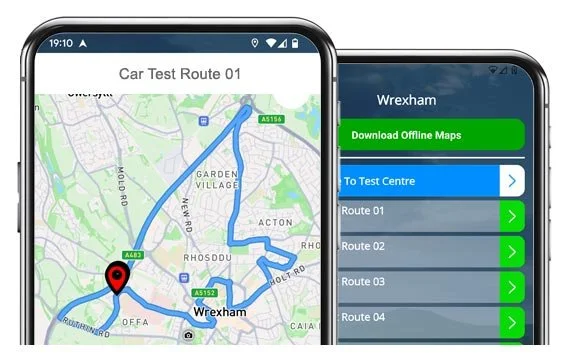

PRACTISE SMARTER


Our #1 Driving Test Routes App lets you practise real test routes.
Build confidence before the big day, and pass first time!
The Routes
Route 1 Instructions:
- Depart from the Driving Test Centre and turn right
- On Croesnewydd Road, at traffic lights turn right
- On Ruthin Road, at traffic lights turn right
- Join the A483 Wrexham Bypass
- On the A483, at the roundabout take the 2nd exit
- On the A483, at the next roundabout take the 6th exit (right)
- On Chester Road, turn left
- On Smithy Lane, turn right
- On Windermere Road, turn right
- On Box Lane, turn left
- On Jeffreys Road, turn left
- On Ffordd Alun, turn right
- On Norfolk Road, turn right
- On Bryn Gryffydd, turn left
- On Jeffreys Road, at the roundabout turn right
- On Borras Road, turn right
- On Herbert Jennings Avenue, turn left
- On Oak Drive, at the roundabout take the 1st exit (left)
- On Oswold Way, turn right
- On Rhosnesni Lane, at the roundabout go straight ahead
- On Rhosnesni Lane, at the next roundabout take the 1st exit (left)
- On Chester Road, at the roundabout take the 3rd exit (right)
- On Link Road, at the roundabout go straight ahead
- On Grosvenor Road, at traffic lights turn right
- On Regent Street, turn left
- On Bradley Road, at the roundabout turn right
- On Watery Road / Croesnewydd Road, at the roundabout go straight ahead taking the 2nd exit
- On Croesnewydd Road, turn right
- Return to the Driving Test Centre
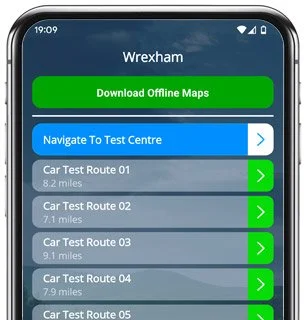
-
Depart from the Driving Test Centre and turn right
On Croesnewydd Road, at traffic lights turn left
On Ruthin Road, at the roundabout go straight ahead
On Ruthin Road, at end of road turn left
On Penybryn / Bridge Street, at traffic lights turn right
On St Giles Link, turn left
On Salop Road, at roundabout go straight ahead
On Eagles Meadow, at roundabout turn right
On Eagles Meadow, at the next roundabout turn left
On Smithfield Road / St Georges Crescent, turn right
* Updated, complete route available on the app.
-
Depart from the Driving Test Centre and turn right
On Croesnewydd Road, at traffic lights turn left
On Ruthin Road, at roundabout turn right
On Victoria Road, at roundabout turn right
On Ruabon Road / Wrexham Road, at roundabout turn right
On the A483 Wrexham Bypass, at the 3rd roundabout take the 6th exit (right)
On Chester Road, turn left
On Box Lane, turn right
On Herbert Jennings Avenue, turn right
On Chestnut Avenue, turn left
On Oak Drive, turn right
On Central Avenue, at roundabout go straight ahead
* Updated, complete route available on the app.
-
Depart from the Driving Test Centre and turn right
On Croesnewydd Road, at traffic lights turn left
On Ruthin Road, turn right
On Centenary Road, at end of road turn right
On Bersham Road, turn right
On Berse Road, turn left
On Ruthin Road, at traffic lights turn right
On the A483 Wrexham Bypass, at the 2nd roundabout take the 6th exit
On Chester Road, turn left
* Updated, complete route available on the app.


“Best driving test app out there! Helped me become more confident ready for my test.”

“Passed first time! Practicing the routes really helped!”
Route-Led provides Driving Test Routes for iPhone and Android devices. Download Wrexham driving test routes straight to your device. Car, Motorcycle, ADI, and LGV routes are available.
Driving Test Routes App - Latest Edition


Compatible with Android, iPhone and SatNavs
Up-to-date Routes
Routes for Experienced and Learner Drivers
Route-Led is a driving test route provider for a large range of devices such as Garmin, TomTom, iPhone and Android for cars, motorcycles, taxis and LGV. Compared with the marketplace, the prices we charge are very low meaning you do not need to spend lots of cash to practice the test-routes. Route-LED will shortly add independent driving routes to Route-Led's collection. Get the latest Wrexham Driving Test-Routes now!
Instructors and Learner drivers are continuously supplying Route-LED with updated test route info, meaning that Route-Led is the best place for driving test routes. New drivers can save lots of money by buying driving test-routes from Route-Led, which means you can increase your driving ability in the most efficient way. Route-Led prides itself on being the premier provider of driving test routes. Download 2021 Wrexham Driving Test-Routes today!
Route-Led provides driving test routes for new and experienced drivers alike so that they can all excel in their driving test with confidence. Route-LED also supplies test routes to driving instructors keen to learn the latest test routes. New drivers can end up spending a huge amount of money learning to pass their driving test. Why spend time and money when you are able to conserve both and improve your skills. Download 2021 Wrexham Test-Routes now!
Number one Provider of Driving Test Routes
Users are able to buy Wrexham driving test-routes for use in Google Maps. iPhone and Android customers are able to use the driving test routes on those devices as well. If you happen to have a Tomtom device, then you are able to purchase Route-Led's driving test routes for TomTom Sat-Nav devices directly from our website and then use it on your device for your practice lessons.
We work alongside Wrexham driving instructors, to produce an updated test route of the local areas. Our test routes are utilised by examiners throughout the United Kingdom during driving tests, and as a result we encourage both students and experienced drivers to become comfortable with these test-routes.
Wrexham Driving Test-Route Formats Navigation


Android Sat nav - Test Routes
By buying our recommended Android app, you can effortlessly use our test-routes. Purchase our dedicated app and immediately start improving your driving skills today. Route-led's detailed instructions will enable customers to concentrate on increasing your driving skills whilst experiencing the test conditions.

Tomtom Satnav Driving Test Routes
Before you take a driving test, it’s really vital to know every one of your test routes. Knowing the driving test-routes will not only boost your self-assurance but it will, in addition, enable you to drive safely. Using our Satnav test routes is quite simple, generally because the customer can just follow the turn-by-turn instructions on the device while driving.
iPhone Sat nav - Test Routes
Route-LED test routes can be bought for a number of devices including your iPhone device. In order to use Route-led's test routes, start by first installing a recommended 3rd party software app that you can use to access the route. Once the application is installed correctly, download the Wrexham test-route and upload to the iPhone device from Route-led's official website. You can then access the test-route file downloaded using the recommended software app. Wrexham test centre.

Practise Wrexham Driving Test Routes
The examiner will ask the learner driver to take instructions from a configured SatNav on their own. The SatNav will include the route that the learner needs to follow. The make or model of Satnav device used whilst the examination is in progress will not matter as the driving test-route will be identical. In case the learner driver takes a different route, the examiner will advise accordingly. However, we very much suggest the tomtom Start 52 mainly as it’s what examiners utilise while examining driving tests.

Route-led provides clients with a large amount of help and support to utilise our driving test routes. You’ll get used to all the different sections of the routes to be navigated during the examination. We would recommend using a knowledgeable driving teacher as well. For extra free information on what you can do to pass your driving test visit Driving Test Practice

The Independent driving test does not check your skill in following directions. Moreover, an independent driving test doesn’t test your ability to remember directions. If you need to query the examiner for updated instructions, he/she will confirm them for you. Going off route will not change your test score in any way. Do not fret about unclear road signs as the examiner will help you if you need it. Please understand that you cannot bring your own SatNav with you to take the test. This is because your own SatNav will be setup to give step-by-step instructions.
Wrexham Test Centre Info
Wrexham test centre can be found at Ground Floor, 1 Birchall House, Wrexham Technology Park, Wrexham Clwyd LL13 7YP. There ought to be ramp access for wheelchair users but we suggest calling to confirm. There are also quite often disabled, male and female toilets available at the test centre but it's generally better to use these at home beforehand! It is sometimes possible to park at the test centre. If this is not possible, it should be easy to park close by and get there by foot. Practise difficult junctions, busy roads, roundabouts and one-way streets. Using test-routes whilst practising to drive is always very useful, as it allows you to learn on routes that you’ll certainly be going on during your test.
Address: Ground Floor, 1 Birchall House, Wrexham Technology Park, Wrexham Clwyd LL13 7YP
Parking: Parking may be available at the test centre. If not, park nearby and head by foot.
Toilets: There are usually male, disabled and female toilets at the test centre but better to go before you travel there.
Disabled access: You ought to be able to get into the test centre in a wheelchair but call ahead to confirm.
Find local test centre details: https://www.gov.uk/find-driving-test-centre