

Whitby Driving Test Routes
The no.1 app for real, current, updated test routes

START PRACTISING TODAY


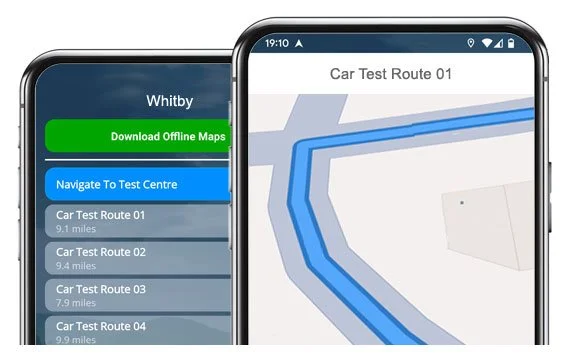
All 10 routes from Whitby Test Centre, ready to drive any time
Download our app and get a confidence boost for test day!
Updated Test Routes
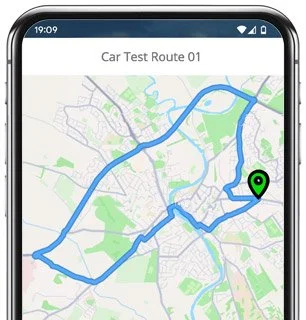
Route 1 Instructions:
- Leave the Driving Test Centre and turn right at the end of the road.
- On The Ropery, turn right at the end of the road.
- On Green Lane, turn left at the end of the road.
- On Spital Bridge, turn left at the end of the road.
- Join the A171 by turning left.
- On High Hawkser, turn right.
- On Old Scarborough Road, turn right.
- On Back Lane, turn right at the end of the road.
- Join the A171 by turning left.
- On Summerfield Lane, turn left at the end of the road.
- Rejoin the A171 by turning left.
- On Eksdale Road, turn right at the end of the road.
- On Larpool Lane, turn left at the end of the road.
- On New Bridge, turn left.
- At the Mayfield Road roundabout, turn right (3rd exit).
- On High Stakesby Road, turn right.
- On Castle Road / Stakesby Road, continue ahead.
- At the Spring Vale roundabout, turn right (4th exit).
- At the Chubb Hill roundabout, turn right (2nd exit).
- On Downdinner Hill, continue ahead.
- Join the A171 by turning left.
- On New Bridge, turn left.
- On Spital Bridge, turn left.
- On Green Lane, turn left and return to the Driving Test Centre.
-
Leave the Driving Test Centre and turn right at the end of the road.
On The Ropery, turn right at the end of the road.
On Green Lane, turn left at the end of the road.
On Spital Bridge, turn right at the end of the road.
On New Bridge, continue ahead at the traffic lights.
At the Downdinner Hill roundabout, take the 2nd left.
At the Chubb Hill roundabout, take the 2nd left.
At the Upgang Lane roundabout, turn right (3rd exit).
On Argyle Street, turn left at the end of the road.
On North Promenade, take the 1st right.
On Mulgrave Road, take the 1st left.
On Valley Road, continue ahead.
* Updated, complete route available on the app.
-
Leave the Driving Test Centre and turn right at the end of the road.
On The Ropery, turn right at the end of the road.
On Green Lane, turn left at the end of the road.
On Spital Bridge, turn right at the end of the road.
On New Bridge, turn left.
On Mayfield Road, turn right.
On St Andrews Road, turn left at the end of the road.
At the High Stakesby Road roundabout, turn right (3rd exit).
On Guisborough Road, take the 1st right.
On Castle Road, take the 1st right.
On High Stakesby Road, take the 2nd left.
* Updated, complete route available on the app.
-
Leave the Driving Test Centre and turn right at the end of the road.
On The Ropery, turn right at the end of the road.
On Green Lane, turn left at the end of the road.
On Spital Bridge, turn right at the end of the road.
On New Bridge, turn left.
At the Mayfield Road roundabout, continue ahead (2nd exit).
On Guisborough Road, take the 1st right.
On Castle Road, take the 4th left.
On Westbourne Road, take the 1st right.
On Stone Cross Road, turn right at the end of the road.
On Highfield Road, turn left at the end of the road.
* Updated, complete route available on the app.


Average Length: 8.8 miles
Based on 10 route variations in the app
Average Duration: 37 minutes
“Best driving test app out there! Helped me become more confident ready for my test.”

“Passed first time! Practicing the routes really helped!”
Route-Led provides Driving Test Routes for iPhone and Android devices. Download Whitby driving test routes straight to your device. Car, Motorcycle, ADI, and LGV routes are available.
Test-Routes App - New Version


Compatible with Android, iPhone and SatNavs
Route-led test-routes are compatible with a number of devices, therefore meaning that you don’t really need a SatNav device for your driving practice sessions. Compared with the marketplace, the rates we charge are extremely low which means that you do not have to fork-out a lot of money to practice the test-routes. Route-led will soon be adding independent driving routes to Route-LED's collection. Download 2021 Whitby Test-Routes today!
Up to date Routes
To continually upgrade Route-led's product and make sure that our driving test routes are up-to-date, we work together with instructors and learner drivers living in Whitby. Buying test-routes from Route-Led saves you money and at the same time improves your driving ability. Route-led prides itself on always being the leading supplier of driving test routes. Get the latest Whitby Test-Routes now!
Routes for Experienced and Learner Drivers
If you are a driver with experience that wishes to get to know the Whitby driving test routes for a motorcycle or vehicle or a learner driver who wishes to pass his/her driving test, then Route-LED has got you covered. The cost of practical lessons, theory lessons and insurance premiums, can be quite high! Route-Led understands that time and money are equally at a premium. Route-Led helps you to save both. Get the latest Whitby Test-Routes today!
Number one Provider of Driving Test Routes
Route-LED's Whitby test routes are able to be used with Google Maps. Don’t worry if you do not have a Sat-Nav because you are able to practise our routes using either iPhone or Android. If you happen to have a Tom-tom device already, then you are able to purchase our driving test routes for tom-Tom Sat nav devices directly from Route-Led's website and then use it on your device for your practise lessons.
Route-Led works alongside Whitby driving instructors, to produce an up to date test-route for the relevant place. Route-Led's driving test-routes are utilised by examiners throughout the United Kingdom during driving tests, and therefore we urge both students and experienced drivers to get comfortable with these test routes.
Whitby Driving Test Routes Navigation
Using our Android test-routes is very easy as long as you have RL’s app or a supported third party app installed on an Android device. Whitby test routes for Android devices are available on Route-LED's official website. After buying the test-route, the user will then either install a supported Android software app or use RL’s dedicated app in order to use a relevant route.


In preparation for taking the driving test, it’s important to know all the driving test-routes. Being familiar with your driving test-routes should not only increase your confidence but it will also ensure that you drive safely. Utilising Route-LED's sat Nav test routes is very simple, mainly because the customer can just follow the turn-by-turn instructions on the device whilst driving.

Route-LED driving test routes can be bought for lots of devices including your iPhone device. In order to use our test routes, begin by installing a preferred third party software application that you can utilise to access the file. As soon as the app is installed correctly, purchase the Whitby test route and upload to your iPhone from Route-Led's official webpages. You are able to then access the driving test route downloaded using the recommended software app. Whitby test centre.

Practise Whitby Driving Test Routes


Satnav Driving Test
Practise
Independent Driving Test
In your driving test, the examiner will choose a particular route on the satnav. You will be expected to follow the route chosen by the examiner in addition to the directions from the sat Nav. The model and make of the device won’t make a difference, this is because Route-Led's test-routes work with a number of devices.You cannot utilise your personal SatNav device in the Whitby driving test. For more info, you can get recent changes to the driving test here.
Route-led provides clients with a high degree of support and help to utilise Route-Led's test routes. You’ll get accustomed to all the different sections of the roads to be navigated during the examination. We would suggest using a skilled driving teacher as well. For extra information on what you can do to pass your driving test please visit Driving Test Practice
If you veer off the independent driving route, it’s not going to have any impact on your test results except if you do some other driving fault, make a traffic offence or break a traffic regulation. In the case where you make an incorrect turn, the test examiner will assist you return to the correct route. In case of obscure or poor traffic signs, the test examiner will instruct the examinee until they arrive at the next clear traffic sign. The learner doesn’t have to have a detailed knowledge of the town. You cannot use your personal Sat-Nav device for independent driving, mainly because it gives the learner very detailed instructions. The independent driving part is designed to test if you can make safe independent choices.
Whitby Test Centre Details
The Whitby test centre is located at Unit F11, St Hilda's Business Centre, Green Lane Whitby YO22 4ET. There ought to be ramp access for disabled users but we suggest calling to make sure. There are also quite often disabled, male and female toilets for use at the test centre but it's generally better to go before you head there! It’s sometimes feasible to park at the test centre. If this is not possible, it ought to be easy to park nearby and get there by foot. Be prepared for roundabouts, busy roads, difficult junctions and one-way streets. Using test routes while learning to drive can be very useful, as it allows you to learn on roads that you’ll certainly be driving during your examination.
Test Centre Address: Unit F11, St Hilda's Business Centre, Green Lane Whitby YO22 4ET
Test Centre Parking: Parking may be possible at the test centre. If not, park close by and head by foot.
Toilets: There are usually male, disabled and female toilets at the test centre but better to use these at your house beforehand.
Disabled access: You should be able to get into the test centre in a wheelchair but telephone ahead to make sure.
Find local test centre details: https://www.gov.uk/find-driving-test-centre