

Wallasey Driving Test Routes
The exact same routes used by Wallasey DVSA examiners
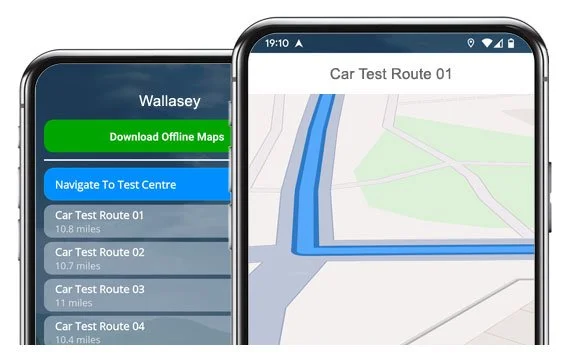

GET THE ROUTES


16 verified routes from Wallasey Test Centre ready to drive!
Get familiar with the roads, boost confidence, and pass first time!
The Routes
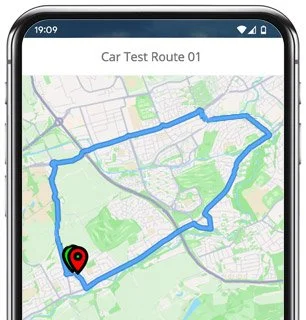
Route 1 Instructions:
- Leave the Driving Test Centre and turn left.
- On Union Street, turn right at the end of the road.
- On Crescent Road, turn right at the end of the road.
- On Serpentine Road, turn left.
- On Hawarden Avenue, turn right at the end of the road.
- On Liscard Road, turn left.
- On Mill Lane, turn right.
- On St Albans Road, turn left.
- On Wallasey Road, continue ahead.
- At the St Hilarys Brow roundabout, turn right.
- At the Wallasey Village roundabout, turn left.
- On Leasowe Road, turn left.
- At the North Wallasey Approach Road roundabout, continue ahead.
- At the Bidston Link Road roundabout, turn left.
- On Hoylake Road, turn right at the traffic lights.
- On Bidston Village Road, turn left.
- On Boundary Road, turn right then left.
- On Upton Road, turn right.
- On Hill Road, turn right.
- On Upton Road, turn left at the traffic lights.
- On Tollemache Road, turn right at the traffic lights.
- On St James Road, turn left at the traffic lights.
- At the Stanley Road roundabout, continue ahead.
- On Wallasey Bridge Road, continue ahead.
- At the Poulton Bridge Road roundabout, turn right.
- On Dock Road, turn left at the traffic lights.
- On Oakdale Road, turn left.
- On Ashville Road, turn left.
- On Crossfield Road, turn right at the end of the road.
- On Poulton Road, turn left at the traffic lights.
- On Mainwaring Road, continue ahead.
- On Liscard Road, turn right.
- On Church Street, turn left at the traffic lights.
- On King Street, turn left.
- On Union Street, turn left and return to the Driving Test Centre.
-
Leave the Driving Test Centre and turn left.
On Union Street, turn left.
On Darlington Street, turn right at the end of the road.
On Church Street, turn left at the end of the road.
On Liscard Road, continue ahead.
On Mainwaring Road, turn right at the traffic lights.
On Poulton Road, turn left.
On Mostyn Street, turn right.
On Bishop Road, turn right at the end of the road.
On Norwood Road, turn right at the end of the road.
On Sherlock Lane, turn left at the end of the road.
On Poulton Road, continue ahead at the traffic lights.
On Breck Road, turn right.
On Cliff Road, turn left.
On Station Road, turn left.
On Cliff Road, turn right at the end of the road.
On Torrington Road, turn right at the traffic lights.
* Updated, complete route available on the app.
-
Leave the Driving Test Centre and turn left.
On Union Street, turn left.
On Darlington Street, turn right at the end of the road.
On Church Street, turn left at the end of the road.
On Liscard Road, turn right.
On Parkside Road, continue ahead.
On Hampstead Road, turn right at the end of the road.
On Poulton Road, turn left at the traffic lights.
At the Gorsey Lane roundabout, turn right and then continue ahead.
At the Duke Street roundabout, continue ahead, then continue ahead at the traffic lights.
At the Ashville Road roundabout, turn right.
On Park Road West, turn left.
At the Forest Road roundabout, turn right.
On Tollemache Road, turn left at the traffic lights.
On Upper Flaybrick Road, turn left at the end of the road.
On Tollemache Road, turn right at the traffic lights.
On St James Road, turn left at the traffic lights.
* Updated, complete route available on the app.
-
Leave the Driving Test Centre and turn right.
On Union Street, turn left at the end of the road.
On King Street, turn left.
On Manor Road, turn right.
On Penkett Road, turn right at the end of the road.
On Steel Avenue, turn left at the end of the road.
On Seabank Road, turn left.
On Rowson Street, turn right.
At the Mount Pleasant Road roundabout, turn right.
On Hose Side Road, turn right.
On Rockland Road, turn right at the end of the road.
On Hose Side Road, continue ahead.
On Grove Road, turn left.
On Claremount Road, turn left.
On Lyndhurst Road, turn left.
On Claremount Road, turn left.
On Rosclare Drive, turn right.
On Belvidere Road, continue ahead at the traffic lights.
* Updated, complete route available on the app.


Average Length: 9 miles
Based on 16 app route variations
Average Duration: 40 minutes
“Best driving test app out there! Helped me become more confident ready for my test.”

“Passed first time! Practicing the routes really helped!”
Route-Led provides Driving Test Routes for iPhone and Android devices. Download Wallasey driving test routes straight to your device. Car, Motorcycle, ADI, and LGV routes are available.
Wallasey Driving Test-Routes App
All Route-Led's driving test routes work with lots of devices, therefore ensuring that you don’t really need a SatNav device for your driving practice lessons. Compared with the marketplace, the prices we charge are very cheap meaning you don’t have to fork-out a lot of money to practise the test routes. Route-LED will shortly add independent driving routes to Route-LED's service. Download 2021 Wallasey Test-Routes now!

Instructors and Learner drivers are continually supplying Route-Led with improved test-route information, meaning that Route-LED is the best place for driving test-routes. New drivers can conserve your money by purchasing test routes from Route-Led, leaving you to improve your driving ability in the most efficient way. Route-Led is the premier supplier of Wallasey driving test-routes in the UK. Download 2021 Wallasey Driving Test-Routes now!

Whether you are an experienced driver who needs to get to know the Wallasey test routes for your vehicle or motorbike or a learner driver that wants to pass their driving test, then Route-Led is the provider for you. The cost of theory lessons, driving lessons and insurance premiums, can be a strain on your wallet! Why waste money and time when you are able to save both and improve your skills. Download 2021 Wallasey Test Routes now!


Premier Supplier of Driving Test-Routes in the UK
Customers are able to purchase Wallasey test-routes in Google Maps format. It does not matter if you do not own a dedicated sat-nav as you are able to use the routes on an iPhone or Android. If you already own a Satnav (e.g. TomTom) you can download the test-routes for that device and start practising right away.
Due to the help of Wallasey examiners who test learner drivers each day on these driving test-routes and learner drivers, Route-Led is able to develop numerous high standard driving test-routes for Sat nav, Android, iPhone and Garmin devices.
Wallasey Test-Route Formats Navigation


Android Sat nav Test Routes
Satnav Test Routes
iPhone Sat nav Test Routes
Utilising RL’s Android test-routes is really simple as long as you have a supported 3rd party app or RL’s app installed on your Android device. Wallasey test-routes for Android devices can be purchased from our website. After downloading the test route, the user will then either install a supported Android app or use RL’s dedicated app to use a particular file.
Driving test routes are available for purchase from our official webpages. Once the routes are purchased from our website, the student should load the test route into their Sat-Nav device and begin their practise session. Wallasey driving test-routes are voice-guided, as a result all the customer will be required to do is to receive instructions from the device.
Route-Led test-routes are available for several devices including your iPhone device. In order to access our driving test routes, begin by installing a preferred third party software application that you can use to access the file. As soon as the program is installed correctly, download the Wallasey test-route and install on the iPhone device from Route-led's webpages. You are able to then access the driving test route file purchased using the recommended software app. Wallasey test centre.
Practise Wallasey Test Routes


Satnav Driving Test
While undertaking the independent driving test, the examiner will request the learner driver to follow directions from the Satnav device. The examiner will provide a pre-configured Tomtom Start 52 device. All you will have to do is to follow directions from the device. The model or make of the Sat nav device that you’ll use in your practice sessions will not matter at all. As a top tier sat-nav company, we supply test-routes for Android, Garmin, Tomtom and iPhone devices.You cannot utilise your own Satnav device in the driving test.
Practice
We aim to supply customers with a great deal of help and support with Route-LED's products. You will quickly get good at the different routes provided. However, we of course recommend having a person who is a professional teacher.
Independent Driving Test
In the course of the independent driving test, the examiner will provide the student all the relevant directions. If the student becomes lost during the journey, they will need to get confirmation on the directions from the examiner. Learners can’t use personal SatNav devices for independent driving as they give turn-by-turn instructions. Independent driving will check the ability of the examinee to make independent decisions.
Wallasey Test Centre Information
The Wallasey test centre can be found at 17c King Street, Wallasey Merseyside CH44 8AT. There should be ramp access for disabled users but it would be best to call to confirm. There are also usually disabled, male and female facilities available at the test centre but it's probably best to go before you travel there! It’s occasionally feasible to park at the test centre. If this is not possible, it ought to be easy to park nearby and get there by foot. Practise difficult junctions, one-way streets, roundabouts and busy roads. Navigating test-routes whilst learning to drive can be very useful, as it allows you to learn on routes that you will actually be going on during your examination.
Test Centre Address: 17c King Street, Wallasey Merseyside CH44 8AT
Parking: Parking could be possible at the test centre. If it’s not, park nearby and walk there.
Toilets: There are usually male, female and disabled facilities at the test centre but best to use these at home beforehand.
Test Centre Disabled access: You should be able to get into the test centre in a wheelchair but telephone ahead to make sure.
Find local test centre details: https://www.gov.uk/find-driving-test-centre