

Wakefield Driving Test Routes
Practise the current routes examiners take on test day
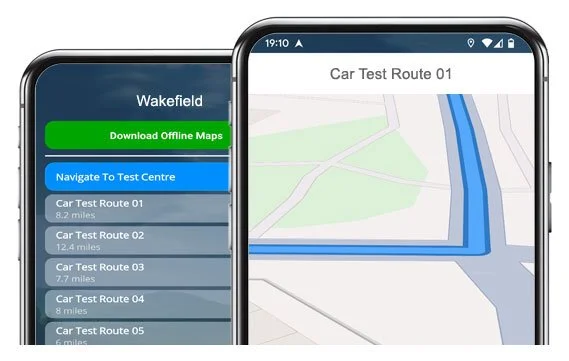

DOWNLOAD NOW!


Drive the 19 current routes from Wakefield Test Centre today!
Practise smart, and boost your chances of passing with our app.
Step-by-Step Satnav Routes
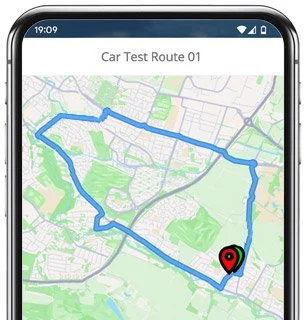
Route 1 Instructions:
- Leave the Driving Test Centre and turn left.
- On Mothers Way, turn right.
- On Mothers Way, turn right at the end of the road.
- On The Wilfred, turn left at the end of the road.
- Albert Drive becomes Flanshaw Way.
- On Flanshaw Way, turn right at the end of the road.
- On Flanshaw Lane, turn left at the traffic lights.
- On Dewsbury Road, turn left.
- At the Alverthorpe Road mini roundabout, continue ahead.
- On Alverthorpe Road, turn right at the end of the road.
- Keep left on Balne Lane.
- On Bell Street, turn right at the traffic lights.
- On Wood Street, turn right at the end of the road.
- On Westgate, take the second left.
- On Queen Street, turn right at the traffic lights.
- At the Denby Dale Road roundabout, continue ahead.
- At the next Denby Dale Road roundabout, turn right (3rd exit).
- At the Charlesworth Way roundabout, take the 2nd exit.
- On Charlesworth Way, turn left at the traffic lights.
- On Ings Road, turn left at the traffic lights.
- Westgate End becomes Horbury Road.
- On Horbury Road, take the fourth right (opposite the garage).
- At the George A Green Road mini roundabout, turn left.
- At the Waterton Road mini roundabout, turn right.
- On Broadway, take the second left.
- On Lindsay Avenue, turn left at the end of the road.
- On Broadway, turn left at the end of the road.
- On Dewsbury Road, turn right at the traffic lights.
- At the Goldsmith Avenue roundabout, continue ahead (2nd exit).
- On Albert Drive, turn left.
- On The Wilfred, turn left.
- On Mothers Way, turn left.
- On Mothers Way, turn right and return to the Driving Test Centre.
-
Leave the Driving Test Centre and turn left.
On Mothers Way, turn right.
On Mothers Way, turn right at the end of the road.
On The Wilfred, turn right at the end of the road.
At the Albert Drive roundabout, continue ahead (2nd exit).
Keep left on Goldsmith Avenue.
On Dewsbury Road, turn right.
At the first Broadway mini roundabout, continue ahead.
At the second Broadway mini roundabout, continue ahead.
On Broadway, turn left at the end of the road.
On Horbury Road, take the third right.
On Thornes Road, turn left at the end of the road.
At the Denby Dale Road roundabout, continue ahead (2nd exit).
At the next Denby Dale Road roundabout, continue ahead (2nd exit).
On Denby Dale Road, continue ahead at the traffic lights.
On George Street, turn right at the traffic lights.
At the Kirkgate roundabout, turn left (1st exit).
On Marsh Way, continue ahead at the traffic lights.
At the Marsh Way roundabout, continue ahead (2nd exit).
On Northgate, continue ahead at the traffic lights.
On Leeds Road, continue ahead at the traffic lights.
* Updated, complete route available on the app.
-
Leave the Driving Test Centre and turn left.
On Mothers Way, turn right.
On Mothers Way, turn right at the end of the road.
On The Wilfred, turn right at the end of the road.
At the Albert Drive roundabout, turn right (3rd exit).
At the next Albert Drive roundabout, continue ahead (2nd exit).
On Albert Drive, turn left at the traffic lights.
On Wakefield Road, turn right at the traffic lights.
On Queens Drive, turn right at the traffic lights.
On Town Gate, turn left.
On Broadowler Lane, take the second right.
On Athold Drive, turn left at the end of the road.
On Broadgate, turn right.
On Greatfield Road, turn left at the end of the road.
On Town Gate, turn left at the end of the road.
At the Prospect Road mini roundabout, continue ahead.
On Prospect Road, turn right at the end of the road.
At the Queen Street mini roundabout, turn left.
* Updated, complete route available on the app.
-
Leave the Driving Test Centre and turn left.
On Mothers Way, turn right.
On Mothers Way, turn right at the end of the road.
On The Wilfred, turn left at the end of the road.
Albert Drive becomes Flanshaw Way.
On Flanshaw Way, turn right at the end of the road.
On Flanshaw Lane, turn left at the traffic lights.
On Dewsbury Road, continue ahead at the traffic lights.
Continue ahead on Dewsbury Road.
On Westgate End, continue ahead at the traffic lights.
On Westgate End, turn left.
On Back Lane, turn left at the end of the road.
Cliff Parade becomes Burton Street.
On Burton Street, turn right.
On Bell Street, turn left at the traffic lights.
On Bond Street, turn right.
Keep left on Wentworth Terrace.
On Northgate, turn right at the traffic lights.
On Westfield Road, turn left at the end of the road.
College Grove Road becomes Eastmoor Road.
On Eastmoor Road, turn right at the traffic lights.
On Stanley Road, turn left at the traffic lights.
* Updated, complete route available on the app.


Average Length: 8.8 miles
Averages formed from 19 route variations in the app
Average Duration: 37 minutes
“Best driving test app out there! Helped me become more confident ready for my test.”

“Passed first time! Practicing the routes really helped!”
Route-Led provides Driving Test Routes for iPhone and Android devices. Download Wakefield driving test routes straight to your device. Car, Motorcycle, ADI, and LGV routes are available.
Wakefield Driving Test Routes App


Compatible with Android, iPhone and SatNavs
At Route-led, we provide Wakefield test routes for your sat-Nav, Android and iPhone devices. The test-routes provided can be used for tests for taxis, motorbikes, LGV and cars. Route-Led supplies one of the most cost effective means to practice your driving test routes. Here at Route-Led, we plan to add Satnav and Independent driving routes to Route-led's product family shortly. Download 2021 Wakefield Test-Routes today!
Up-to-date Routes
Instructors and Learner drivers are continually providing Route-LED with improved driving test-route info, which means that Route-LED is the best place for driving test routes. New drivers can conserve your money by buying test routes from Route-Led, leaving you to increase your driving ability in the most efficient way. We pride ourselves on being the leading provider of test routes. Get the latest Wakefield Driving Test Routes now!
Routes for Experienced and Learner Drivers
It's immaterial if you are an existing driver looking at the advanced, taxi or new vehicle test, an instructor seeking to understand the latest test-routes or a new driver looking to excel in their driving test. Route-led is the one-stop shop for everything you need. Being taught how to drive and the costs of insurance is usually an extremely costly process. Our test routes for your test will let you to be money and time cost efficient. Get the latest Wakefield Driving Test-Routes now!
Leading Provider of Test Routes
Route-LED's Wakefield driving test routes are able to be used with Google Maps. Those who haven’t purchased a Sat-Nav device are able to use their Android or iPhone devices to access our test routes. If you have a Tomtom device, then you are able to download Route-led's driving test-routes for Tom tom SatNav devices from Route-Led's web page and then load it on your device for your driving sessions.
To make sure our driving test routes are fully updated, Route-led works side-by-side with local Wakefield driving instructors and learner drivers. Route-LED is also keen on feedback from Route-LED's customers regarding any product that we offer.
Wakefield Driving Test Routes Navigation
Using our Android test routes is quite easy and is possible making use of Route-LED's dedicated Android app or a recommended third party Android application. Once you have installed your chosen app on your device, you should then download the driving test route from Route-LED's website. The pre-programmed routes on your Android device will lead you through your test or practise session. Buy Wakefield Driving Test Routes


Following December 4 2017, the United Kingdom driving test also requires following SatNav directions. As the leading provider of SatNav test routes in the UK, we provide many routes for Garmin and Tomtom devices. For people that wish to purchase Sat-nav devices, we definitely recommend the Tom tom Start 52, mainly because it’s the top pick for the Wakefield driving test examiners.

Route-LED has made practicing test routes a lot easier using an iPhone by creating test-routes specifically for iPhones. All you need to do is to either download our iPhone format file, and then use a recommended third party application to access the driving test routes or install RL’s dedicated iPhone app in the Apple app store following our detailed guide. The iPhone can then lead you to the Wakefield test centre, all around the test route, and finally back to the test centre. While learning with our driving test routes, you’ll be led safely with the helpful voice-guided directions to Wakefield driving test centre.

Practise Wakefield Test Routes
The test examiner will ask the student to follow instructions from a pre-setup Sat-nav on their own. The Satnav will show the route that the student needs to track. The make or model of Sat-Nav used while the exam is going on will not really make a difference as the test-route will be the same. In the situation where the learner driver takes a different route, the examiner will let them know and give instructions. That said, we highly suggest the Tomtom Start 52 mainly because it is the device examiners tend to use whilst conducting driving tests.

As a client-focused company, we supply Route-led's clients with extra help and support for Route-Led's test-routes. Learning with Route-Led's test-routes enables the customers to experience the roads, corners and junctions they will encounter during their driving tests.To assist the learner in practising how to drive carefully and in addition to perform well during the driving test, we definitely suggest using an experienced driving teacher. How it works

When you veer off the independent driving route, it will not have any effect on your test score except if you make an additional driving error, break a traffic regulation or make a traffic offence. If you do an incorrect turn, the test examiner will assist you to return to the route. In case of obscure or poor traffic signs, the examiner will instruct the learner until such time as they get to the next visible traffic sign. The learner doesn’t have to have a detailed understanding of the town. You cannot use your own Sat-nav device for independent driving, mainly because it gives the learner very detailed prompts. The independent driving section is designed to test if you can effect secure independent decisions.
Wakefield Test Centre Details
Wakefield test centre is located at Mothers Way, Silkwood Park, Ossett West Yorkshire WF5 9TR. There ought to be ramp access for wheelchair users but we suggest calling to make sure. There are also usually disabled, male and female toilets for use at the test centre but it's probably better to go before you head there! It’s sometimes feasible to park at the test centre. If not, it ought to be easy to park close by and walk. Be prepared for one-way streets, busy roads, roundabouts and difficult junctions. Navigating test routes whilst learning to drive is always very useful, allowing you to learn on roads that you will certainly be driving during your examination.
Address: Mothers Way, Silkwood Park, Ossett West Yorkshire WF5 9TR
Test Centre Parking: Parking may be available at the test centre. If not, park close by and walk there.
Toilets: There are usually male, disabled and female facilities at the test centre but better to use these at your house before.
Disabled access: You should be able to access the test centre in a wheelchair but telephone ahead to confirm.
Find local test centre details: https://www.gov.uk/find-driving-test-centre