

Upton Driving Test Routes
The only place to find the latest routes used by examiners during actual tests
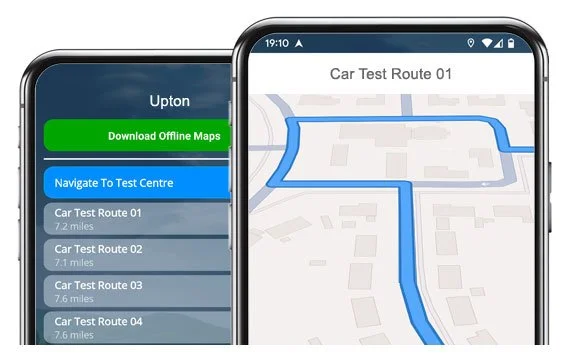

PRACTISE THE SMART WAY


24 current, verified routes from Upton Test Centre ready to drive
Download our satnav app and learn the roads before your test!
All Current Routes
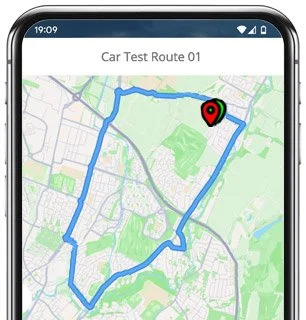
Route 1 Instructions:
- Leave the Driving Test Centre and turn left.
- At the Arrowe Park Road roundabout, take the 4th exit.
- On Upton Bypass, turn left.
- On Salacre Lane, take the second left.
- On Salacre Crescent, turn right at the end of the road.
- On Salingby Drive, turn left at the end of the road.
- On Salacre Lane, turn left at the end of the road.
- On The Village, turn right at the traffic lights.
- On Moreton Road, continue ahead at the traffic lights.
- At the Upton Road roundabout, take the 3rd exit.
- On Hoylake Road, turn left at the traffic lights.
- On Reeds Lane, turn right.
- Follow the road left onto Birket Avenue.
- On Castleway South, turn right at the end of the road.
- On Leasowe Road, turn left.
- Take the slip road on the right.
- At the Wallasey Approach roundabout, take the 2nd exit.
- At the Bidston Link Road roundabout, take the 3rd exit.
- On Fender Lane, continue ahead at the traffic lights.
- At the Hoylake Road roundabout, take the 1st exit.
- On Upton Road, turn right at the traffic lights.
- At the Upton Bypass roundabout, take the 1st exit, then the 2nd exit at the next roundabout, and the 3rd exit at the following roundabout.
- On Arrowe Park Road, take the second right.
- Return to the Driving Test Centre.
-
Leave the Driving Test Centre and turn left.
At the Arrowe Park Road roundabout, take the 2nd exit.
At the Upton Bypass roundabout, take the 4th exit.
On Old Greasby Road, continue ahead at the traffic lights.
On Ford Road, turn left at the traffic lights.
At the Upton Road roundabout, take the 2nd exit, then the 3rd exit at the next roundabout.
Turn right at the second set of traffic lights.
On Tollemache Road, take the second right.
On Shrewsbury Road, turn right.
On Howbeck Road, take the third right.
On Brancote Road, turn left.
On Ashburton Road, turn right at the end of the road.
On Bidston Road, turn left.
On Vyner Road South, take the second left.
On Noctorum Lane, turn right.
On Noctorum Road, turn left at the end of the road.
On Budworth Road, take the second left then turn right.
On Waterford Road, turn left.
On Budworth Road, turn left at the end of the road.
At the Wexford Road crossroads, continue ahead.
On Beresford Road, take the second right.
On Shrewsbury Road, take the fourth right.
On Gerald Road, turn left at the traffic lights.
At the traffic lights at Talbot Road / Ingestre Road / Storeton Road, turn right.
On Woodchurch Road, continue ahead at the traffic lights and take the 2nd exit at the roundabout.
On Arrowe Park Road, continue ahead at the traffic lights and take the second left.
Return to the Driving Test Centre.
* Updated, complete route available on the app.
-
Leave the Driving Test Centre and turn left.
At the Arrowe Park Road roundabout, take the 4th exit.
On Upton Bypass, continue ahead at the traffic lights.
At the Upton Road roundabout, take the 1st exit.
On Fender Way, turn right at the end of the road.
At the traffic lights on Fender Lane / Bidston Village Road, turn left.
At the Hoylake Road roundabout, take the 2nd exit.
At the Bidston Link Road roundabout, take the 2nd exit.
On Wallasey Approach Road, take the second right.
On Wallasey Link Road, turn left.
On Leasowe Road, continue ahead at the traffic lights then take the 3rd exit at the roundabout.
At the Wallasey Village Road roundabout, take the 2nd exit.
On Breck Road, turn right at the traffic lights.
At the Poulton Bridge Road roundabout, take the 2nd exit.
At the Wallasey Bridge Road roundabout, take the 2nd exit.
At the Stanley Road roundabout, take the 4th exit.
On Tollemache Road, turn right at the traffic lights.
On Upton Road, take the fourth right.
On Bidston Road, take the fourth right.
At the end of the road at Wexford Road / Budworth Road / West Road / Beryl Road, turn right.
On Noctorum Avenue, turn right.
On Windermere Road, turn right at the end of the road.
On Noctorum Avenue, turn left at the end of the road.
On Upton Road, continue ahead at the traffic lights.
At the Upton Bypass roundabout, take the 1st exit.
On Arrowe Park Road, take the second right.
Return to the Driving Test Centre.
* Updated, complete route available on the app.
-
Leave the Driving Test Centre and turn left.
At the Arrowe Park Road roundabout, take the 4th exit.
On Upton Bypass, continue ahead at the traffic lights.
On Upton Road, turn right.
On Noctorum Avenue, take the second left.
On Beryl Road / West Road / Budworth Road, take the second left then turn right.
On Waterford Road, turn right.
On Budworth Road, turn left at the end of the road.
On Bidston Road, take the second right.
At the crossroads on Howbeck Road, turn left.
At the crossroads on Shrewsbury Road, continue ahead then turn left at the end of the road.
On Upton Road, turn right at the traffic lights.
On Tollemache Road, turn right at the traffic lights.
At the Stanley Road roundabout, take the 1st exit.
At the Wallasey Bridge Road / Poulton Bridge Road roundabout, take the 2nd exit then continue ahead at the traffic lights.
On Mill Lane, turn left at the traffic lights.
On Marlowe Road, take the third left then turn left at the end of the road.
At the Wallasey Road / St Hilary Brow roundabout, take the 3rd exit.
At the Wallasey Village roundabout, take the 1st exit.
On Leasowe Road, continue ahead at the traffic lights then take the second left.
Follow the slip road left.
* Updated, complete route available on the app.


Average Length: 8.9 miles
Based on more than 20 route variations in the app
Average Duration: 39 minutes
“Best driving test app out there! Helped me become more confident ready for my test.”

“Passed first time! Practicing the routes really helped!”
Route-Led provides Driving Test Routes for iPhone and Android devices. Download Upton Driving Test Routes straight to your device. Car, Motorcycle, ADI, and LGV routes are available.
Upton Test-Routes App - Latest Edition


Compatible with Android, iPhone and SatNavs
Up to date Routes
Routes for Experienced and Learner Drivers
As the leading test-route supplier in the United Kingdom, Route-Led supplies driving test-routes compatible with lots of modern devices such as Tomtom, Mac, PC, iPhone and Garmin devices. Route-Led provides one of the most cost effective ways to learn your driving test routes. We intend to add SatNav and Independent driving routes to our products soon. Download 2021 Upton Driving Test-Routes now!
Every day Route-Led collaborates with experienced drivers, instructors and learners to update Route-led's driving test routes, meaning that you have the best information to pass your test. At affordable rates we provide you driving test routes that you are able to use to increase your ability while also lowering your expenditure on driving lessons. Of all the providers of test routes, Route-LED is the #1. Get the latest Upton Driving Test-Routes now!
Route-led supplies routes for new and experienced drivers alike in order that everyone is able to pass their driving test with flying colours. Route-led also provides routes to instructors wanting to understand the newest driving test-routes. The price of theory lessons, exorbitant insurance premiums and driving lessons, can be quite high! We understand that time and money are both important. Route-led helps you be efficient in both. Download 2021 Upton Test-Routes now!
Leading Provider of Test Routes
Upton Driving Test-Routes can be purchased for many devices including Google Maps. Android and iPhone users can load our routes on those devices as well. Should you have a tomTom device already, you are able to download our test-routes for tom-Tom Sat-nav devices directly from our website and then use it on your device for your driving sessions.
We work closely with Upton driving instructors, to come up with an up to date test-route for the relevant place. Route-led's driving test-routes are also used by examiners throughout the United Kingdom for the purpose of driving tests, and therefore we highly encourage experienced drivers and students to get acquainted with the driving test-routes.
Upton Driving Test Route Formats Navigation


Android SatNav - Test Routes
By downloading our dedicated Android app, you’ll be able to effortlessly use Route-Led's test-routes. Download our recommended applications and immediately begin testing your driving ability right now. Our detailed directions will enable customers to focus on improving your driving skills whilst getting to experience the driving test routes.

TomTom Sat nav Test Routes
Following December 4 2017, the United Kingdom driving test includes being able to follow Satnav directions. Given Route-Led is the #1 supplier of SatNav test routes in the United Kingdom, we provide many driving test-routes for Tom Tom and Garmin devices. For people that want to purchase Sat-nav devices, we definitely recommend the tomTom Start 52, mainly because it’s the #1 choice for the Upton driving test examiners.
iPhone SatNav - Test Routes
Route-led makes practicing test routes much simpler using an iPhone device by creating test-routes specifically for iPhones. All you have to do is to either purchase our iPhone format file, and then use a recommended third party application to use the test routes or install RL’s dedicated iPhone app in the Apple app store following our detailed instructions. Your iPhone device will navigate you to the Upton test centre, completely around the test-route, and finally returning to the driving test centre. Whilst learning with our test routes, you’ll be navigated securely with the helpful voiced directions to Upton driving test centre.

Learn Upton Driving Test Routes


Sat-Nav Driving Test
During your driving examination, the examiner will select a particular route on the satnav. You will be expected to use the route selected by the examiner as well as the instructions from the SatNav. The make and model of the device will not make a difference, this is due to the fact that our test routes work with a lot of devices.You cannot use your personal Satnav device during the Upton driving test. For more info, you can find recent changes to the driving test here.
Practise
As a service-oriented company, we provide Route-LED's customers with additional help and support for Route-led's driving test-routes. Learning with Route-led's test-routes enables the customers to practice the corners, junctions and roads they will be driving on during their driving tests.To assist the learner in practising how to conduct a vehicle carefully and in addition to perform well during the driving test, we definitely suggest using an experienced driving instructor. How it works
Independent Driving Test
When you veer off the independent driving route, it won’t have any impact on your examination score unless you commit a traffic offence, break a traffic regulation or make an additional driving mistake. In the case where you do an incorrect turn, the test examiner will help you in getting back to the correct route. Where you have poor or obscure road signs, the examiner will direct the examinee until such time as they arrive at the following visible traffic sign. The learner does not need to have a detailed knowledge of the area. You cannot use your personal Sat nav device for independent driving, mainly because it gives the student very detailed prompts. The independent driving section will test if you can make safe independent decisions.
Upton Test Centre Details
Upton test centre is located at Arrowe Park Rd, Upton, Wirral Merseyside CH49 0UF. There should be ramp access for disabled users but it would be best to call to make sure. There are also usually disabled, female and male facilities for use at the test centre but it's generally better to use these at your house in advance! It’s sometimes possible to park at the test centre. If not, it should be easy to park nearby and get there by foot. Be prepared for busy roads, difficult junctions, one-way streets and roundabouts. Navigating test routes whilst learning to drive can be very useful, allowing you to learn on routes that you’ll actually be driving during your test.
Address: Arrowe Park Rd, Upton, Wirral Merseyside CH49 0UF
Test Centre Parking: Parking could be possible at the test centre. If it is not, park close by and walk there.
Toilets: There are quite often disabled, female and male toilets at the test centre but better to go before you head there.
Disabled access: You ought to be able to access the test centre in a wheelchair but call ahead to make sure.
Find local test centre details: https://www.gov.uk/find-driving-test-centre