

Tunbridge Wells Driving Test Routes
Master the same roads used during real tests to get an advantage!
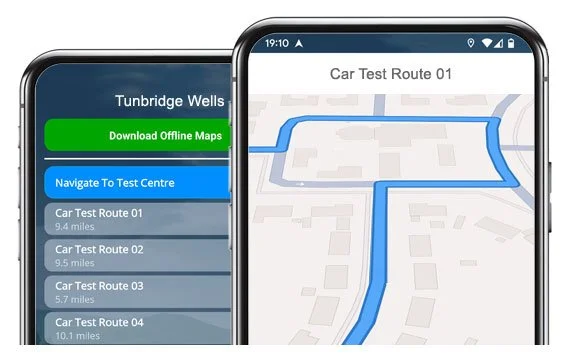

DOWNLOAD NOW


Drive all 15 current routes from Tunbridge Wells Test Centre
Save time, money, and practise the smart way with our no.1 routes app.
All Routes - Step-by-Step
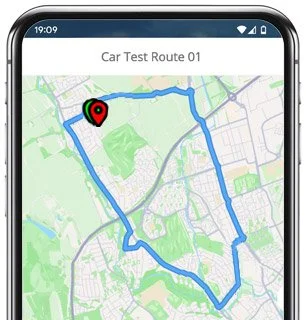
Route 1 Instructions:
- Leave the Driving Test Centre and turn left.
- On Meadow Road, turn right at the traffic lights.
- On Goods Station Road, use the left lane for the A26 and continue ahead at the traffic lights.
- On Grosvenor Road, continue ahead at the traffic lights, then turn left at the mini roundabout.
- At the Mount Ephraim / London Road roundabout, continue ahead (2nd exit).
- At the Eridge Road roundabout, continue ahead, then turn right.
- On Summervale Road, turn left at the end of the road.
- On Eastlands Road, take the second right.
- On Waterdown Road, turn left.
- On Saunders Road, turn left.
- On Waterdown Road, turn right at the end of the road.
- On Friezland Road, turn right at the end of the road, then left at the next end of the road.
- On Ramslye Road, turn right at the end of the road.
- On Eridge Road, turn left.
- On Bunny Warren, turn left at the end of the road.
- On Frant Road, turn right.
- On Forest Road, take the fourth left.
- On Farmcombe Road, continue ahead at the third mini roundabout, then turn right at the end of the road.
- On Claremont Road, turn left at the end of the road.
- At the Grove Hill Road mini roundabout, turn right (2nd exit).
- On Mount Pleasant, turn right at the traffic lights.
- At the Crescent Road roundabout, continue ahead (2nd exit).
- On Lansdowne Road, turn left at the end of the road.
- On Garden Road, continue ahead at the traffic lights.
- Victoria Road becomes Goods Station Road.
- After the traffic lights on Goods Station Road, use the right-hand lane.
- On Grosvenor Road, turn right at the traffic lights.
- On Upper Grosvenor Road, follow the middle lane.
- Turn left into Meadow Road.
- Return to the Driving Test Centre.
-
Leave the Driving Test Centre and turn left.
On Meadow Road, turn left at the traffic lights.
At the traffic lights on Goods Station Road / Victoria Road, turn left.
At the traffic lights on Camden Road / Quarry Road / Grosvenor Bridge, continue ahead.
On Dunstan Road, turn left.
On Woodbury Park Road, turn left at the end of the road.
On St Johns Road, turn right.
On Culverden Park Road / Culverden Park, turn left at the end of the road.
On Culverden Down / Molyneux Park Road, turn left.
On Court Road, turn right at the end of the road.
On Earls Road, turn left at the end of the road.
On Molyneux Park Road, turn right at the end of the road.
Turn right onto Mount Ephraim / Bishops Down / Langton Road.
On Rusthall Road / Rusthall High Street, take the fifth right.
On Southwood Road, turn left.
On Bowen Road, turn right at the end of the road.
On Southwood Road, turn right at the end of the road.
On Rusthall High Street, turn left.
On Longmeads, take the second left.
* Updated, complete route available on the app.
-
Leave the Driving Test Centre and turn left.
On Meadow Road, turn left at the traffic lights.
On Goods Station Road / Victoria Road, continue ahead at the traffic lights.
On Garden Road, take the second right.
At the Lansdowne Road roundabout, continue ahead (2nd exit).
On Crescent Road, continue ahead at the traffic lights.
On Church Road, continue ahead at the traffic lights, then turn left at the end of the road.
At the Mount Ephraim / Bishops Down roundabout, take the 2nd exit.
On Langton Road, take the second right.
At the crossroads on Coach Road, continue ahead.
On Lower Green Road, turn left.
On Manor Road, turn left.
On Ashley Park, turn left.
On Ashley Gardens, turn right.
On Erskine Park Road, turn right.
At the crossroads on Parsonage Road, continue ahead.
* Updated, complete route available on the app.
-
Leave the Driving Test Centre and turn left.
On Meadow Road, turn left at the traffic lights.
On Goods Station Road / Victoria Road, continue ahead at the traffic lights.
On Garden Road, take the second right.
At the Lansdowne Road roundabout, turn left.
On Calverley Road, continue ahead at the traffic lights.
On Bayhall Road / Forest Road, take the seventh left, then the fourth right.
On Bayham Road / Birling Road, turn left at the end of the road.
Continue ahead on Frant Road (A267), then turn right.
On Bunny Warren, turn right at the end of the road.
On A26 Bridge Road, turn left.
On Ramslye Road, turn right.
On Eastlands Road, take the second left.
On Waterdown Road, turn left.
On Saunders Road, turn right at the end of the road.
On Waterdown Road, turn left at the end of the road.
On Eastlands Road, take the second right.
* Updated, complete route available on the app.


Average Length: 8.79 miles
Based on 15 route variations in the app
Average Duration: 36 minutes
“Best driving test app out there! Helped me become more confident ready for my test.”

“Passed first time! Practicing the routes really helped!”
Route-Led provides Driving Test Routes for iPhone and Android devices. Download Tunbridge Wells driving test routes straight to your device. Car, Motorcycle, ADI, and LGV routes are available.
Tunbridge Wells Test-Routes App


Compatible with Android, iPhone and SatNavs
Up to date Routes
Routes for Experienced and Learner Drivers
At Route-LED, we provide Tunbridge Wells test routes for your Android, iPhone and Satnav devices. The driving test routes provided can be used for tests for motorbikes, taxis, cars and LGV. Route-led provides one of the cheapest means to practise your test-routes. Route-Led will shortly add independent driving routes to Route-Led's service. Download 2021 Tunbridge Wells Test-Routes now!
To improve Route-Led's product and ensure that our local driving test routes are up to date, we collaborate closely with local learning drivers and instructors based in Kent. At affordable prices we provide you driving test routes that you are able to practise to improve your ability whilst lowering the expenditure on driving sessions. Route-Led is the leading supplier of Tunbridge Wells test routes in the UK. Download 2021 Tunbridge Wells Test-Routes now!
Route-led supplies routes for experienced and new drivers alike in order that everyone can excel in their driving test with flying colours. Route-LED also supplies test routes to instructors keen to learn the newest routes. New drivers can end up spending a huge amount of cash learning to drive. Route-LED understands that money and time are equally at a premium. Route-led helps you be efficient in both. Get the latest Tunbridge Wells Test-Routes today!
Premier Provider of Test Routes
Route-Led's Tunbridge Wells driving test routes can be used with Google Maps. It does not matter if you don’t have a dedicated Sat-nav because you can use the driving test routes using either iPhone or Android. If you have a SatNav (e.g. TomTom) you are able to purchase the test-routes for that device and get learning straight away.
To make sure Route-led's driving test routes are fully updated, we work side by side with Tunbridge Wells driving instructors and learner drivers. Route-led is also always open to information from Route-LED's customers regarding any of Route-Led's products.
Tunbridge Wells Test Route Formats Navigation


Android SatNav Test Routes
Utilising RL’s Android driving test routes is quite easy provided you have a supported third party app or RL’s app installed on an Android device. Tunbridge Wells driving test-routes for Android devices are available on our official webpages. After buying a test-route, the customer can then either install a supported Android app or use RL’s dedicated app in order to access the relevant route.

Sat nav Driving Test Routes
After 4th December, 2017, the United Kingdom driving test includes following SatNav instructions. As the #1 supplier of SatNav test routes in the UK, we provide numerous routes for Garmin and Tomtom devices. For customers who want to buy Satnav devices, we highly recommend the Tom-tom Start 52, mainly as it is the leading choice for the Tunbridge Wells driving test examiners.
iPhone SatNav Test Routes
Download test-routes from Route-led's website into your iPhone or from Route-LED's dedicated iPhone app. To access the test route either download a recommended third party iPhone software application or use the dedicated Route-LED App. Supported third party software apps are located in the iPhone app store.

Learn Tunbridge Wells Test Routes
The test examiner will require the student to take instructions from a configured SatNav independently. The Sat nav will show the route that the learner needs to track. The model or make of Sat-nav utilised during the exam will not matter as the driving test route will be identical. In case the student accidentally takes the wrong route, the examiner will let them know and give instructions. That said, we highly suggest the Tom-tom Start 52 mainly as it is what examiners use while examining driving tests.

As a service-oriented company, we provide Route-Led's clients with additional help and support for our driving test routes. Using our test-routes allows the customers to experience the corners, roads and junctions they will be driving on during their driving examinations.To assist the learner in learning how to conduct a vehicle safely and in addition to pass the driving examination, we highly recommend using a good driving teacher. How it works

During the independent driving test, the examiner will give the student all the necessary instructions. If the learner becomes lost along the way, they will be required to get confirmation on the directions from the examiner. Learners cannot utilise personal Sat nav for independent driving as they give detailed voice prompts. Independent driving will check the skill of the examinee to make independent decisions.
Tunbridge Wells Test Centre Information
The Tunbridge Wells test centre can be found at 8 Upper Grosvenor Road, Tunbridge Wells Kent TN1 2ES. There ought to be ramp access for wheelchair users but it would be best to call to make sure. There are also usually disabled, male and female facilities for use at the test centre but it's probably better to go before you travel there! It is sometimes possible to park at the test centre. If not, it should be fine to park close by and get there by foot. Be prepared for busy roads, roundabouts, one-way streets and difficult junctions. Using test routes while practising to drive is always very useful, allowing you to learn on roads that you will actually be going on during your examination.
Test Centre Address: 8 Upper Grosvenor Road, Tunbridge Wells Kent TN1 2ES
Parking: Parking may be available at the test centre. If it is not, park close by and walk there.
Toilets: There are usually female, male and disabled facilities at the test centre but better to use these at home before.
Disabled access: You ought to be able to access the test centre in a wheelchair but call in advance to confirm.
Find local test centre details: https://www.gov.uk/find-driving-test-centre