

Telford Driving Test Routes
The app that gives you an unfair advantage


DOWNLOAD & PRACTISE


Take the guesswork out of test day.
Our app puts every Telford route in your hands, so nothing will catch you off guard on the day.
All Routes, Up To Date
Route 1 Instructions:
- Leave the Driving Test Centre and turn left.
- On Hortonwood 35, turn left at the end of the road.
- At the Hortonwood 30 roundabout, turn right (3rd exit).
- At the Hortonwood 37 roundabout, turn right (3rd exit).
- At the A518 gyratory, turn left (1st exit).
- At the Trench Road mini roundabout, turn right.
- On Wombridge Road, turn right at the end of the road.
- At the Wrockwardine Wood Way roundabout, turn left (1st exit).
- Join the A442 via the 1st exit.
- At the Greyhound Interchange roundabout, turn right (3rd exit).
- On Station Road, take the second right.
- At the crossroads on Canongate, continue ahead.
- On Priorslee Road, take the second left.
- On Freeston Avenue, turn right at the end of the road.
- On Stafford Street, take the second left.
- On Marions Hill, turn left at the end of the road.
- Albion Hill becomes Station Hill.
- At the Station Hill mini roundabout, turn left.
- At the Stafford Road roundabout, turn right (3rd exit).
- At the Lion Street mini roundabout, turn left (1st exit).
- Bridge Street becomes Hartshill.
- At the Hartshill roundabout, turn right (4th exit).
- At the Wombridge Way roundabout, turn left (1st exit).
- At the A442 gyratory, continue ahead (4th exit).
- At the next A442 roundabout, turn right (4th exit).
- At the Hortonwood 20 roundabout, continue ahead (2nd exit).
- On Hortonwood 30, take the second left.
- On Hortonwood 35, take the second right and return to the Driving Test Centre.
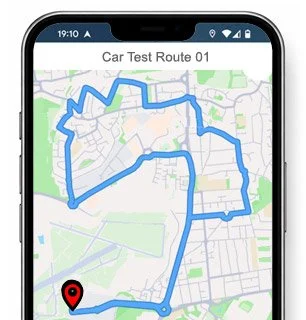
-
Leave the Driving Test Centre and turn left.
On Hortonwood 35, turn right at the end of the road.
At the Hortonwood 30 roundabout, continue ahead (2nd exit).
At the Hortonwood 20 roundabout, turn left (1st exit).
At the A442 gyratory, continue ahead (4th exit).
Join the A442 via the 1st exit.
At the Wombridge Interchange roundabout, turn right (3rd exit).
On Wombridge Way, take the first left.
At the end of the slip road, turn left.
On Hadley Road, turn right at the end of the road.
Bridge Street becomes Hartshill.
On Hartshill, take the first left.
At the crossroads on Hartsbridge Road, continue ahead.
On Sunnyside Road, turn left at the end of the road.
On Shrubbery Road, turn right at the end of the road.
Keep left on Mossey Green.
At the Mossey Green Way roundabout, turn right (4th exit).
On Mossey Green Way, take the first left.
On Shepherds Lane, take the first right.
On Shepherds Lane, turn left at the end of the road.
* Updated, complete route available on the app.
-
Leave the Driving Test Centre and turn left.
On Hortonwood 35, turn right at the end of the road.
At the Hortonwood 30 roundabout, continue ahead (2nd exit).
At the Hortonwood 20 roundabout, turn left (1st exit).
At the A442 gyratory, continue ahead (4th exit).
Join the A442 via the 1st exit.
At the Wombridge Interchange roundabout, turn right (3rd exit).
On Wombridge Way, take the first left.
At the end of the slip road, turn left.
On Hadley Road, turn right at the end of the road.
On Hartshill, take the first left.
On Charlton Street, turn left at the end of the road.
At the Holyhead Road roundabout, turn left (1st exit).
On Station Road, take the second right.
At the crossroads on Canongate, turn left.
At the Stafford Street mini roundabout, turn right (3rd exit).
At the Church Street mini roundabout, turn left (1st exit).
On Cricketers Lane, turn right at the end of the road.
* Updated, complete route available on the app.
-
Leave the Driving Test Centre and turn left.
On Hortonwood 35, turn left at the end of the road.
At the Hortonwood 30 roundabout, turn right (3rd exit).
At the Hortonwood 37 roundabout, turn left (1st exit).
At the New Trench Road roundabout, turn right (2nd exit).
At the next roundabout, turn right (4th exit).
At the Wellington Road mini roundabout, turn left.
On Furnace Lane, turn right at the end of the road.
On Furnace Lane, turn left at the end of the road.
On Moss Road, take the first left.
At the end of the slip road, turn left.
On St Georges Road, turn right at the end of the road.
At the Wrockwardine Wood Way roundabout, turn right (3rd exit).
At the next Wrockwardine Wood Way roundabout, turn right (3rd exit).
At the Redhill Way roundabout, continue ahead.
On Redhill Way, take the first right.
On Checkley Lane, take the second left.
At the Cricketers Lane mini roundabout, turn right.
* Updated, complete route available on the app.


Average Length: 9.4 miles
Based on 18 route variations from the app
Average Duration: 40 minutes
“Best driving test app out there! Helped me become more confident ready for my test.”

“Passed first time! Practicing the routes really helped!”
Route-Led provides Driving Test Routes for iPhone and Android devices. Download Telford driving test routes straight to your device. Car, Motorcycle, ADI, and LGV routes are available.
Telford Test-Routes App
All our test-routes are compatible with lots of devices, and so ensuring that you don’t necessarily require a Sat-nav device for your driving practice lessons. Route-Led's prices are very good value when compared with lots of the test-routes being sold. In an effort to expand our offering, Route-LED will shortly be updating our collection to include independent driving routes. Get the latest Telford Test-Routes now!

Each day Route-led co-operates with instructors, learners and experienced drivers to improve Route-LED's test-routes, ensuring that you have the best information to excel in your driving test. New drivers can conserve your money by purchasing test routes from Route-LED, which means you can improve your driving skills in the most efficient way. Route-LED is the leading provider of Telford test routes in the United Kingdom. Download 2021 Telford Test Routes today!

Route-LED supplies test-routes for experienced and new drivers alike so that everyone can excel in their driving test with flying colours. Route-LED also supplies test routes to driving instructors keen to understand the latest routes. Being taught how to pass your driving test and the costs of vehicle insurance can often be a very costly process. Our driving test-routes for your forthcoming test will allow you to save both money and time. Download 2021 Telford Driving Test-Routes now!


Premier Provider of Driving Test Routes
Customers are able to buy Telford test routes in Google Maps format. Those that have not purchased a Satnav can make use of iPhone or Android devices to access Route-Led's driving test-routes. If you have a SatNav (e.g. TomTom) you can purchase the test routes for that device and start learning.
Route-Led works alongside Telford driving instructors, to come up with an up to date test route for the relevant place. Route-led's driving test routes are utilised by examiners everywhere in the United Kingdom for the purpose of driving tests, and as a result we highly encourage both experienced drivers and students to get comfortable with the driving test-routes.
Telford Driving Test-Routes Navigation


Android Satnav - Driving Test Routes
Tom tom Satnav - Test Routes
iPhone Satnav - Driving Test Routes
Using Route-LED's Android test routes is quite simple and is possible using a recommended third party Android app or our dedicated Android app. As soon as you have loaded your chosen software app on your device, you can then buy the test-route file from Route-LED's official webpages. The turn-by-turn routes on your Android device will lead you through your test or practise session. Purchase Telford Test Routes
After December 4 2017, the United Kingdom driving test includes following SatNav instructions. As the leading supplier of Satnav test routes in the UK, we provide a lot of routes for Tom-tom and Garmin devices. For customers who wish to download Satnav devices, we definitely recommend the tom-tom Start 52, pretty much because it is the leading choice for the Telford driving test examiners.
Purchase routes from our website into an iPhone or from Route-led's purpose built iPhone app. In order to use the driving test-route either install a recommended third party iPhone software app or open the purpose built Route-Led App. Supported 3rd party software apps are found in the iPhone app store.
Learn Telford Test Routes


Sat nav Driving Test
Practice
Independent Driving Test
Whilst undertaking the independent driving test, the examiner will ask the student to follow directions from the satNav. The examiner will provide a configured Tomtom Start 52 device. All you will need to do is to take directions from the device. The make or model of the SatNav that you will use during your practise sessions will not matter one bit. As a top tier Sat nav company, we supply test-routes for iPhone, Garmin, Android and Tomtom devices.You can’t utilise your personal SatNav device in the Telford driving test.
We aim to supply purchasers with a lot of support and help with our products. You will quickly become skilled at the different routes provided. However, we of course recommend having someone who is a skilled teacher.
When you go off the independent driving route, it will not have any impact on your test score unless you commit a traffic offence, break a traffic regulation or do some other driving error. In the case where you make an incorrect route choice, the examiner will help you return to the route. Where you have obscure or poor road signs, the test examiner will direct the learner until such time as they get to the following clear traffic sign. The examinee doesn’t need to have a good knowledge of the town. You can’t use your own Sat-nav device for independent driving, as it gives the learner very detailed instructions. The independent driving part will test if you are able to effect safe independent decisions.
Telford Test Centre Info
Telford test centre can be found at 35 Horton Wood, Telford Shropshire TF1 7FR. There ought to be ramp access for disabled users but it would be best to call to confirm. There are also usually male, disabled and female facilities for use at the test centre but it's probably better to use these at your house beforehand! It is sometimes feasible to park at the test centre. If this is not possible, it ought to be fine to park close by and get there by foot. Practise roundabouts, busy roads, difficult junctions and one-way streets. Navigating test routes whilst learning to drive can be very useful, as it allows you to practice on roads that you’ll actually be driving during your examination.
Address: 35 Horton Wood, Telford Shropshire TF1 7FR
Parking: Parking may be possible at the test centre. If it’s not, park nearby and walk there.
Test Centre Toilets: There are usually male, female and disabled facilities at the test centre but better to go before you travel there.
Disabled access: You should be able to get into the test centre in a wheelchair but telephone in advance to confirm.
Find local test centre details: https://www.gov.uk/find-driving-test-centre