

Sunderland Driving Test Routes
The test route app trusted by learners across the UK
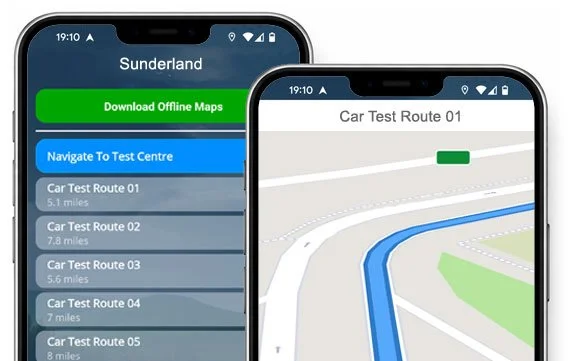

TAKE A LOOK


There's no better test preparation than knowing the roads.
Every route from the Sunderland DVSA Centre is waiting in the app.
Current Route List
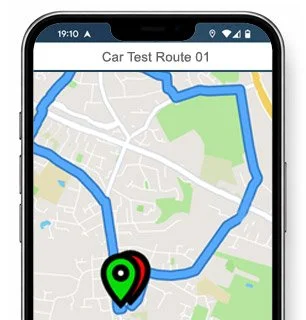
Route 1 Instructions:
- Leave the Driving Test Centre and turn right.
- On Riverbank Road, turn left at the end of the road.
- On Washington Road, take the first right.
- On Rotherfield Road, turn right at the end of the road.
- On Redhill Road / Redcar Road, take the third left.
- On Redmond Road, turn left at the end of the road.
- On Redcar Road, take the second right.
- On Beechwood Crescent, take the fourth right.
- On Hazelwood Avenue, turn left at the end of the road.
- At the North Hylton Road roundabout, turn right (3rd exit).
- At the Northern Way mini roundabout, continue ahead (2nd exit).
- On Northern Way, keep left at the traffic lights (one-way).
- On Wessington Way, continue ahead at the traffic lights.
- On Queens Road, turn left at the traffic lights.
- At the Southwick Road roundabout, turn right (2nd exit).
- On Thompson Road, turn left at the traffic lights.
- At the Newcastle Road roundabout, continue ahead (2nd exit).
- On Newcastle Road / Sunderland Road, take the first left after the traffic lights.
- On Gordon Drive, turn right at the end of the road.
- On Allison Drive, turn left at the end of the road.
- On South Lane, turn left at the end of the road.
- On Bridle Path, turn left at the traffic lights.
- On Western Terrace / Addison Road, turn left at the traffic lights.
- On Hylton Lane, turn left at the end of the road.
- On Washington Road, take the third right.
- On Riverbank Road, turn left and return to the Driving Test Centre.
-
Leave the Driving Test Centre and turn right.
On Riverbank Road, turn left at the end of the road.
On Washington Road, turn left at the traffic lights.
On Craigavon Road, take the first right.
On Cranleigh Road / Cheadle Road, take the fourth right.
On Canterbury Road, turn left at the end of the road.
On Washington Road, take the first right.
On Blackwood Road, take the second right.
On Brunswick Road, turn left at the end of the road.
On Hylton Lane, take the fourth right after the 30 mph signs.
On Dipe Lane, take the first right.
On South Lane, turn right at the end of the road.
On Bridle Path, turn right at the traffic lights.
On Front Street, take the second left.
On The Hawthorns, take the second right.
On Langholme Road, turn right at the end of the road.
On Station Road, turn left at the traffic lights.
At the Sunderland Road / Newcastle Road roundabout, continue ahead (2nd exit).
* Updated, complete route available on the app.
-
Leave the Driving Test Centre and turn right.
On Riverbank, turn left at the end of the road.
On Washington Road, turn left at the traffic lights.
On Craigavon Road, take the third left.
On Ernwill Avenue, turn left at the end of the road.
At the Hylton Castle Road roundabout, turn right (3rd exit).
At the Grange Road roundabout, turn left.
At the Ferryboat Lane roundabout, turn right (3rd exit).
At the Wessington Way roundabout, turn left (1st exit).
Join the A19 South keeping left.
At the A19 South slip road roundabout, turn left.
At the Chester Road roundabout, continue ahead (2nd exit).
At the next Chester Road roundabout, turn right (2nd exit).
On Greenwood Road, turn left at the end of the road.
On Gleneagles Road, turn right at the end of the road.
At the Grindon Lane roundabout, turn left.
On Somerset Road, turn left at the end of the road.
On Springwell Road, continue ahead at two roundabouts (2nd exit).
At the Holbourn Road roundabout, continue ahead (2nd exit).
* Updated, complete route available on the app.
-
Leave the Driving Test Centre and turn right.
On Riverbank Road, turn left at the end of the road.
On Washington Road, continue ahead at the traffic lights.
On Washington Road, take the first left.
On Canterbury Road, turn left at the end of the road.
At the Cranleigh Road / Hylton Castle Road roundabout, continue ahead (2nd exit).
At the Barons Quay Road roundabout, turn right (3rd exit).
At the Wessington Way roundabout, continue ahead (2nd exit).
At the next Wessington Way roundabout, turn left.
Join the A19 South keeping left.
At the A19 slip road roundabout, turn left (1st exit).
At the Chester Road roundabout, continue ahead (2nd exit).
At the next Chester Road roundabout, continue ahead (1st exit).
At the next Chester Road roundabout, turn left (1st exit).
At the Pennywell Road mini roundabout, turn right (2nd exit).
On Portsmouth Road, take the second right.
On Palmstead Road, turn left at the end of the road.
On Penwood Road, turn right at the end of the road.
On Pitcairn Road, turn left at the end of the road.
* Updated, complete route available on the app.


Average Length: 7.8 miles
Based on the route variations offered in the app
Average Duration: 38 minutes
“Best driving test app out there! Helped me become more confident ready for my test.”

“Passed first time! Practicing the routes really helped!”
Route-Led provides Driving Test Routes for iPhone and Android devices. Download Sunderland driving test routes straight to your device. Car, Motorcycle, ADI, and LGV routes are available.
Test-Routes App - Latest Edition


Compatible with Android, iPhone and SatNavs
Up to date Routes
Routes for Experienced and Learner Drivers
Route-LED test-routes work with lots of devices, therefore ensuring that you do not really require a Sat nav device for your practice sessions. Route-led's rates are very affordable when compared with lots of the test routes being sold. In an effort to improve Route-Led's services, Route-led will shortly be improving our products to add independent driving routes. Get the latest Sunderland Driving Test-Routes today!
Instructors and Learner drivers are continuously providing Route-Led with updated driving test route information, which means that Route-LED is the best place for test routes. Buying test routes from Route-led saves you money and simultaneously adds to your driving ability. Route-Led prides itself on always being the leading provider of test-routes. Get the latest Sunderland Test-Routes today!
It doesn't matter if you are an experienced driver taking the advanced, taxi or new vehicle test, a learner driver looking to pass their driving test or an instructor looking to learn the latest driving test routes. Route-Led is the best place for all your test-route needs. Learning to drive and the price of insurance can often be a very exorbitant procedure. We understand that money and time are both at a premium. Route-Led assists you to save both. Download 2021 Sunderland Test-Routes today!


Premier Provider of Driving Test Routes
Sunderland Test-Routes are available on many devices including Google Maps. iPhone and Android customers can navigate our routes on those devices as well. Should you have a Tom-tom device already, you are able to download the test-routes for Tomtom Sat-nav devices from Route-led's website and then use it on your device for your practise lessons.
Route-Led works alongside Sunderland driving instructors, to produce an up to date test route of the local areas. Our driving test routes are utilised by examiners everywhere in the United Kingdom during driving tests, and therefore we highly encourage students and experienced drivers to get comfortable with the test-routes.
Sunderland Driving Test-Route Formats Navigation
Accessing our Android driving test routes is very easy and is possible making use of our dedicated Android app or a recommended 3rd party Android software application. Once you have installed your relevant application on your device, you should then download the test route file from Route-led's official webpages. The pre-programmed routes on your Android device will lead you through your practise session or test. Buy Sunderland Test Routes

Driving test routes are readily available for purchase on Route-Led's official website. As soon as the routes are bought from our website, the customer should load the driving test-route into their Satnav device and start their driving session. Sunderland driving test-routes include voice guiding, thereby all the customer needs to do is to follow instructions from the device.

Route-Led has made practicing driving test-routes much easier with an iPhone by creating test-routes specifically for iPhones. All you have to do is to either load RL’s dedicated iPhone app from the Apple app store or download our iPhone file, and then use a recommended 3rd party application to access the driving test routes following our detailed instructions. Your iPhone device will lead you to the Sunderland test centre, all along the driving test-route, and then back to the test centre. While learning with our test routes, you’ll be navigated safely with the helpful voice-guided directions to Sunderland driving test centre.
Practise Sunderland Test Routes


Satnav Driving Test
Practice
Independent Driving Test
The examiner will ask the student to follow directions from a configured Satnav on their own. The Sat-Nav will show the route that the student is required to follow. The model or make of sat-nav utilised during the exam will not make a difference mainly because the driving test-route will be identical. In the situation where the learner driver accidentally takes the wrong road, the examiner will advise accordingly. That said, we highly suggest the Tomtom Start 52 mainly because it’s what examiners tend to utilise whilst examining driving tests.
Route-Led provides customers with a high degree of help and support to use Route-LED's driving test-routes. You will get accustomed to all the different sections of the routes to be travelled during the examination. We would suggest using a skilled driving teacher as well. For more information on what you can do to pass your driving test please go to Driving Test Practice
When you veer off the independent driving route, it is not going to have any effect on your examination results unless you make a traffic offence, break a traffic regulation or make an additional driving error. In the case where you make an incorrect turn, the test examiner will help you return to the correct route. Where you have poor or obscure road signs, the test examiner will instruct the examinee until they get to the following clear traffic sign. The learner doesn’t need to have a good knowledge of the area. You can’t use your personal SatNav for independent driving, as it gives the learner turn by turn instructions. The independent driving section will test if you are able to make secure independent decisions.
Sunderland Test Centre Information
The Sunderland test centre can be found at River Bank Road, North Hylton Road Industrial Estate, Sunderland Tyne and Wear SR5 3JJ. There ought to be ramp access for wheelchair users but it would be best to call to make sure. There are also quite often male, disabled and female facilities for use at the test centre but it's generally better to go before you travel there! It is occasionally feasible to park at the test centre. If not, it should be fine to park nearby and walk. Be prepared for roundabouts, busy roads, difficult junctions and one-way streets. Navigating test routes whilst practising to drive can be very useful, as it allows you to learn on routes that you will actually be going on during your test.
Test Centre Address: River Bank Road, North Hylton Road Industrial Estate, Sunderland Tyne and Wear SR5 3JJ
Parking: Parking may be available at the test centre. If it’s not, park close by and head by foot.
Test Centre Toilets: There are usually female, male and disabled toilets at the test centre but better to use these at home beforehand.
Test Centre Disabled access: You should be able to access the test centre in a wheelchair but call in advance to make sure.
Find local test centre details: https://www.gov.uk/find-driving-test-centre