

Southport Driving Test Routes (Liverpool)
Familiar roads. Fewer nerves. Better results.
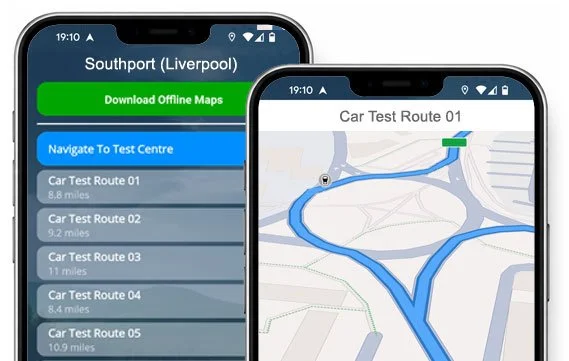

ACCESS THE ROUTES


Get properly prepared with real routes from Southport Test Centre.
Know the roads, drive confidently, and pass first time!
Routes Currently In Use
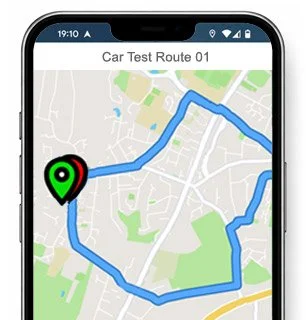
Route 1 Instructions:
- Leave the Driving Test Centre and turn left.
- On Part Street, turn right at the end of the road.
- At the Eastbank Street roundabout, turn left (1st exit).
- On Virginia Street, turn right.
- On Arbour Street, turn left.
- On Sefton Street, turn right.
- Virginia Street becomes Forest Road.
- On Forest Road, turn left at the traffic lights.
- Rosehill becomes St Lukes Road.
- On St Lukes Road, turn right.
- On Hawkshead Street, turn left at the end of the road.
- On Cypress Road, turn right.
- Norwood Road becomes Meols Cop Road.
- At the second Meols Cop Road roundabout, turn right (3rd exit).
- On Southport Road, take the fourth right.
- On the turning lane, turn right at the end of the road.
- Jacksmere Lane becomes Heathey Lane.
- Heathey Lane becomes Birkdale Cop.
- At the Moss Road roundabout, turn left.
- At the Guildford Road roundabout, turn right (2nd exit).
- On Kew Road, turn right.
- On Eastbourne Road, turn left at the traffic lights.
- On Duke Street, take the fourth right.
- Shakespeare Street becomes St James Street.
- At the St James Street roundabout, turn left.
- On Eastbank Street, take the third left.
- On Part Street, return to the Driving Test Centre.
-
Leave the Driving Test Centre and turn right.
On Part Street, take the second right.
At the second Duke Street roundabout, turn left (1st exit).
On Rotten Row, turn right.
At the Weld Road roundabout, turn left (1st exit).
At the Coastal Road roundabout, turn left (1st exit).
Shore Road becomes Kenilworth Road.
On Kenilworth Road, turn left at the traffic lights.
Liverpool Road becomes Liverpool Avenue.
At the Liverpool Avenue roundabout, turn right (2nd exit).
On Liverpool Road, turn right at the traffic lights.
Carr Lane becomes Guildford Road.
On Guildford Road, turn left at the traffic lights.
On Halsall Road, turn right.
On Shaftsbury Road, turn right at the end of the road.
On Liverpool Road, turn right at the traffic lights.
Eastbourne Road becomes Cemetery Road.
On Cemetery Road, turn left at the traffic lights.
On Duke Street, take the fourth right.
* Updated, complete route available on the app.
-
Leave the Driving Test Centre and turn left.
On Part Street, turn left at the end of the road.
On Eastbank Street, turn right at the second traffic lights.
At the Lord Street roundabout, continue ahead (2nd exit).
On Albert Road, take the second left.
On Alexandra Road, turn right at the end of the road.
On the Promenade, turn left.
At the Fairway roundabout, turn right (2nd exit).
At the Marine Drive roundabout, continue ahead (2nd exit).
At the first A565 roundabout, turn right (4th exit).
At the next A565 roundabout, continue ahead (2nd exit).
On Preston New Road, turn right.
On Fylde Road, turn right at the end of the road.
On Marshside Road, turn left.
On Fleetwood Road, turn left at the end of the road.
* Updated, complete route available on the app.
-
Leave the Driving Test Centre and turn left.
On Part Street, turn right at the end of the road.
At the Eastbank Street roundabout, turn left.
On Virginia Street, turn right.
On Arbour Street, turn left.
On Sefton Street, turn right.
Virginia Street becomes Forest Road.
On Forest Road, turn left.
Rose Hill becomes St Lukes Road, which becomes Hartwood Road.
On Hartwood Road, turn right at the traffic lights.
On Roe Lane, take the fifth left.
On Bibby Road, turn right.
At the Denmark Road roundabout, continue ahead (2nd exit).
Cambridge Road becomes Botanic Road, which becomes Bankfield Lane.
At the Rufford Road roundabout, turn right (4th exit).
* Updated, complete route available on the app.


Average Length: 9.2 miles
Averages based on 20+ route variations in the app
Average Duration: 40 minutes
“Best driving test app out there! Helped me become more confident ready for my test.”

“Passed first time! Practicing the routes really helped!”
Route-Led provides Driving Test Routes for iPhone and Android devices. Download Southport driving test routes straight to your device. Car, Motorcycle, ADI, and LGV routes are available.
Driving Test-Routes App


Compatible with Android, iPhone and SatNavs
Up-to-date Routes
Routes for Experienced and Learner Drivers
As the leading test-route supplier in the United Kingdom, Route-LED creates test-routes compatible with lots of devices including Mac, iPhone, PC, Garmin and Tomtom devices. Route-Led provides one of the most cost effective ways to practice your test-routes. Route-LED will shortly add independent driving routes to Route-Led's offering. Download 2021 Southport (Liverpool) Driving Test-Routes now!
To continually upgrade Route-Led's service and ensure that Route-led's test-routes are up to date, we co-operate together with local instructors and learner drivers living in Merseyside. At affordable rates we provide you test routes that you are able to practice to improve your skills whilst lowering your cost of driving lessons. We pride ourselves on always being the leading supplier of driving test-routes. Download 2021 Southport (Liverpool) Driving Test-Routes now!
Route-led supplies routes for experienced and new drivers alike in order that they can all excel in their driving test with flying colours. Route-LED also provides routes to instructors looking to learn the newest driving test-routes. The price of theory lessons, exorbitant insurance premiums and practical lessons, can be quite high! Who would spend time and money when you can save both and at the same time increase your ability. Download 2021 Southport (Liverpool) Driving Test-Routes now!
Leading Supplier of Test Routes
Southport (Liverpool) Test-Routes can be purchased for many devices including Google Maps. Those who haven’t purchased a Sat-nav can use their Android or iPhone devices to access Route-Led's test-route files. If you happen to have a Tomtom device, you are able to download our test routes for Tom-tom Satnav devices from Route-Led's website and then load it on your device for your practise sessions.
To make sure our test-routes are fully updated, Route-led works closely with Southport (Liverpool) driving instructors and learner drivers. We are always open to feedback from our customers regarding any of our products.
Southport (Liverpool) Driving Test Routes Navigation
Accessing Route-Led's Android test-routes is quite easy and can be done using a recommended 3rd party Android application or Route-LED's dedicated Android app. Once you have installed your chosen application on your device, you can then buy the driving test route file from our official website. The turn-by-turn test routes on your Android device will lead you through your practise session or test. View Southport (Liverpool) Driving Test Routes


Driving test-routes can be bought from our website. As soon as the routes are bought from Route-LED's website, the student should install the test route into their Satnav device and start their driving session. Southport (Liverpool) test-routes include voice guiding, thus all the customer needs to do is to receive instructions from the device.

Purchase routes from Route-Led's website into your iPhone or from Route-LED's purpose built iPhone app. In order to access the driving test-route either install a recommended 3rd party iPhone software app or open the dedicated Route-led App. Supported 3rd party software apps are located in the iPhone app store.

Practise Southport (Liverpool) Test Routes


Sat nav Driving Test
The examiner will ask the student to take directions from a configured Sat-Nav on their own. The Sat-Nav will include the route that the student needs to follow. The make or model of Sat-nav utilised whilst the examination is going on won’t make a difference as the driving test-route will be identical. In the situation where the student accidentally tries a different route, the examiner will let them know and give instructions. That said, we very much suggest the Tomtom Start 52 mainly as it is what examiners utilise while examining driving tests.
Practice
Being a client-focused company, we provide Route-led's clients with additional support and help for our driving test-routes. Learning with Route-LED's driving test routes enables the users to experience the corners, junctions and roads they will be driving on during their driving tests.To help the learner in practising how to conduct a vehicle carefully and in addition to pass the driving examination, we definitely recommend using a good driving instructor. How it works
Independent Driving Test
The Independent driving test does not test your skill in following instructions. Moreover, an independent driving test doesn’t check your skill in remembering instructions. If you need to ask the examiner for the directions, he/she should confirm them for you. Veering off route will not change your examination results in any way. Do not fret about unclear road signs as the examiner will help you should you require it. You should understand that you cannot take your personal Sat-Nav device with you for the test. This is due to the fact that your own sat-nav device will be configured to give detailed instructions.
Southport (Liverpool) Test Centre Details
The Southport (Liverpool) test centre is located at Eastbank House, Eastbank Street, Southport Merseyside PR8 1HE. There should be ramp access for wheelchair users but it would be best to call to confirm. There are also usually female, male and disabled toilets for use at the test centre but it's generally better to use these at your house beforehand! It is occasionally possible to park at the test centre. If not, it should be fine to park nearby and walk. Be prepared for difficult junctions, busy roads, one-way streets and roundabouts. Using test routes whilst learning to drive is always very helpful, as it allows you to practise on routes that you will actually be driving during your test.
Test Centre Address: Eastbank House, Eastbank Street, Southport Merseyside PR8 1HE
Test Centre Parking: Parking could be available at the test centre. If it’s not, park nearby and walk there.
Test Centre Toilets: There are quite often male, disabled and female toilets at the test centre but better to go before you travel there.
Test Centre Disabled access: You ought to be able to access the test centre in a wheelchair but call in advance to make sure.
Find local test centre details: https://www.gov.uk/find-driving-test-centre