

Skipton Driving Test Routes
Follow the exact routes examiners use step-by-step before test day

#1 RATED ROUTE APP!


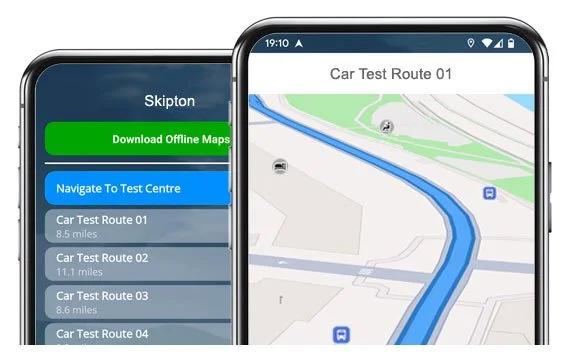
Start driving the 14 current routes from Skipton Test Centre.
Our app for iOS/Android guides you turn-by-turn along the way.
14 Current Routes
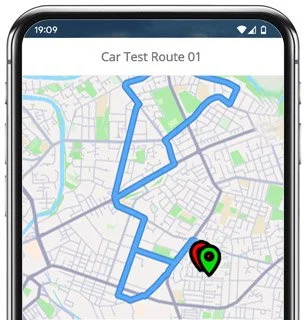
Route 1 Instructions:
- Leave the Driving Test Centre and turn right.
- On Carleton Road, turn right.
- On Carleton New Road, turn left at the end of the road.
- At the Broughton Road roundabout, continue ahead.
- On Swadford Street, turn left at the end of the road.
- At the Caroline Square roundabout, turn right (2nd exit).
- At the Newmarket Street roundabout, turn left.
- On Otley Road, turn left.
- On Consort Street, continue ahead.
- On Regent Road, turn right.
- On Regent Drive, turn left.
- On Uplands, turn right at the end of the road.
- On Long Meadow, turn left.
- On Meadow Rise, turn right at the end of the road.
- On Greenacres, turn left.
- On Link Road, turn right at the end of the road.
- On Knaresborough Road, turn left at the end of the road.
- At the A65 Trunk Road roundabout, turn left.
- Grassington Road becomes Mill Bridge.
- At the Mill Bridge roundabout, turn left.
- Bailey becomes Knaresborough Road.
- On Knaresborough Road, turn right at the end of the road.
- At the A65 Trunk Road roundabout, turn right (2nd exit).
- On the A65, turn right.
- At the Otley Road roundabout, continue ahead.
- Brougham Street becomes Westmoreland Street.
- On Westmoreland Street, turn right at the end of the road.
- On Sackville Street, turn left at the end of the road.
- On Keighley Road, turn right.
- On Cavendish Street, turn left at the end of the road.
- At the Broughton Road roundabout, continue ahead.
- On Broughton Road, turn right.
- On Carleton New Road, turn left at the end of the road.
- On Carleton Road, turn left and return to the Driving Test Centre.
-
Leave the Driving Test Centre and turn left.
On Carleton Road, turn left at the end of the road.
At the Keighley Road roundabout, turn left.
At the High Street roundabout, turn left.
On Mill Bridge, continue ahead.
At the Grassington Road roundabout, turn right (4th exit).
On the Northern By-Pass, turn right.
On Knaresborough Road, turn left.
On Greenacres, turn right.
Continue on Greenacres and turn left.
On Meadow Rise, turn right at the end of the road.
* Updated, complete route available on the app.
-
Leave the Driving Test Centre and turn left.
On Carleton Road, turn left at the end of the road.
On Keighley Road, turn right.
On Sackville Street, turn left.
On Westmoreland Street, continue ahead.
At the Brougham Street roundabout, turn right.
On Shortbank Road, turn left.
On Hurrs Road, turn right at the end of the road.
On Moorview Way, turn right at the end of the road.
At the Shortbank Road roundabout, turn right.
* Updated, complete route available on the app.
-
Leave the Driving Test Centre and turn right.
On Carleton New Road, turn left at the end of the road.
On Broughton Road, turn left.
At the Coach Street roundabout, turn left.
On Gargrave Road, turn right.
On Salisbury Street, turn left.
On Raikeswood Drive, turn left.
At the Rockwood Drive roundabout, turn right.
At the Gargrave Road roundabout, continue ahead (3rd exit).
Join the A65 towards Gargrave by turning right.
* Updated, complete route available on the app.


Average Length: 9 miles
Average of all variations within the app
Average Duration: 41 minutes
“Best driving test app out there! Helped me become more confident ready for my test.”

“Passed first time! Practicing the routes really helped!”
Route-Led provides Driving Test Routes for iPhone and Android devices. Download Skipton driving test routes straight to your device. Car, Motorcycle, ADI, and LGV routes are available.
Skipton Test-Routes App - Latest Version


Compatible with Android, iPhone and SatNavs
Up to date Routes
Routes for Experienced and Learner Drivers
Route-led is a test route supplier for a extensive range of devices including Android, iPhone, Garmin and Tom-Tom for motorcycles, cars, LGV and taxis. Route-Led's prices are very good value when compared to many of the driving test-routes available in the marketplace. Route-LED will shortly add independent driving routes to our service. Get the latest Skipton Driving Test Routes today!
Instructors and Learner drivers are continually supplying Route-led with updated test-route info, which means that Route-LED is the leading provider of test routes. At affordable rates we provide you driving test routes that you can practise to increase your driving skills whilst simultaneously lowering your cost of driving sessions. Of all the providers of test routes, Route-Led is the best. Get the latest Skipton Driving Test-Routes today!
Whether you are a driver with experience who wishes to get to know the Skipton driving test-routes for your vehicle or motorbike or a new driver who wants to pass their driving test, then Route-Led has got you covered. The price of exorbitant insurance premiums, driving lessons and theory lessons, can be a strain on your wallet! Our driving test routes for your test will let you to be time and money cost efficient. Download 2021 Skipton Driving Test-Routes now!


#1 Provider of Driving Test Routes
Users are able to buy Skipton test-routes in Google Maps format. Android and iPhone customers are able to use our driving test-routes on those devices as well. If you happen to have a Tom Tom device already, then you are able to download Route-LED's driving test-routes for Tom-Tom satNav devices directly from Route-led's web page and then load it on your device for your driving lessons.
To ensure our driving test-routes are up to date, we work closely with learner drivers and Skipton driving instructors. We are also always open to information from Route-led's clients regarding any of Route-Led's products.
Skipton Test-Route Formats Navigation
By downloading our dedicated Android application, customers will be able to easily use our test-routes. Purchase our dedicated applications and immediately start improving your driving ability today. Route-led's turn by turn instructions enable you to concentrate on increasing your driving skills whilst getting to experience the driving test routes.

From 04-Dec-17, the United Kingdom driving test includes following Satnav directions. Given Route-Led is the top supplier of Satnav test routes in the United Kingdom, we provide numerous test-routes for Garmin and Tom-Tom devices. For customers that wish to buy Sat-Nav devices, we definitely suggest the tomTom Start 52, pretty much because it’s the premier pick for the Skipton driving test examiners.

Route-led driving test routes are available for a number of devices including your iPhone device. In order to use our test routes, start by first installing a preferred 3rd party software app that you can utilise to access the file. As soon as the app has loaded properly, download the Skipton test route and install on your iPhone from Route-LED's official website. You can then access the driving test-route file purchased using the recommended software application. Skipton test centre.
Learn Skipton Driving Test Routes


Sat-Nav Driving Test
During your driving test, the examiner will select a preferred route on the satnav device. You will be expected to use the route selected by the examiner as well as the directions from the Sat Nav. The make and model of the device will not matter, mainly due to the fact that Route-led's test routes work with many different devices.You cannot use your personal SatNav during the driving test. For more information, you can find recent changes to the driving test here.
Practise
We aim to supply customers with a lot of support and help with our routes. You will speedily become skilled at the different routes we provided. That said, we definitely recommend using someone who is a professional instructor.
Independent Driving Test
The Independent driving test does not check your ability to follow directions. In addition, an independent driving test does not test your skill in remembering directions. If you need to ask the examiner for updated instructions, they should confirm them for you. Going off route won’t change your examination score at all. Don’t fret about unclear traffic signs as the examiner will help you if you need it. You should understand that you cannot bring your own Sat nav device with you to take the test. This is because your personal SatNav device will be setup to give detailed directions.
Skipton Test Centre Information
The Skipton test centre can be found at Foundry House, Carleton Road, Skipton North Yorkshire BD23 2BE. There ought to be ramp access for wheelchair users but it would be best to call to make sure. There are also quite often male, female and disabled toilets for use at the test centre but it's generally best to go before you head there! It’s sometimes possible to park at the test centre. If not, it should be fine to park close by and walk. Practise busy roads, difficult junctions, roundabouts and one-way streets. Using test routes whilst learning to drive is always very helpful, allowing you to practice on roads that you will certainly be going on during your examination.
Test Centre Address: Foundry House, Carleton Road, Skipton North Yorkshire BD23 2BE
Parking: Parking may be available at the test centre. If it is not, park close by and head by foot.
Test Centre Toilets: There are quite often disabled, male and female toilets at the test centre but best to use these at your house beforehand.
Disabled access: You ought to be able to access the test centre in a wheelchair but call in advance to confirm.
Find local test centre details: https://www.gov.uk/find-driving-test-centre