

Shrewsbury Driving Test Routes
The smarter way to prepare for your driving test
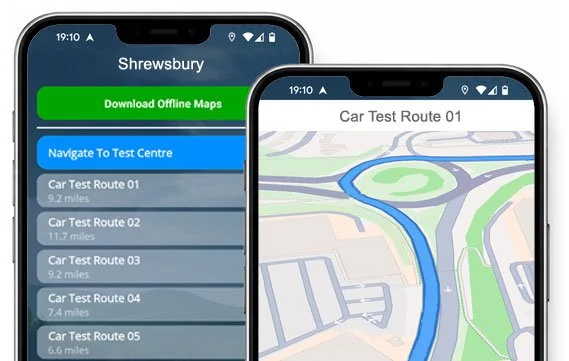

GET YOUR ROUTES


Every Shrewsbury route, every road, every turn - ready to practise whenever you are.
Download the app for iOS/Android and pass with confidence.
Routes Updated
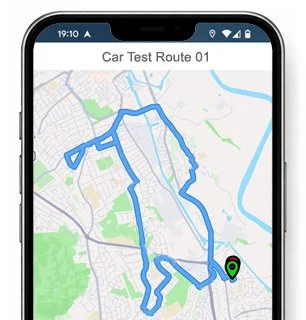
Route 1 Instructions:
- Leave the Driving Test Centre and turn left.
- At the Stafford Drive roundabout, turn right.
- Continue ahead at the second Knights Way roundabout.
- On Huffley Lane, turn left.
- On Newton Plantation, turn right at the end of the road.
- On Berwick Road, turn right.
- On Leaton Road, turn left at the end of the road.
- On Bomere Heath Road, turn right.
- On Brook Road, turn left at the end of the road.
- On Merrington Road, turn left.
- On Preston Gubbals Road, turn right.
- On Church Farm, turn right at the end of the road.
- At the A528 Shrewsbury Road roundabout, turn left.
- At the A5124 roundabout, turn right.
- At the Battlefield Way roundabout, continue ahead, then turn left at the end of the road.
- On Harlescott Lane, turn right.
- Continue ahead at the Lancaster Road roundabout.
- On Boscobel Drive, turn right at the end of the road.
- On Westbury Road, turn left.
- On Lydham Road, turn right at the end of the road.
- On Westbury Road, turn left at the end of the road.
- On Mount Pleasant Road, turn right at the end of the road.
- At the Ellesmere Road roundabout, turn right.
- At the Knights Way roundabout, continue ahead then turn left.
- On Stafford Drive, turn right and return to the Motorcycle Practical Test Centre.
-
Leave the Motorcycle Practical Test Centre and turn left.
At the Stafford Drive roundabout, turn right.
At the Knights Way roundabout, continue ahead then turn right.
At the A5124 roundabout, continue ahead then turn right.
At the A49 roundabout, turn right.
At the A5 roundabout, turn left.
On B4380 (Emstrey Bank), turn left.
On Uffington Road, turn left at the end of the road.
At the B5062 (Roden Lane) roundabout, continue ahead.
At the Sundorne Road mini roundabout, turn right.
On Featherbed Lane, turn right.
On Alberbury Drive, turn right at the end of the road.
At the Featherbed Lane mini roundabout, turn right.
At the Arlington Way roundabout, turn left, then turn left at the traffic lights.
At the traffic lights on Whitchurch Road, turn right.
At the Harlescott Lane mini roundabout, turn right.
* Updated, complete route available on the app.
-
Leave the Driving Test Centre.
At the roundabout, turn right.
At the Knights Way roundabout, continue ahead then turn right.
At the Battlefield Link Road roundabout, turn right.
At the A49 roundabout, turn right.
At the A5 roundabout, turn right.
Continue ahead at two Thieves Lane roundabouts.
Continue ahead at the Oteley Road roundabout.
On Moneybrook Way, turn left.
On Stapleton Road, turn right at the end of the road.
At the Moneybrook Way roundabout, turn left.
At the Roman Road roundabout, turn right.
Continue onto Porthill Road.
On New Street, turn right at the end of the road.
At the Copthorne Road roundabout, turn right.
At the traffic lights in Frankwell, turn right.
* Updated, complete route available on the app.
-
Leave the Driving Test Centre.
At the roundabout, continue ahead.
At the Knights Way roundabout, turn right.
At the A5124 roundabout, turn right.
At the A49 roundabout, turn right.
At the A5 roundabout, turn right.
Continue ahead at two Thieves Lane roundabouts.
At the Oteley Road roundabout, turn right.
At the Hazeldine Way roundabout, turn right.
On Whitecroft Road, turn right.
On Walton Road / White Hart, turn left.
At the Whitecroft Road roundabout, turn right.
Continue ahead at the Pritchard Way roundabout.
Continue ahead at the Bage Way roundabout.
Continue ahead at the Robertson Way roundabout.
Continue ahead at the Telford Way roundabout.
At the traffic lights on Whitchurch Road, turn left.
* Updated, complete route available on the app.


Average Length: 9.1 miles
Based on 25+ variations in the app
Average Duration: 40 minutes
“Best driving test app out there! Helped me become more confident ready for my test.”

“Passed first time! Practicing the routes really helped!”
Route-Led provides Driving Test Routes for iPhone and Android devices. Download Shrewsbury driving test routes straight to your device. Car, Motorcycle, ADI, and LGV routes are available.
Test-Routes App


Compatible with Android, iPhone and SatNavs
Up to date Routes
Routes for Experienced and Learner Drivers
Route-Led test routes are compatible with a number of devices, therefore ensuring that you do not really need a Satnav device for your driving practise lessons. Our prices are very affordable when compared with lots of the driving test-routes being sold in the market. We plan on adding Sat-nav and Independent driving routes to our product family shortly. Get the latest Shrewsbury Test-Routes today!
To continually upgrade our product delivery and make sure that Route-led's driving test routes are up to date, we collaborate closely with learner drivers and instructors operating in Shropshire. Buying driving test routes from Route-led conserves your money and simultaneously adds to your driving ability. Out of every provider of driving test routes, Route-Led is the best. Get the latest Shrewsbury Driving Test-Routes today!
It's immaterial if you are an instructor looking to understand the newest test-routes, an existing driver looking at the taxi, new vehicle or advanced test or a new driver seeking to excel in their driving test. Route-led is the best place for all your driving test-route needs. The cost of practical lessons, insurance premiums and theory lessons, can be quite high! We understand that money and time are both important. Route-led assists you be efficient in both. Get the latest Shrewsbury Test-Routes today!


Premier Supplier of Test-Routes in the UK
Customers can purchase Shrewsbury driving test routes in Google Maps format. It does not matter if you do not have a dedicated Satnav as you are able to use the routes on an iPhone or Android. If you happen to have a Tomtom device already, then you are able to buy our test-routes for Tom tom Satnav devices from our web page and then load it on your device for your practice lessons.
In order to ensure our driving test routes are fully updated, we work side-by-side with local learner drivers and Shrewsbury driving instructors. Route-LED is also keen on feedback from Route-Led's clients regarding any of Route-LED's products.
Shrewsbury Test-Route Formats Navigation


Android Sat-nav Test Routes
By downloading our dedicated Android application, you will be able to effortlessly use our test-routes. Download our dedicated applications and instantly begin testing your driving ability today. Our turn by turn directions will allow customers to focus on increasing your driving skills while experiencing the test conditions.
Satnav Driving Test Routes
Driving test routes are available for purchase on Route-Led's official website. Once the routes are bought from our website, the customer will be expected to load the driving test-route into their Satnav device and begin their practise session. Shrewsbury driving test-routes are voice-guided, thus all the customer will be required to do then is to take instructions from the device.
iPhone Sat-nav Test Routes
Download test routes from our website directly into an iPhone or from our dedicated iPhone app. In order to access the test-route either use the purpose built Route-led App or download a supported third party iPhone software application. Supported 3rd party software applications can be found in the iPhone app store.
Practice Shrewsbury Driving Test Routes
While undertaking the independent driving test, the examiner will request the learner driver to take instructions from the Sat-nav device. The examiner will bring an already setup Tom-Tom Start 52 device. All you’ll need to do is to follow directions from the device. The make or model of the Satnav device that you will use during your practice sessions won’t matter one bit. As a top tier Sat-nav company, we supply test-routes for iPhone, Tomtom, Android and Garmin devices.You can’t utilise your personal Sat-Nav during the driving test.

Being a client-focused company, we provide Route-LED's customers with additional support and help for Route-led's test-routes. Using Route-Led's test-routes enables the customers to experience the roads, junctions and corners that they will be driving on during their driving examinations.To assist the student in practising how to conduct a vehicle safely and also to pass the driving test, we highly recommend using a good driving instructor. How it works

In the course of the independent driving test, the examiner will provide the learner all the necessary directions. In case the student becomes lost during the journey, they will be required to get confirmation on the directions from the examiner. Students cannot use personal SatNav for independent driving as they give turn by turn instructions. Independent driving will check the skill of the learner to make independent choices.
Shrewsbury Test Centre Information
The Shrewsbury test centre can be found at Stafford Drive, Battlefield Enterprise Park, Shrewsbury Shropshire SY1 3BF. There should be ramp access for wheelchair users but it would be best to call to confirm. There are also quite often disabled, male and female toilets for use at the test centre but it's generally better to use these at home beforehand! It is occasionally possible to park at the test centre. If this is not possible, it ought to be fine to park close by and walk. Practise one-way streets, difficult junctions, roundabouts and busy roads. Navigating test-routes while practising to drive can be very useful, allowing you to learn on roads that you will certainly be going on during your test.
Test Centre Address: Stafford Drive, Battlefield Enterprise Park, Shrewsbury Shropshire SY1 3BF
Parking: Parking could be available at the test centre. If it is not, park nearby and head by foot.
Toilets: There are usually disabled, male and female toilets at the test centre but better to go before you travel there.
Test Centre Disabled access: You ought to be able to get into the test centre in a wheelchair but telephone in advance to confirm.
Find local test centre details: https://www.gov.uk/find-driving-test-centre