

Sheffield Driving Test Routes (Handsworth)
Practise like a pro with routes straight from the test centre
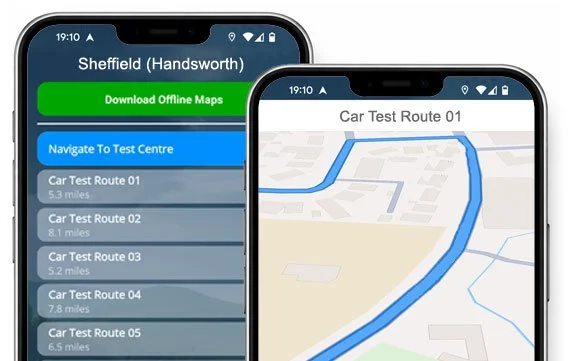

DISCOVER THE ROUTES


Go into your Handsworth test knowing the roads, roundabouts, junctions, and tricky spots.
Download for iOS or Android, and start practising the smart way.
Current Routes
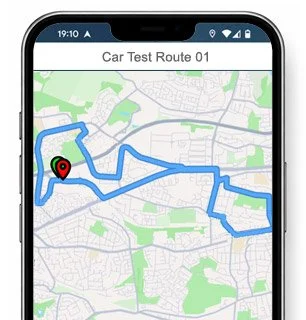
Route 1 Instructions:
- Leave the Driving Test Centre and take the first left onto Richmond Park Road.
- On Birklands Avenue, take the first right.
- On Birklands Drive, turn right at the end of the road.
- On Richmond Park Road, turn left at the traffic lights.
- At the Handsworth Road roundabout, turn left (1st exit).
- Continue ahead on the slip road.
- At the next slip road roundabout, continue ahead (2nd exit), then turn left.
- At the next slip road roundabout, turn right (3rd exit).
- On Prince of Wales Road, take the first right.
- On Bowdenwood Crescent, take the first right.
- On Bowdenwood Drive, turn left at the end of the road.
- On Bowdenwood Road, turn left at the end of the road.
- On Bowdenwood Crescent, turn left at the end of the road.
- At the Prince of Wales Road roundabout, turn left (1st exit).
- At the slip road roundabout, continue ahead (1st exit).
- Join the Sheffield Parkway via the slip road.
- Take the first exit on the Sheffield Parkway.
- At the slip road roundabout, turn right (3rd exit).
- At the Poplar Way roundabout, continue ahead (1st exit).
- At the next Poplar Way roundabout, continue ahead (2nd exit).
- On Poplar Way, turn left at the end of the road.
- On Orgreave Road, take the first left, turn right at the end of the road, then take the first right.
- At the Poplar Way roundabout, turn left (1st exit).
- At the Highfield Springs roundabout, turn left (1st exit), then at the next roundabout turn right (1st exit).
- On Highfield Lane / Rotherham Road, turn left at the end of the road.
- On Retford Road, take the first right.
- On Beaver Hill Road, take the first right.
- On Handsworth Grange Road, take the third right.
- On Handsworth Grange Crescent / Ballifield Drive, take the fourth left.
- On Ballifield Road, turn right at the end of the road.
- On Handsworth Grange Road, turn left at the end of the road.
- On Handsworth Road, take the first left, then take the sharp left.
- On Bramley Lane, take the second right, then take the sharp right.
- On Bramley Park Road, turn left at the end of the road.
- On Richmond Road, take the first right.
- On Laverack Street, turn left at the traffic lights.
- On Handsworth Road, turn left at the traffic lights.
- On Richmond Park Road, return to the Driving Test Centre.
-
Leave the Driving Test Centre.
On Richmond Park Road, take the second right.
On Richmond Park Avenue, turn right at the end of the road.
On Richmond Park Crescent, turn left at the end of the road.
On Richmond Park Road, turn left at the traffic lights.
At the Handsworth Road roundabout, turn right (4th exit).
On Handsworth Road, take the second left.
On Dodson Drive, turn right at the end of the road.
On Hall Road / St Josephs Road, take the second right.
On Fitzalan Road, turn left at the end of the road.
On St Josephs Road, take the first left.
On Hall Road, take the first right.
On Fitzalan Road, turn left at the end of the road.
On Handsworth Road, take the second right.
On Bramley Lane, take the second right.
On Sundown Road, turn left at the end of the road.
On Bramley Park Road, turn left at the end of the road.
On Richmond Road, take the first right.
* Updated, complete route available on the app.
-
Leave the Driving Test Centre.
On Richmond Park Road, take the third left.
On Athelstan Road, turn right at the end of the road.
On Richmond Road, take the fourth left.
On Hastilar Road South, turn left at the end of the road.
On Richmond Road, turn right.
On Hastilar Road South, turn right at the end of the road.
At the Hastilar Road South / Castlebeck Avenue traffic lights, turn right.
At the Prince of Wales Road roundabout, turn right (3rd exit).
At the slip road roundabout, turn right (2nd exit).
At the Mosborough Parkway roundabout, continue ahead (1st exit).
At the next Mosborough Parkway roundabout, turn left (1st exit).
On Coisley Hill / Sheffield Road / Tannery Street, take the seventh right.
On Lambcroft View, turn right at the end of the road.
On Spa Lane, turn right at the end of the road.
At the Market Street / Beighton Road roundabout, turn left (1st exit).
At the Mosborough Parkway roundabout, continue ahead (1st exit).
At the Chesterfield Road roundabout, turn left (1st exit).
At the Aston Way roundabout, turn left (1st exit).
* Updated, complete route available on the app.
-
Leave the Driving Test Centre and take the first left onto Richmond Park Road.
On Birklands Avenue / Parsley Hay Road, turn right at the end of the road.
On Ashbourne Grove, turn right at the end of the road.
On Ashbourne Road, take the first left.
On Ashbourne Road, turn left.
On Laverack Street, turn right at the traffic lights.
Continue ahead at the traffic lights on Handsworth Road.
On Retford Road, take the third left.
On St James Walk, take the first right.
On Orgreave Rise, turn left at the end of the road.
On Rotherwood Avenue, turn left at the end of the road.
On Coalbrook Avenue, take the first left.
On Coalbrook Road, turn left at the end of the road.
At the traffic lights on Retford Road, turn right.
On Furnace Lane / Station Road, turn left at the end of the road.
On Market Street / Beighton Road, take the third left.
On Greengate Road, turn left at the end of the road.
At the Beighton Road roundabout, turn right (3rd exit).
* Updated, complete route available on the app.


Average Length: 7.2 miles
Based on 25 route variations found in the app
Average Duration: 39 minutes
“Best driving test app out there! Helped me become more confident ready for my test.”

“Passed first time! Practicing the routes really helped!”
Route-Led provides Driving Test Routes for iPhone and Android devices. Download Sheffield driving test routes straight to your device. Car, Motorcycle, ADI, and LGV routes are available.
Sheffield (Handsworth) Test Routes App


Compatible with Android, iPhone and SatNavs
Route-Led is a driving test route supplier for a wide group of devices including iPhone, Garmin, Android and Tom Tom for taxis, LGV, cars and motorcycles. Route-led's rates are very affordable when compared with lots of the test routes currently available. Route-Led will soon be adding independent driving routes to Route-LED's offering. Get the latest Sheffield (Handsworth) Test-Routes today!
Up to date Routes
Instructors and Learner drivers are continually providing Route-Led with updated driving test route information, which means that Route-Led is the best place for driving test routes. You can save lots of cash by buying driving test routes from Route-led, leaving you to increase your driving skills in the most efficient way. Route-Led is the #1 supplier of Sheffield (Handsworth) test-routes in the United Kingdom. Get the latest Sheffield (Handsworth) Driving Test-Routes today!
Routes for Experienced and Learner Drivers
Whether you are a novice driver who wants to pass his/her driving test or a driver with experience that wants to get acquainted with Sheffield (Handsworth) test routes for a motorbike or car, then Route-LED is the provider for you. Being taught how to pass your driving test and the costs of insurance is usually an extremely expensive process. Why waste time and money when you can conserve both and increase your skills. Get the latest Sheffield (Handsworth) Test-Routes today!
#1 Provider of Driving Test Routes
Route-LED's Sheffield (Handsworth) test-routes are able to be used with Google Maps. Android and iPhone customers are able to use the test routes on those devices too. If you have a Tom Tom device already, you are able to purchase our driving test routes for Tom-tom Satnav devices from Route-led's website and then load it on your device for your practice sessions.
To ensure Route-Led's test-routes are up to date, Route-led works closely with learner drivers and Sheffield (Handsworth) driving instructors. We are also keen on feedback from our clients with respect to any product that we offer.
Sheffield (Handsworth) Test-Route Formats Navigation
By purchasing Route-led's recommended Android app, you will be able to effortlessly utilise our test-routes. Purchase our dedicated app and immediately start improving your driving skills right now. Route-led's detailed instructions will allow customers to focus on increasing your driving skills while experiencing the test conditions.


Driving test routes are available for purchase on Route-Led's webpages. Once the routes are purchased from our webpages, the student should load the test route into their Satnav device and begin their practise session. Sheffield (Handsworth) driving test routes are voice-guided, therefore all the student will be required to do is to take directions from the device.

Route-LED driving test-routes are available for many devices including your iPhone device. In order to use our driving test-routes, begin by installing a recommended 3rd party software app that you will utilise to use the route. As soon as the program is installed properly, download the Sheffield (Handsworth) test-route and upload to your iPhone from Route-LED's website. You are able to then access the test-route file downloaded using the preferred software application. Sheffield (Handsworth) test centre.

Practise Sheffield (Handsworth) Test Routes


Sat Nav Driving Test
While undertaking the independent driving test, the examiner will request the learner driver to follow instructions from the Satnav device. The examiner will bring an already setup Tom tom Start 52 device. All you’ll have to do is to follow directions from the device. The make or model of the SatNav device that you will use in your practice sessions will not matter one bit. As a top tier Sat-Nav company, we supply test-routes for iPhone, Android, Garmin and Tomtom devices.You cannot utilise your own Satnav during the driving examination.
Practice
Being a client-focused company, we supply Route-Led's clients with additional help and support for our test routes. Learning with Route-led's test routes enables the customers to experience the junctions, corners and roads they will be driving on during their driving tests.To help the student in learning how to conduct a vehicle carefully and in addition to perform well during the driving examination, we definitely suggest using a good driving instructor. How it works
Independent Driving Test
The Independent driving test does not check your ability to follow directions. Moreover, an independent driving test does not test your ability to remember directions. If you ask the examiner for the directions, they will give them to you. Veering off route will not affect your examination results at all. Do not worry about obscured road signs as the examiner will assist you if you need it. Please note that you can’t bring your personal Sat-Nav device with you to take the test. This is due to the fact that your personal Satnav will be configured to provide step by step directions.
Sheffield (Handsworth) Test Centre Information
The Sheffield (Handsworth) test centre can be found at Orgreave Way, Handsworth, Sheffield South Yorkshire S13 9LT. There should be ramp access for disabled users but it would be best to call to make sure. There are also usually male, disabled and female toilets for use at the test centre but it's generally better to go before you travel there! It is sometimes feasible to park at the test centre. If not, it should be easy to park close by and get there by foot. Be prepared for busy roads, one-way streets, roundabouts and difficult junctions. Using test routes whilst practising to drive can be very useful, as it allows you to practise on routes that you will certainly be driving during your test.
Test Centre Address: Orgreave Way, Handsworth, Sheffield South Yorkshire S13 9LT
Parking: Parking could be possible at the test centre. If it is not, park close by and walk there.
Test Centre Toilets: There are usually male, disabled and female toilets at the test centre but better to use these at home before.
Disabled access: You should be able to access the test centre in a wheelchair but call ahead to confirm.
Find local test centre details: https://www.gov.uk/find-driving-test-centre