

Reading Driving Test Routes
Up-to-date routes to give you the edge
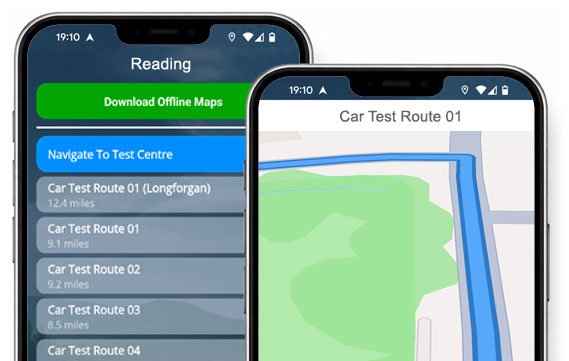

TRY THE APP


Tackle your test with confidence using real, current routes from Reading Test Centre.
Download and practise as many times as you need!
The Routes - Current & Updated
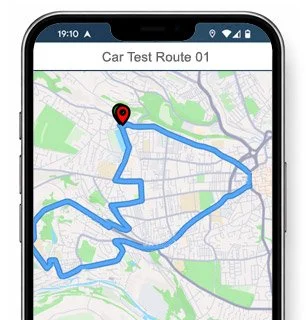
Route 1 Instructions:
- Leave the Driving Test Centre and turn right.
- On Elgar Road South, turn left at the end of the road at the traffic lights.
- At the Basingstoke Road roundabout, turn right (2nd exit).
- Christchurch Road becomes Shinfield Road.
- At the first Shinfield Road roundabout, continue ahead (2nd exit).
- At the next roundabout, turn right (2nd exit).
- At the Whitley Wood Road roundabout, turn left (1st exit) then take the first right.
- On Holberton Road, take the first right.
- On Foxhays Road, take the first left.
- On Hawkchurch Road, take the first left.
- On Foxhays Road, take the first right.
- On Gratton Road, turn left at the end of the road.
- On Northumberland Avenue, take the first right.
- On Wincanton Road, turn right at the end of the road.
- On Blandford Road, take the third left.
- On Greenfields Road, turn left at the end of the road.
- Continue ahead at the Blandford Road roundabout then turn left at the end of the road.
- On Hartland Road, turn left at the end of the road.
- At the Basingstoke Road roundabout, turn right (3rd exit).
- At the Imperial Way roundabout, turn right (3rd exit).
- Continue ahead at two roundabouts on the A33, then turn right at the traffic lights.
- On Rose Kiln Lane, continue ahead at the roundabout then turn left (1st exit).
- At the traffic lights, turn left onto Basingstoke Road.
- Take the second left onto Elgar Road South.
- Return to the Driving Test Centre.
-
Leave the Driving Test Centre and turn right.
On Elgar Road South, turn left at the end of the road.
On Basingstoke Road, turn right at the traffic lights.
At the Rose Kiln Lane roundabout, turn right (3rd exit).
At the next roundabout, continue ahead (2nd exit) then turn left at the traffic lights.
At the first A33 roundabout, continue ahead.
At the next A33 roundabout, turn left.
Take the next left off the A33.
At the Imperial Way roundabout, turn left.
On Basingstoke Road, take the second right.
On Hartland Road, take the first right.
On Blandford Road, take the first right.
On Ambrooke Road, take the first left then turn right at two end-of-road junctions.
At the Blandford Road roundabout, turn right (3rd exit).
At the Meadowcroft Road roundabout, turn right (3rd exit).
On Blandford Road, turn right at the end of the road.
At the Whitley Wood Road roundabout, turn left (1st exit).
On Whitley Wood Lane, turn left at the end of the road then turn left at the roundabout (1st exit).
At the first Shinfield Road roundabout, continue ahead (2nd exit).
* Updated, complete route available on the app.
-
Leave the Driving Test Centre and turn right.
On Elgar Road, turn right at the end of the road.
On Basingstoke Road, turn left.
On Long Barn Lane, turn right.
On Tavistock Road, turn left at the end of the road.
At the Buckland Road roundabout, turn right.
At the first Northumberland Avenue roundabout, continue ahead.
At the next roundabout, turn right.
On Hartland Road, turn left.
On Blandford Road, turn right.
On Ambrook Road, turn left then left again.
On Thornbridge Road, turn left at the end of the road.
On Ambrook Road, turn left.
On Greenfields Road, turn left.
On Thornbridge Road, turn left at the end of the road.
On Greenfields Road, turn right at the end of the road.
On Blandford Road, turn right at the end of the road.
At the Whitley Wood Road roundabout, turn left.
On Whitley Wood Lane, turn left at the end of the road then continue ahead at the roundabout.
At the Lower Earley Way roundabout, turn left.
* Updated, complete route available on the app.
-
Leave the Driving Test Centre and turn right.
On Elgar Road, turn right at the end of the road.
On Basingstoke Road, continue ahead at the third set of traffic lights then turn left.
On Hartland Road, turn right.
On Blandford Road, turn right.
On Ambrook Road, turn right at the end of the road.
At the Blandford Road roundabout, turn right.
At the Meadowcroft Road roundabout, turn right.
On Blandford Road, turn right at the end of the road.
At the Whitley Wood Road roundabout, turn left.
On Whitley Wood Lane, turn left at the end of the road then continue ahead at the roundabout.
At the Lower Earley Way roundabout, turn left.
At the Beeston Way roundabout, turn left.
At the first Rushey Way roundabout, continue ahead.
At the next roundabout, turn left.
At the Elm Lane roundabout, turn right.
At the Elm Road roundabout, turn left.
On Pepper Lane, continue ahead at the traffic lights.
* Updated, complete route available on the app.


Average Length: 9.2 miles
Based on 20+ route variations found in the app
Average Duration: 40 minutes
“Best driving test app out there! Helped me become more confident ready for my test.”

“Passed first time! Practicing the routes really helped!”
Route-Led provides Driving Test Routes for iPhone and Android devices. Download Reading driving test routes straight to your device. Car, Motorcycle, ADI, and LGV routes are available.
Driving Test-Routes App - New Version


Compatible with Android, iPhone and SatNavs
Route-led driving test routes are compatible with lots of devices, thereby meaning that you don’t really need a Sat-Nav device for your driving practice sessions. Compared to the marketplace, the rates we charge are very low which means that you don’t need to fork-out lots of cash to learn the driving test routes. Here at Route-Led, we plan to add SatNav and Independent driving routes to our offering shortly. Get the latest Reading Driving Test-Routes today!
Up-to-date Routes
Each day Route-led co-operates with experienced drivers, learners and instructors to update our test routes, meaning that you have the latest info to pass your test. New drivers can save lots of cash by buying test-routes from Route-Led, which means you can increase your driving ability in the best way. Out of every provider of test-routes, Route-LED is the leading. Get the latest Reading Driving Test-Routes today!
Routes for Experienced and Learner Drivers
Route-Led supplies routes for new and experienced drivers alike so that they can all excel in their driving test with confidence. Route-LED also provides routes to driving instructors wanting to learn the newest routes. People often spend a huge amount of money learning to pass their driving test. Why waste time and money when you can conserve both and at the same time improve your ability. Download 2021 Reading Driving Test-Routes today!
Leading Provider of Test Routes
Route-Led's Reading test routes are able to be used with Google Maps. iPhone and Android customers can load Route-Led's test routes on those devices too. If you already have a Sat nav (e.g. TomTom) you are able to buy the relevant routes and get practising.
To ensure our test routes are up to date, we work closely with learner drivers and Reading driving instructors. We are always open to feedback from our clients regarding any product that we offer.
Reading Driving Test Routes Navigation
Using Route-LED's Android driving test-routes is really easy provided you have RL’s app or a supported third party app installed on your Android device. Reading driving test-routes for Android devices are available on our official website. After buying a driving test route, the customer can then either install a supported Android software app or use RL’s dedicated app in order to access a relevant file.


After 04-Dec-17, the United Kingdom driving test also requires following Satnav directions. As the leading supplier of Sat-nav test-routes in the UK, we provide numerous test-routes for Tomtom and Garmin devices. For those that wish to purchase Sat nav devices, we highly suggest the Tom-Tom Start 52, mainly because it is the leading pick for the Reading driving test examiners.

Route-LED test-routes are available for several devices including your iPhone. In order to access Route-Led's driving test routes, begin by downloading a recommended 3rd party software app that you will use to access the file. As soon as the app has loaded correctly, buy the Reading test-route and install on the iPhone device from Route-Led's webpages. You can then use the driving test-route file downloaded using the preferred software application. Reading test centre.

Learn Reading Driving Test Routes
During your driving examination, the examiner will select a particular route on the Satnav device. You’ll be requested to use the route selected by the examiner in addition to the directions from the Sat nav. The make and model of the device will not matter, this is because our test routes are compatible with a number of devices.You can’t use your personal SatNav in the Reading driving examination. For more information, you can get 2021 changes to the driving test here.

As a service-oriented company, we provide Route-Led's customers with extra help and support for Route-led's test routes. Using Route-Led's test-routes enables the customers to experience the roads, junctions and corners that they will be driving on during their driving examinations.To help the student in practising how to drive carefully and in addition to pass the driving test, we highly recommend using a good driving teacher. How it works

The Independent driving test doesn’t check your skill in following directions. In addition, an independent driving test doesn’t test your ability to remember directions. If you query the examiner for the directions, he/she should confirm them for you. Going off route won’t affect your test results at all. Do not worry about obscured traffic signs as the examiner will help you should you require it. Please note that you can’t take your personal Satnav device with you to take the examination. This is because your own Sat-nav device will be setup to provide detailed directions.
Reading Test Centre Details
Reading test centre is located at 220 Elgar Road South, Reading Berkshire RG2 0BW. There ought to be ramp access for disabled users but we suggest calling to make sure. There are also usually male, female and disabled facilities available at the test centre but it's generally better to use these at home in advance! It is occasionally feasible to park at the test centre. If this is not possible, it should be fine to park nearby and walk. Be prepared for one-way streets, roundabouts, busy roads and difficult junctions. Using test routes while learning to drive can be very helpful, as it allows you to practise on roads that you will actually be going on during your test.
Address: 220 Elgar Road South, Reading Berkshire RG2 0BW
Test Centre Parking: Parking may be possible at the test centre. If not, park close by and walk there.
Test Centre Toilets: There are quite often male, female and disabled toilets at the test centre but better to go before you head there.
Test Centre Disabled access: You should be able to get into the test centre in a wheelchair but call in advance to make sure.
Find local test centre details: https://www.gov.uk/find-driving-test-centre