

Nuneaton Driving Test Routes
Prepare properly with current, verified directions
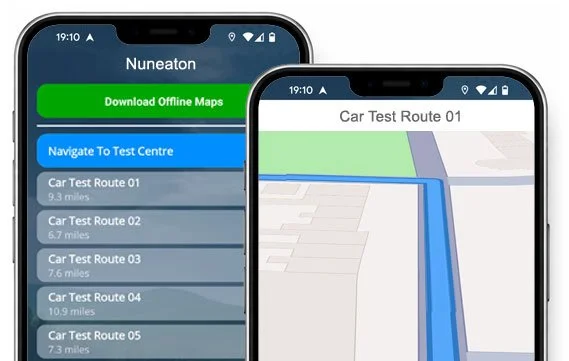

INSTALL THE APP


Drive all current routes from Nuneaton Test Centre.
Download our app and start practising turn-by-turn satnav directions today!
All Current Routes
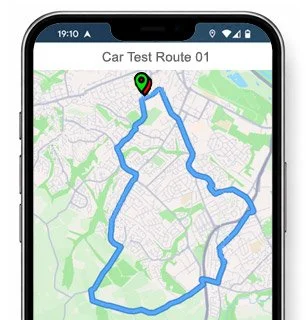
Route 1 Instructions:
- Leave the Driving Test Centre onto Vernons Lane.
- Turn left onto Beaumont Road.
- Turn right onto Countess Road.
- Turn right onto Earls Road.
- At the Manor Court Road mini roundabout, continue ahead.
- Turn right onto Queens Road.
- Continue ahead onto Tomkinson Road.
- Turn left onto Haunchwood Road.
- Turn left onto Westbury Road.
- At the Arbury Road mini roundabout, turn right.
- Turn right onto Heath End Road.
- On Radnor Drive, turn left at the end of the road, then right at the next end of the road.
- Turn right onto Charnwood Avenue.
- On Atholl Crescent, turn right at the end of the road.
- At the Heath End Road mini roundabout, turn right.
- At the Bull Ring / College Street roundabout, turn right.
- At the second A444 roundabout, take the 2nd exit.
- At the B4113 Coventry Road mini roundabout, turn right.
- Turn right onto Donnithorne Avenue.
- Turn left onto Dorlecote Road.
- At the Donnithorne Avenue mini roundabout, turn right.
- At the Coventry Road roundabout, continue ahead.
- At the Coton Road roundabout, turn right.
- At the Vicarage Street roundabout, turn left.
- Follow the one-way system on Church Street and continue ahead at the traffic lights.
- On Bond Gate, turn left at the traffic lights.
- On Newtown Road, continue ahead at the second roundabout.
- On Roanne Ringway, turn right at the traffic lights.
- At the Queens Road mini roundabout, turn right.
- Turn onto Beaumont Road.
- Return to the Driving Test Centre on Vernons Lane.
-
Leave the Driving Test Centre onto Vernons Lane.
Turn left onto Beaumont Road.
Turn right onto Countess Road.
Turn right onto Earls Road.
At the Manor Court Road roundabout, turn left.
On Queens Road, turn right at the traffic lights.
At the Roanne Ringway roundabout, continue ahead.
At the Vicarage Street roundabout, continue ahead and continue ahead at the second set of traffic lights.
On Back Street, turn right at the traffic lights.
Follow the roundabout from Bond Street / Regent Street into Leicester Road.
Continue ahead onto Leicester Road.
On Weddington Road, turn right after the bridge.
At the Shanklin Drive / Brookdale Road mini roundabout, turn left.
At the Higham Lane mini roundabout, turn right.
Turn right onto St Nicolas Park Drive.
On Windermere Avenue, turn left, continue ahead, then turn right at the end of the road.
Turn left onto St Nicolas Park Road.
At the Hinckley Road roundabout, turn right.
Continue ahead on Eastboro Way to the third roundabout.
Turn left onto Avenue Road.
* Updated, complete route available on the app.
-
Leave the Driving Test Centre onto Vernons Lane.
Turn left onto Beaumont Road.
Turn right onto Countess Road.
Turn right onto Earls Road.
At the Manor Court Road roundabout, continue ahead.
Turn left onto Croft Road.
At the Greenmoore Road roundabout, turn left.
Continue ahead onto the Bullring.
At the College Street roundabout, turn right.
At the second A444 roundabout, turn right.
At the St Davids Way roundabout, turn left.
At the Walsingham Drive roundabout, turn right.
Turn left onto the A444.
Turn left onto Sutherland Drive.
Turn right onto Nuneaton Road / Coventry Road.
At the Gipsy Lane roundabout, turn left.
Turn right onto Marston Lane.
Turn right onto Northbourne Drive.
At the Marston Lane mini roundabout, turn right.
At the second Sterling Way roundabout, turn left.
* Updated, complete route available on the app.
-
Leave the Driving Test Centre and turn left at the Vernons Lane mini roundabout.
At the Harpool Road mini roundabout, turn right.
Turn left onto Tomkinson Road.
Turn left onto Northumberland Avenue.
Turn left onto Rutland Avenue.
Turn left onto Northumberland Avenue.
At the Croft Road mini roundabout, turn right.
Turn right onto The Raywoods.
Turn left onto Brodrick Way.
Turn left onto Fair Isle Drive.
Turn right onto Oldany Way.
At The Raywoods mini roundabout, turn left.
At the Heath End Road mini roundabout, turn right.
At the Bullring / College Street roundabout, continue ahead.
On College Street, turn right at the end of the road.
At the second Coventry Road roundabout, turn right.
At the St Davids Way roundabout, turn left.
At the Walsingham Drive roundabout, turn left.
At the A444 roundabout, turn left.
* Updated, complete route available on the app.


Average Length: 9.2 miles
Based on all route variations in the app
Average Duration: 39 minutes
What the Routes Actually Cover
The test routes from Vernons Lane are deliberately varied, designed to assess your ability across different road environments. Here's what you'll encounter.
Residential streets and estates
A significant portion of them pass through quieter residential areas — roads like Northumberland Avenue, Rutland Avenue, Charnwood Avenue and Radnor Drive. These sections test precise control, awareness of parked cars, and junction observation rather than speed.
Main A-roads and dual carriageways
Routes regularly join the A444, one of Nuneaton's main arterial roads, where you'll need to demonstrate confident lane discipline and safe positioning at speed. The transition from residential streets onto the A444 is a moment where many lose composure.
Town centre navigation
Several routes pass through Nuneaton town centre, including the one-way system on Church Street, traffic lights on Bond Gate, and the Roanne Ringway — a stretch that demands close attention to lanes and road markings under pressure.
Roundabouts
Nuneaton routes tend to be roundabout-heavy. You'll encounter everything from the large multi-lane Bull Ring/College Street roundabout and the Coton Road/Vicarage Street roundabouts to a series of mini-roundabouts in residential estates. Correct lane choice, timing, and signalling at each of these is critical.
“Best driving test app out there! Helped me become more confident ready for my test.”

“Passed first time! Practicing the routes really helped!”
Junctions and Roads Where Some Struggle
Knowing a route isn't just about knowing where to turn. It's about knowing where things get difficult. These are the sections of the Nuneaton routes that catch learners out most often.
The Roanne Ringway traffic lights
Coming off Newtown Road and onto the Roanne Ringway involves a right turn at traffic lights on a fairly fast-moving road. Lane discipline and observation here are under real scrutiny.
The Bull Ring / College Street roundabout
This large roundabout appears on multiple routes and requires clear lane choice well in advance. Approaching from Heath End Road and navigating across multiple exits is a genuine pressure point.
The A444 roundabout sequence
Routes use the A444 corridor and its roundabouts in quick succession. Getting the exit count right and signalling correctly at each one — particularly the second A444 roundabout — is something worth rehearsing specifically.
The Church Street one-way system
Navigating Nuneaton town centre's one-way system demands close attention to signs and road markings. It's easy to position incorrectly if you're not familiar with the layout.
Mini-roundabout sequences in residential estates
Routes 1 and 4 in particular pass through estate roads with closely-spaced mini-roundabouts. Giving way correctly and maintaining smooth progress through these without hesitation or over-caution is assessed carefully.

Manoeuvres - What to Expect and Where
Your examiner will ask you to perform one manoeuvre during the test. Based on the Nuneaton routes, here are the most likely types and where they tend to be asked.
- Pulling up on the right and reversing: Quieter stretches on roads like Northumberland Avenue, Westbury Road or Donnithorne Avenue are typical spots for this — enough space to pull up safely, with light enough traffic to reverse a short distance without undue risk. The key is smooth observation all round before moving off again.
- Bay parking: The test centre at Vernons Lane has its own car park, making a bay park on return a real possibility. It's worth practising both forward and reverse bay parking — examiners can request either.
- Emergency stop: Less busy roads in the residential sections — around Radnor Drive, Fair Isle Drive or similar estate roads — are the most likely setting. You'll have little warning, so staying alert throughout these quieter stretches matters just as much as on the main roads.
Though the app focuses on routes rather than manoeuvres directly, practising the routes builds familiarity with the exact roads where manoeuvres are most likely to be asked — so they're less likely to feel like a surprise on the day.
Download The #1 Driving Test Routes App
All current Nuneaton test routes are available to practise immediately on both iPhone and Android. Each route launches directly from the test centre on Vernons Lane with clear turn-by-turn satnav directions - the same roads your examiner will take you down on test day.

iOS App
Download from the App Store for all iOS devices. Powered by Mapbox — the same satnav technology used by leading car manufacturers.

Android App
Available on Google Play for Pixel, Galaxy and all compatible Android devices. Install and start practising straight away.
Nuneaton Driving Test Centre
Located at 54 Vernons Lane, Stockingford, Nuneaton, CV10 8AA — on the northern edge of town, with test routes heading out in multiple directions from the moment you leave the car park.
Pass rate — above the national average of 47.9%
Average wait — shorter than the national average of 14.8 wks
54 Vernons Lane, Stockingford, CV10 8AA
Available at the test centre
Toilets and disabled access provided
gov.uk/book-driving-test or call 0300 200 1122
FAQs
-
There are currently over 20 route variations used by examiners at Nuneaton Test Centre.
The app includes all current routes with full turn-by-turn directions.
-
Yes. Our routes are built from real GPS data recorded during live tests, cross-referenced with local ADI knowledge.
When routes change due to roadworks or diversions, we update the app accordingly.
-
We'd recommend completing each main route at least three times before your test - ideally at different times of day so you experience varying traffic conditions.
The morning rush hour around the town centre and Roanne Ringway is worth experiencing at least once.
-
Your examiner will choose the route, and you won't know in advance which one it will be.
Practising all routes gives you confidence regardless of which way you're sent - and means nothing on the road will feel genuinely unfamiliar.