

Northallerton Driving Test Routes
Real test routes. Real confidence. Real results.
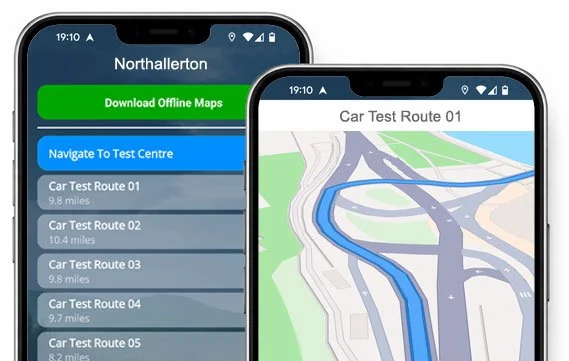

GET THE APP


Drive all 20 current routes from Northallerton Test Centre
Practise the smart way, and learn the routes before your test.
All Live Test Routes
Route 1 Instructions:
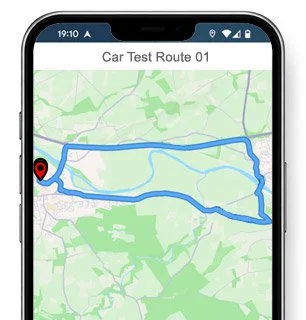
- Leave the Driving Test Centre and turn right at the end of the road.
- At the Bullamoor Road roundabout, turn right.
- At the Valley Road roundabout, turn left.
- At the next Bullamoor Road roundabout, continue ahead, then turn right at the following roundabout.
- Continue ahead at two roundabouts on Brompton Road.
- On Stokesley Road, take the second left.
- On Little Lane / Water End, turn left at the end of the road.
- On Lead Lane, turn right at the end of the road.
- At the Brompton Road roundabout, turn right.
- At the Friarage Street roundabout, turn left.
- Continue ahead at the High Street roundabout.
- On Thirsk Road, take the second right.
- Turn left onto Racecourse Lane.
- On Broomfield Road, take the second left.
- On Normanby Road, turn right at the end of the road.
- On Broomfield Road, turn left at the end of the road.
- At the Racecourse Lane roundabout, turn right.
- On Malpas Road, turn right at the end of the road.
- On Romanby Road, turn left at the traffic lights.
- Turn right onto High Street.
- On Zetland Street, turn right at the end of the road.
- Turn left onto East Road.
- At The Link roundabout, turn left.
- Crosby Road becomes Lascelles Lane.
- Continue ahead on Lascelles Lane.
- At the Valley Road roundabout, turn left.
- Turn right onto Bullamoor Road and return to the Driving Test Centre.
-
Leave the Driving Test Centre and turn right at the end of the road.
Continue ahead at the Bullamoor Road roundabout.
On Bullamoor Road, take the second right.
On Ashlands Road, take the fifth left.
Turn left onto Bankhead Road.
At the second Valley Road roundabout, turn left.
At the Greenhowsyke Lane roundabout, turn right.
At the Crosby Road roundabout, turn left.
On The Link, turn left at the end of the road.
At the East Road roundabout, turn left.
Turn right onto Thirsk Road.
On Hatfield, turn left at the end of the road.
Continue ahead at the South Parade roundabout.
At the Boroughbridge Road roundabout, turn right.
Lees Lane becomes Ainderby Road (A684).
Turn right onto Ainderby Road (A684).
On Dolly Lane, turn right at the end of the road.
Turn right onto Yafforth Road.
Country Lane becomes The Green.
* Updated, complete route available on the app.
-
Leave the Driving Test Centre and turn left at the end of the road.
Continue ahead at two Bullamoor Road roundabouts.
At the Friarage Street roundabout, turn left.
On High Street, turn right at the traffic lights.
On Romanby Road, turn right at the end of the road.
Continue ahead at two roundabouts on Ainderby Road.
Turn right onto Ainderby Road.
Turn left onto Chantry Road.
At the Ainderby Road roundabout, turn right.
Turn left onto Harewood Lane.
Turn left onto The Fairway.
At the Boroughbridge Road roundabout, turn right.
On Racecourse Lane, turn right at the end of the road.
Turn left onto Thirsk Road.
Mill Hill Lane becomes Borrowby Road.
Turn right onto Borrowby Road.
* Updated, complete route available on the app.
-
Leave the Driving Test Centre and turn left at the end of the road.
Continue ahead at two Bullamoor Road roundabouts.
At the Friarage roundabout, turn left.
On High Street, turn right at the traffic lights.
On Romanby Road, take the second left.
At the Mill Lane roundabout, take the 3rd exit.
Turn right onto Racecourse Lane.
On Broomfield Road, take the second left.
On Normanby Road, turn right at the end of the road.
Turn left onto Thirsk Road.
On Thornton-le-Beans, turn left at the end of the road.
On Borrowby Road, take the second right.
On Crosby Road, turn right at the end of the road.
On Mill Hill Lane, turn right at the end of the road.
Continue ahead at the Thirsk Road roundabout.
* Updated, complete route available on the app.


Average Length: 9.8 miles
Based on 20 route variations in the app
Average Duration: 39 minutes
“Best driving test app out there! Helped me become more confident ready for my test.”

“Passed first time! Practicing the routes really helped!”
Route-Led provides Driving Test Routes for iPhone and Android devices. Download Northallerton driving test routes straight to your device. Car, Motorcycle, ADI, and LGV routes are available.
Northallerton Test-Routes App - Latest Edition


Compatible with Android, iPhone and SatNavs
Up to date Routes
Routes for Experienced and Learner Drivers
As the leading test-route provider in the UK, Route-LED creates driving test-routes that work with very many devices such as Mac, iPhone, Garmin, Tomtom and PC devices. Route-Led supplies one of the most cost effective ways to practise your driving test routes. In an effort to expand our offering, Route-Led will soon be improving Route-LED's collection to add independent driving routes. Download 2021 Northallerton Test-Routes now!
Every day Route-led collaborates with learners, experienced drivers and instructors to improve our driving test routes, ensuring that you have the best info to excel in your test. At good value prices we offer you driving test routes that you can practise to improve your skills whilst lowering your expenditure on driving lessons. Route-led prides itself on always being the leading provider of driving test routes. Download 2021 Northallerton Test-Routes now!
It's immaterial if you are an instructor seeking to learn the latest driving test-routes, a new driver looking to excel in their driving test or an existing driver looking at the advanced, taxi or new vehicle test. Route-led is the best place for everything you need. People often spend a lot of cash being taught how to drive. Route-Led understands that time and money are equally important. Route-led helps you to save both. Get the latest Northallerton Test-Routes now!
#1 Supplier of Driving Test-Routes in the UK
Route-LED's Northallerton test-routes can be used on Google Maps. Those that have not purchased a Sat-Nav device are able to use their Android or iPhone devices to access our test route files. If you happen to have a Tomtom device already, you are able to download the test-routes for Tom tom Satnav devices from our web page and then load it on your device for your practise lessons.
To make sure our test routes are fully updated, Route-Led works side by side with Northallerton driving instructors and learner drivers. Route-LED is also always open to feedback from Route-Led's customers regarding any product that we offer.


Northallerton Driving Test Routes Navigation
By purchasing our recommended Android application, customers can effortlessly utilise our test routes. Download the recommended app and instantly begin improving your driving ability right now. Route-Led's detailed directions enable customers to concentrate on improving your driving ability whilst experiencing the test-routes.

In preparation for taking the driving test, it is really vital to know all your test-routes. Being familiar with the driving test routes won’t only boost your confidence but it will also ensure that you drive well. Using Route-led's Sat-nav test-routes is quite simple, mainly because the customer can just follow the turn-by-turn instructions on the device whilst driving.

Purchase driving test routes from our website directly into your iPhone or from Route-LED's purpose built iPhone app. In order to access the driving test-route either download a supported third party iPhone software application or use the dedicated Route-LED App. Supported third party software applications are located in the iPhone app store.
Practice Northallerton Driving Test Routes
While conducting the independent driving test, the examiner will ask the learner driver to take instructions from the SatNav. The examiner will provide a configured Tom Tom Start 52 device. All you’ll need to do is to take directions from the device. The make or model of the SatNav device that you’ll use during your learning sessions will not make a difference one bit. As a leading SatNav company, we supply test routes for Tomtom, Android, iPhone and Garmin devices.You cannot use your own Satnav device in the driving examination.

We aim to provide purchasers with a lot of help and support with Route-led's routes. You’ll speedily become skilled at the various routes provided. That said, we of course recommend using a person that is a professional teacher.

In the course of the independent driving test, the examiner will provide the learner all the relevant directions. In case the learner gets lost along the way, they will need to confirm the instructions from the test examiner. Learners cannot utilise personal SatNav devices for independent driving because they give detailed voice instructions. Independent driving will check the skill of the learner to undertake independent choices.
Northallerton Test Centre Details
The Northallerton test centre is located at Elder House, East Road, Northallerton North Yorkshire DL6 1NU. There ought to be ramp access for disabled users but we suggest calling to confirm. There are also usually female, disabled and male facilities for use at the test centre but it's generally best to go before you head there! It’s occasionally possible to park at the test centre. If this is not possible, it should be easy to park nearby and get there by foot. Practise busy roads, difficult junctions, roundabouts and one-way streets. Using test-routes whilst practising to drive is always very helpful, as it allows you to practise on routes that you’ll actually be going on during your examination.
Test Centre Address: Elder House, East Road, Northallerton North Yorkshire DL6 1NU
Test Centre Parking: Parking may be possible at the test centre. If not, park nearby and walk there.
Test Centre Toilets: There are usually disabled, female and male toilets at the test centre but best to use these at your house beforehand.
Test Centre Disabled access: You ought to be able to get into the test centre in a wheelchair but call ahead to make sure.
Find local test centre details: https://www.gov.uk/find-driving-test-centre