

Nelson Driving Test Routes
Drive the same routes used during actual driving tests
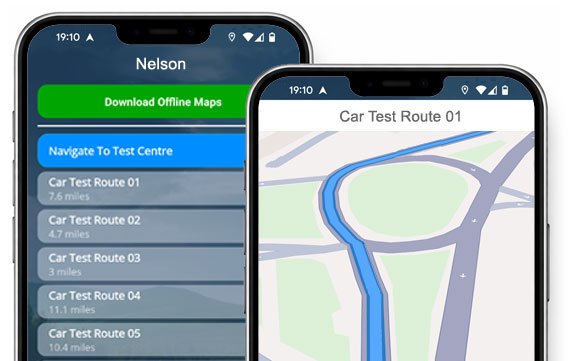

DOWNLOAD NOW


Ace your Nelson driving test by learning the routes beforehand!
Get our app for iOS/Android and practise them all turn-by-turn.
All Current Routes
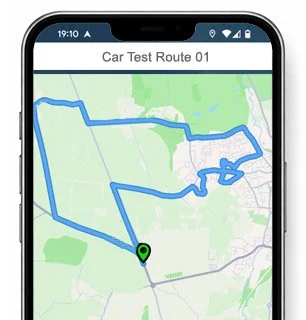
Route 1 Instructions:
- Leave the Driving Test Centre and turn right.
- On Cobden Street, turn left at the end of the road.
- At the Lomeshaye Road roundabout, turn right.
- Turn right onto Hibson Road / Walverden / Higher Reedley Road.
- Turn right onto Reedley Road.
- Turn left onto Pennine Way.
- On Heyhead Street, turn left at the end of the road.
- On Halifax Road, continue ahead at the traffic lights.
- Turn right onto Railway Street / Clitheroe Road / Cuckstool Lane.
- At the first Bypass roundabout, continue ahead.
- At the next Bypass roundabout, turn right.
- At the Scotland Road roundabout, take the 2nd exit, then turn left at the traffic lights.
- At the Leeds Road roundabout, continue ahead then turn right.
- On Priory Street, turn left at the end of the road.
- Turn right onto Bradley Hall Road.
- Turn left onto Priory Street.
- At the Leeds Road roundabout, turn left.
- Turn right onto Hildrop Road / Hallam Road.
- At the Marsden Hall Road roundabout, turn right.
- At the Barkerhouse Road roundabout, turn left.
- Continue ahead at the third Netherfield Road roundabout.
- Turn right onto Hibson Road.
- Turn right onto Cobden Street and return to the Driving Test Centre.
-
Leave the Driving Test Centre and turn left.
Turn left onto Cobden Street.
At the third Hibson Road roundabout, turn left.
Continue ahead at the Sagar Street roundabout.
On Holme Street, continue ahead at the traffic lights.
At the Scotland Road roundabout, take the 2nd exit.
At the next roundabout, turn left (1st exit).
At the Barrowford Road By-pass roundabout, continue ahead then turn left.
Cuckstool Lane becomes Clitheroe Road.
Clitheroe Road becomes Railway Street.
On Railway Street, turn right at the traffic lights.
On Burnley Road, turn right at the traffic lights.
Turn left onto Windermere Avenue.
Turn left onto Ruskin Street.
On Windermere Road, turn left at the end of the road.
Turn left onto Barden Lane.
On Newman Street, turn right at the traffic lights.
Turn left onto Colne Road.
At the Briercliffe Road roundabout, continue ahead then turn left.
* Updated, complete route available on the app.
-
Leave the Driving Test Centre and turn right.
On Cobden Street, turn right at the end of the road.
On Lomeshaye Road, turn right at the traffic lights.
On Manchester Road, turn right at the traffic lights.
At the Broadway roundabout, turn left.
On Holme Street, turn right at the traffic lights.
At the Leeds Road roundabout, turn right, then turn left.
Turn left onto Bradley Hall Road.
On Fulham Street, turn left at the end of the road.
At the Leeds Road roundabout, turn right.
At the first Reedyford Road roundabout, continue ahead.
At the next roundabout, turn right.
At the Scotland Road roundabout, turn left.
At the first Bypass roundabout, continue ahead.
Turn left onto the Bypass.
Turn right onto Carr Road.
Turn left onto Park Avenue / Carr Hall Road.
Turn left onto the Bypass.
Turn left onto Greenhead Lane / Barden Lane.
Turn right onto Windermere Avenue.
* Updated, complete route available on the app.
-
Leave the Driving Test Centre and turn right.
On Cobden Street, turn right at the end of the road.
On Lomeshaye Road, turn right at the traffic lights.
On Manchester Road, turn right at the traffic lights.
At the Broadway roundabout, turn right.
At the Sagar Street roundabout, turn left.
Continue ahead at the Netherfield Road roundabout.
At the Barkerhouse Road roundabout, turn left.
At the Marsden Hall Road roundabout, continue ahead.
At the Marsden Hall Road North roundabout, turn right.
At the Walton Lane roundabout, turn right.
Continue ahead at the Leeds Road roundabout.
At the Burnley Road roundabout, turn left.
Continue ahead at the Whitewalls Drive roundabout.
On Vivary Way, turn left at the traffic lights.
On Barrowford Road / Colne Road, turn left at the end of the road.
Turn right onto Gisburn Road.
Turn left onto Church Street / Wheatley Lane Road.
Turn right onto Carr Hall Road / Park Avenue.
On Carr Road, continue ahead at the traffic lights.
* Updated, complete route available on the app.


Average Length: 8.4 miles
Based on 17 variations in the app
Average Duration: 39 minutes
“Best driving test app out there! Helped me become more confident ready for my test.”

“Passed first time! Practicing the routes really helped!”
Route-Led provides Driving Test Routes for iPhone and Android devices. Download Nelson driving test routes straight to your device. Car, Motorcycle, ADI, and LGV routes are available.
Test-Routes App - New Edition
At Route-led, we provide Nelson test routes for your iPhone, Android and Sat-Nav devices. The test routes provided cover tests for LGV, cars, taxis and motorbikes. Route-Led supplies the most cost effective means to practise your driving test routes. Route-Led will shortly add independent driving routes to Route-Led's service. Get the latest Nelson Test Routes today!

Learner drivers and Instructors are continually supplying Route-Led with updated driving test route info, meaning that Route-Led is the best place for driving test routes. Purchasing test routes from Route-Led conserves your money and simultaneously adds to your ability. Route-led is the #1 supplier of Nelson test routes in the United Kingdom. Get the latest Nelson Test-Routes today!

Route-LED provides test-routes for experienced and new drivers alike in order that everyone can pass their driving test with confidence. Route-led also supplies routes to driving instructors wanting to understand the newest test-routes. Being taught how to pass your driving test and the price of vehicle insurance can often be an extremely costly procedure. Route-led understands that money and time are equally important. Route-Led helps you to save both. Get the latest Nelson Driving Test-Routes today!


#1 Provider of Test Routes
Nelson Driving Test Routes can be purchased for many devices including Google Maps. Don’t worry if you don’t own a dedicated Satnav as you can use the routes using either Android or iPhone. If you have a Sat-Nav (e.g. TomTom) you can download the relevant routes and start learning.
With the help of local learner drivers and Nelson examiners who conduct tests each day on these driving test routes, Route-LED is able to produce many high standard driving test routes for Android, iPhone, Sat nav and Garmin devices.
Nelson Driving Test-Routes Navigation


Android Sat-nav - Driving Test Routes
Using Route-Led's Android test routes is quite easy and can be done using a recommended 3rd party Android application or our dedicated Android app. Once you have installed your relevant application on your device, you can then purchase the driving test-route file from Route-led's official website. The pre-programmed routes on your Android device will guide you through your practise session or test. Buy Nelson Driving Test Routes
Tom-tom SatNav - Test Routes
Driving test-routes can be bought from our website. Once the test-routes have been bought from our website, the student should install the test-route into their Sat nav device and begin their practise session. Nelson test-routes include voice guiding, therefore all the student needs to do is to follow instructions from the device.
iPhone Sat-nav - Driving Test Routes
Route-led test-routes are available for several devices including your iPhone device. To access our driving test routes, begin by first installing a recommended third party software app that you can utilise to access the route. Once the application has loaded properly, buy the Nelson test route and install on the iPhone device from Route-Led's website. You are able to then access the driving test-route file purchased using the recommended software app. Nelson test centre.
Learn Nelson Driving Test Routes


SatNav Driving Test
Whilst undertaking the independent driving test, the examiner will ask the learner driver to take instructions from the Sat-Nav device. The examiner will bring an already setup Tom-Tom Start 52 device. All you’ll have to do is to take instructions from the satNav. The model or make of the Satnav device that you’ll use during your learning sessions won’t make a difference one bit. As a premier Satnav company, we provide driving test routes for Garmin, iPhone, Android and Tomtom devices.You cannot utilise your own Sat-Nav during the Nelson driving test.
Practise
As a service-oriented company, we provide Route-led's customers with extra help and support for our test routes. Learning with our driving test routes allows the customers to practise the junctions, corners and roads they will encounter during their driving examinations.To help the learner in practising how to drive safely and in addition to perform well during the driving examination, we highly recommend using a good driving instructor. How it works
Independent Driving Test
If you go off the independent driving route, it is not going to have any impact on your examination results unless you commit a traffic offence, break a traffic regulation or make an additional driving error. In the case where you make an incorrect turn, the test examiner will assist you get back to the correct route. Where you have poor or obscure traffic signs, the examiner will instruct the learner until they arrive at the following clear road sign. The learner doesn’t need to have a good understanding of the town. You cannot use your personal Satnav for independent driving, mainly because it gives the learner very detailed prompts. The independent driving section is designed to test if you are able to make secure independent choices.
Nelson Test Centre Info
Nelson test centre can be found at Ground Floor Units 103,104,105, Pendle Business Centre, Commercial Road Nelson Lancashire BB9 9BT. There should be ramp access for disabled users but we suggest calling to confirm. There are also usually disabled, female and male facilities for use at the test centre but it's generally best to go before you travel there! It’s occasionally feasible to park at the test centre. If not, it should be fine to park close by and get there by foot. Be prepared for difficult junctions, busy roads, one-way streets and roundabouts. Using test-routes whilst learning to drive can be very helpful, as it allows you to learn on routes that you will certainly be going on during your examination.
Address: Ground Floor Units 103,104,105, Pendle Business Centre, Commercial Road Nelson Lancashire BB9 9BT
Parking: Parking could be possible at the test centre. If not, park nearby and walk there.
Toilets: There are quite often female, male and disabled toilets at the test centre but best to use these at home beforehand.
Test Centre Disabled access: You should be able to access the test centre in a wheelchair but call in advance to confirm.
Find local test centre details: https://www.gov.uk/find-driving-test-centre