

Luton Driving Test Routes
The only test route app that offers current, updated routes
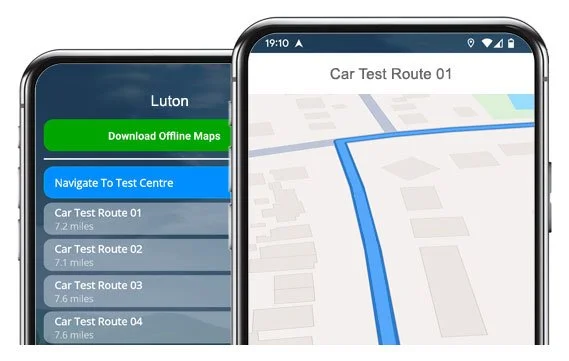

START PRACTISING SMART


Drive the same routes examiners take from Luton Test Centre.
Give yourself a test-day advantage with our app for iOS & Android.
25 Current Routes
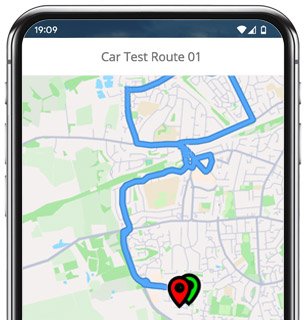
Route 1 Instructions:
- Leave the Driving Test Centre and turn left.
- On Stuart Place, turn left.
- On Adelaide Street, turn right.
- On Wellington Street, turn left.
- At the crossroads on Dumfries Street, continue ahead.
- On Dumfries Street, turn left at the end of the road.
- On Chapel Street, follow the left bend onto Stuart Street.
- On Stuart Street, turn left.
- At the Stuart Street roundabout, continue ahead (2nd exit).
- On Park Viaduct, keep left.
- On Cumberland Street, turn right at the traffic lights.
- On Park Street, turn right.
- On Alton Road, turn right at the end of the road.
- On Seymour Road, turn right at the end of the road.
- On Park Street, turn left.
- At the Osborne Road roundabout, turn right (2nd exit).
- At the first Gipsy Lane roundabout, continue ahead (1st exit).
- At the second Gipsy Lane roundabout, continue ahead (2nd exit).
- On Lower Harpenden Road, turn right.
- On West Hyde Road, turn right at the end of the road.
- At the A1081 roundabout, continue ahead (2nd exit).
- On London Road, turn right.
- On Tennyson Road, turn left.
- On West Hill Road, turn right.
- On London Road, continue ahead at the traffic lights.
- At the Castle Street roundabout, turn left (1st exit).
- On Stuart Street, turn left.
- On Hastings Street, turn right.
- At the crossroads on Adelaide Street, continue ahead.
- On Adelaide Street, turn right.
- On Stuart Place, return to the Driving Test Centre.
-
Leave the Driving Test Centre and turn left.
On Stuart Place, turn left.
On Adelaide Street, turn right.
On Wellington Street, turn left.
On Dumfries Street, turn left.
On Hastings Street, turn left at the end of the road.
On Stuart Street, keep right.
At the Stuart Street roundabout, turn right (2nd exit).
On Telford Way, continue ahead at the traffic lights.
* Updated, complete route available on the app.
-
Leave the Driving Test Centre and turn left.
On Stuart Place, turn left.
On Adelaide Street, turn right.
On Wellington Street, turn left.
At the crossroads on Dumfries Street, continue ahead.
On Dumfries Street, turn right at the end of the road.
On Chapel Street, continue ahead at the traffic lights.
On Farley Hill, turn right.
On Wilsden Avenue, turn left.
On The Crossway, turn left.
On Redrails, turn right at the end of the road.
* Updated, complete route available on the app.
-
Leave the Driving Test Centre and turn left.
On Stuart Place, turn right at the end of the road.
On Adelaide Street, turn right.
At the Buxton Road roundabout, turn left (1st exit).
At the first Hatters Way roundabout, continue ahead (2nd exit).
At the next Hatters Way roundabout, keep left (1st exit).
At the Skimpot Road roundabout, turn right (3rd exit).
On Dunstable Road, turn left.
On Wordsworth Road, turn right at the end of the road.
On Macaulay Road, turn left.
* Updated, complete route available on the app.


Average Length: 8.9 miles
Based on 25 routes in the app
Average Duration: 39 minutes
“Best driving test app out there! Helped me become more confident ready for my test.”

“Passed first time! Practicing the routes really helped!”
Route-Led provides Driving Test Routes for iPhone and Android devices. Download Luton driving test routes straight to your device. Car, Motorcycle, ADI, and LGV routes are available.
Luton Driving Test Routes App - Latest Version


Compatible with Android, iPhone and SatNavs
Up-to-date Routes
Routes for Experienced and Learner Drivers
Route-LED is a driving test-route supplier for a wide group of devices including Tomtom, Android, iPhone and Garmin for LGV, cars, taxis and motorcycles. Compared to the marketplace, the prices we charge are very low which means that you don’t need to spend lots of cash to practise the driving test routes. In an effort to improve Route-led's services, Route-led will soon be updating our collection to add independent driving routes. Download 2021 Luton Test-Routes today!
Instructors and Learner drivers are continuously providing Route-LED with improved driving test route information, meaning that Route-led is the best place for driving test routes. Buying driving test routes from Route-led conserves your cash and improves your driving ability. Route-LED is the premier supplier of Luton driving test-routes in the United Kingdom. Download 2021 Luton Test-Routes now!
It doesn't matter if you are an instructor seeking to understand the latest driving test-routes, an existing driver taking the taxi, new vehicle or advanced test or a learner looking to pass their driving test. Route-LED is the one-stop shop for all your test route needs. The price of driving lessons, exorbitant insurance premiums and theory lessons, can be a strain on your wallet! Route-Led's driving test routes for your test will allow you to save both money and time. Download 2021 Luton Driving Test-Routes now!
#1 Provider of Driving Test-Routes in the UK
Route-led's Luton driving test-routes are able to be used on Google Maps. It does not matter if you don’t own a dedicated SatNav as you are able to practise our driving test-routes on an Android or iPhone. Tom-tom owners can also buy test routes to load on their device.
We work alongside local Luton driving instructors, to come up with an up to date test route of the local areas. Route-led's test-routes are also utilised by examiners everywhere in the UK during driving tests, and thus we urge students and experienced drivers to get comfortable with the test routes.


Luton Driving Test-Routes Navigation
By buying Route-LED's recommended Android application, you will be able to easily use our test-routes. Buy our recommended app and instantly start testing your driving ability today. Route-Led's turn-by-turn directions will allow customers to focus on improving your driving ability whilst getting to experience the driving test routes.

Driving test-routes can be bought from Route-led's webpages. As soon as the routes are bought from our website, the student should load the driving test route into their Sat nav device and begin their practise session. Luton driving test-routes are voice-guided, thus all the customer will be required to do is to receive instructions from the device.

Purchase routes from our webpages into your iPhone or from our purpose built iPhone app. In order to access the driving test route either open the purpose built Route-LED App or download a supported third party iPhone software application. Supported 3rd party software applications are found in the iPhone app store.
Learn Luton Driving Test Routes
Whilst conducting the independent driving test, the examiner will request the student to take instructions from the Sat nav device. The examiner will bring an already setup Tom-Tom Start 52 device. All you will have to do is to take directions from the SatNav. The make or model of the Sat-Nav that you will use in your learning sessions will not make a difference at all. As a leading Sat-nav company, we supply test-routes for Garmin, Android, Tomtom and iPhone devices.You cannot utilise your own Sat-Nav device in the driving examination.

We aim to provide purchasers with a lot of support and help with Route-Led's routes. You’ll speedily get good at the various routes provided. That said, we definitely recommend having a person who is a professional teacher.

During the independent driving test, the examiner will give the learner all the necessary instructions. If the student gets confused during the journey, they will be required to get confirmation on the instructions from the examiner. Learners cannot use their own Sat nav devices for independent driving as they give detailed voice prompts. Independent driving will test the ability of the learner to undertake independent choices.
Luton Test Centre Info
Luton test centre can be found at 6/10 Adelaide Street, Luton Bedfordshire LU1 5BT. There ought to be ramp access for disabled users but we suggest calling to make sure. There are also usually male, disabled and female facilities available at the test centre but it's generally better to go before you head there! It is sometimes possible to park at the test centre. If not, it ought to be fine to park nearby and walk. Be prepared for one-way streets, roundabouts, busy roads and difficult junctions. Navigating test routes whilst practising to drive is always very useful, allowing you to learn on routes that you will actually be driving during your examination.
Address: 6/10 Adelaide Street, Luton Bedfordshire LU1 5BT
Parking: Parking may be possible at the test centre. If not, park close by and walk there.
Test Centre Toilets: There are usually disabled, female and male toilets at the test centre but better to use these at your house before.
Disabled access: You ought to be able to access the test centre in a wheelchair but telephone in advance to make sure.
Find local test centre details: https://www.gov.uk/find-driving-test-centre