

Herne Bay Driving Test Routes
The smart way to learn Kent’s test routes before the big day.
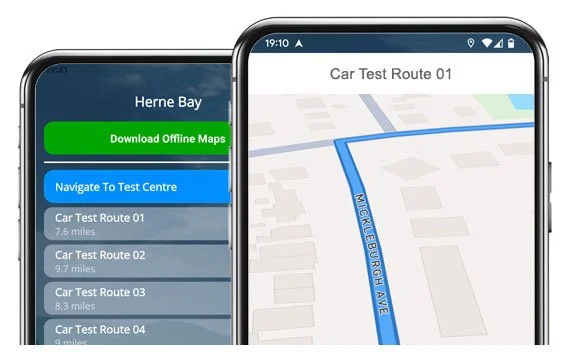

PRACTISE SMART


15 real, updated routes to practise from Herne Bay Test Centre
Discover why learner drivers across Kent rate this app no.1 when it comes to passing their test!
The Test Routes - Step-by-Step
Route 1 Instructions:
- Turn right out of the Test Centre.
- On The Boulevard, take the roundabout left (1st exit).
- On The Boulevard, take the next roundabout left (1st exit).
- On Margate Road Fly-Over, take the roundabout right (3rd exit).
- On Margate Road, turn left.
- On Broomfield Slip Road, take the roundabout right (4th exit).
- On Canterbury Road, take the roundabout right (2nd exit).
- On Canterbury Road, take the roundabout left (1st exit).
- On Canterbury Road, take the next roundabout left (1st exit).
- On Kings Road, take the 1st right.
- On South Road, take the 1st left.
- On Queens Gardens, turn right.
- Continue on Underdown Road / New Street and turn left at the end.
- Continue on The High Street / Avenue Road.
- On Sea Street, take the 4th left.
- On Bognor Drive, turn right at the end.
- On Fleetwood Avenue, take the 1st left.
- On Cross Street, turn left at the end.
- Continue on Eddington Lane / Cobblers Bridge Road and take the roundabout left (1st exit).
- On Sea Street, turn left at the lights.
- On Greenhill Bridge Road, take the roundabout ahead (2nd exit).
- Continue on Greenhill Road East / Bullockstone Road and take the 3rd left.
- On Lower Herne Road, turn left at the end.
- On Canterbury Road, take the 1st right.
- On Mill View Road, turn right, then left.
- On Mill Lane, take the 2nd right.
- On Kingsfield Road, take the 1st left.
- On Pear Tree Road, turn left at the end.
- On Kingsfield Road, turn left at the end.
- On Hunters Forstal Road, take the roundabout left (1st exit).
- On Margate Road, take the roundabout right (2nd exit).
- On Margate Road Fly-Over, take the roundabout right (3rd exit).
- On The Boulevard, take the roundabout right (2nd exit).
- Return on The Boulevard to the Driving Test Centre.
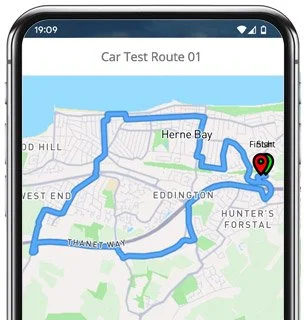
-
Turn right out of the Test Centre.
On The Boulevard, take the roundabout left (1st exit).
On The Boulevard, take the next roundabout left (1st exit).
On Margate Road Fly-Over, take the roundabout right (3rd exit).
On Margate Road, turn left.
On Broomfield Slip Road, take the roundabout right (4th exit).
On Canterbury Road, take the roundabout right (2nd exit).
On Canterbury Road, take the roundabout left (1st exit).
On Canterbury Road, take the 2nd left.
On Spenser Road, turn left at the end.
Continue on Station Road.
On The Circus, take the 3rd right.
* Updated, complete route available on the app.
-
Turn right out of the Test Centre.
On The Boulevard, take the roundabout left (1st exit).
On The Boulevard, take the next roundabout ahead (2nd exit).
Join A299 and take the 1st exit.
On Reculver Slip Road, take the 1st left.
On Hawthorn Road / May Street, turn right at the end.
On Sweechbridge Road, take the 1st left.
On Reculver Road, take the roundabout ahead (2nd exit).
On Reculver Road, take the 3rd left.
On Osbourne Gardens, turn left at the end.
On Reculver Road, take the 3rd right.
On Sea View Road, take the 1st right.
* Updated, complete route available on the app.
-
Turn right out of the Driving Test Centre.
On The Boulevard, take the roundabout left (1st exit).
On The Boulevard, take the next roundabout left (1st exit).
On Margate Road Fly-Over, take the roundabout right (3rd exit).
On Margate Road, turn left.
On Broomfield Slip Road, take the roundabout right (4th exit).
On Canterbury Road, take the roundabout left (1st exit).
On Thanet Way, take the roundabout right (4th exit).
On Greenhill Bridge Road, turn right at the end.
On Sea Street, take the roundabout left (1st exit).
On Grand Drive, take the 1st left.
On Cliff Sea Grove, turn left at the end.
On Grand Drive, take the 5th right.
* Updated, complete route available on the app.


Average Length: 8.5 miles
Based on the 15 route variations offered in the app
Average Duration: 38 minutes
Key Herne Bay Focus Areas
We’ve identified the following areas as ‘must-practise’ as they occur in the majority of the 15 Herne Bay route variations. Take some additional time to familiarise yourself as you’ll probably encounter them on test day.
The Boulevard & Margate Road Flyover:
These appear at the start and end of nearly every route variation and feature back-to-back roundabouts and lane-choice checks. This is your opportunity to reate a strong starting and finishing impression.Canterbury Road (A291/A299 access):
Several consecutive roundabouts make this a frequently used stretch to assess lane discipline, positioning, and merging.Beltinge / Reculver area:
Narrower residential roads with some steep gradients and hidden driveways to test observation. It's a popular place for examiners to request manoeuvres.Sea Street, the High Street & Avenue Road:
All busy central routes with lights, pedestrians and tight turns to navigate. Awareness and speed control are important here, and will be carefully observed.Broomfield & Greenhill:
Rural-style sections with fast-changing speeds and occasional sharp bends make these popular across several routes.

“Best driving test app out there! Helped me become more confident ready for my test.”

“Passed first time! Practicing the routes really helped!”
Route-Led provides Driving Test Routes for iPhone and Android devices. Download Herne Bay driving test routes straight to your device. Car, Motorcycle, ADI, and LGV routes are available.
Test-Routes App
Route-Led is a test route supplier for a extensive range of devices including iPhone, Android, Garmin and Tomtom for taxis, motorcycles, LGV and cars. Compared with the marketplace, the prices we charge are extremely cheap which means that you don’t need to fork-out a lot of cash to learn the test routes. Route-led will soon be adding independent driving routes to Route-Led's collection. Download 2021 Herne Bay Test-Routes today!

Every day Route-LED collaborates with learners, experienced drivers and instructors to improve Route-Led's test routes, meaning that you have the latest info to pass your driving test. New drivers are able to conserve your cash by buying test routes from Route-LED, leaving you to increase your driving ability in the most efficient way. Route-led is the number one provider of Herne Bay driving test-routes in the UK. Get the latest Herne Bay Driving Test-Routes now!

If you are a learner driver who wants to pass their driving test or a driver with experience that wishes to get acquainted with Herne Bay test routes for a vehicle or motorbike, then Route-led has got you covered. New drivers often spend a huge amount of money being taught how to pass their driving test. Route-LED's driving test routes for your test will let you to be money and time cost efficient. Download 2021 Herne Bay Driving Test-Routes today!
Leading Supplier of Driving Test Routes
Herne Bay Test-Routes are available on many devices including Google Maps. iPhone and Android users can use the driving test-routes on those devices too. If you have a Satnav (e.g. TomTom) you are able to buy the relevant test routes and get learning.
Due to the help of Herne Bay examiners who conduct tests each day on these routes and local learner drivers, Route-led is able to develop a lot of high standard test-routes for iPhone, Android, Sat nav and Garmin devices.
Herne Bay Test-Route Formats Navigation


Android Satnav Test Routes
Satnav Driving Test Routes
iPhone Satnav Test Routes
Using our Android test routes is quite easy and can be done making use of our dedicated Android app or a recommended 3rd party Android software app. As soon as you have installed your relevant software application on your device, you should then purchase the driving test-route file from our website. The turn-by-turn routes on your Android device will lead you through your test or practise session. Purchase Herne Bay Test Routes

Before you take a driving test, it is really important to know all the potential driving test routes. Being familiar with your test routes won’t only boost your confidence but, in addition, ensure that you drive well. Using our Satnav test-routes is very easy, generally because you can just track the pre-programmed routes on your device while driving.
Route-Led makes practising test-routes much easier with an iPhone device by making driving test routes specifically for iPhones. All you need to do is to either install RL’s dedicated iPhone app in the Apple app store or buy our iPhone format file, and then install a recommended 3rd party application to use the test-routes following our step by step guide. Your iPhone will navigate you to the Herne Bay test centre, completely around the test route, and finally back to the driving test centre. Whilst learning with our test-routes, you will be navigated securely with the helpful voiced instructions to Herne Bay driving test centre.

Learn Herne Bay Driving Test Routes
While conducting the independent driving test, the examiner will ask the student to follow directions from the SatNav device. The examiner will bring an already setup Tom-Tom Start 52 device. All you will have to do is to follow directions from the device. The model or make of the Sat-Nav that you will use in your learning sessions won’t make a difference one bit. As a leading Satnav company, we provide test routes for Garmin, Android, Tomtom and iPhone devices.You can’t use your personal SatNav in the driving examination.

We aim to supply customers with a lot of support and help with our routes. You’ll speedily become skilled at the various routes provided. That said, we of course recommend having someone that is a skilled instructor.

When you go off the independent driving route, it won’t have any impact on your examination score except if you make an additional driving fault, break a traffic regulation or make a traffic offence. In the case where you do an incorrect route choice, the examiner will help you get back to the correct route. In case of obscure or poor traffic signs, the test examiner will direct the examinee until they arrive at the following visible traffic sign. The learner does not need to have a good knowledge of the area. You can’t use your own Sat-Nav for independent driving, as it gives the student turn-by-turn prompts. The independent driving section will test if you can effect safe independent decisions.
Herne Bay Test Centre Information
The Herne Bay test centre can be found at Altria Business Park, Margate Road, Thanet Way, Herne Bay Kent CT6 6LA. There should be ramp access for disabled users but we suggest calling to make sure. There are also quite often disabled, female and male facilities available at the test centre but it's probably better to use these at your house in advance! It is occasionally feasible to park at the test centre. If this is not possible, it ought to be fine to park nearby and walk. Be prepared for busy roads, difficult junctions, roundabouts and one-way streets. Using test routes whilst practising to drive can be very useful, as it allows you to practise on routes that you will certainly be going on during your test.
Test Centre Address: Altria Business Park, Margate Road, Thanet Way, Herne Bay Kent CT6 6LA
Parking: Parking could be possible at the test centre. If not, park close by and head by foot.
Toilets: There are quite often female, male and disabled facilities at the test centre but better to go before you head there.
Test Centre Disabled access: You should be able to get into the test centre in a wheelchair but telephone in advance to make sure.
Find local test centre details: https://www.gov.uk/find-driving-test-centre