

Halifax Driving Test Routes
Updated routes you won't find anywhere else online

GET THE APP


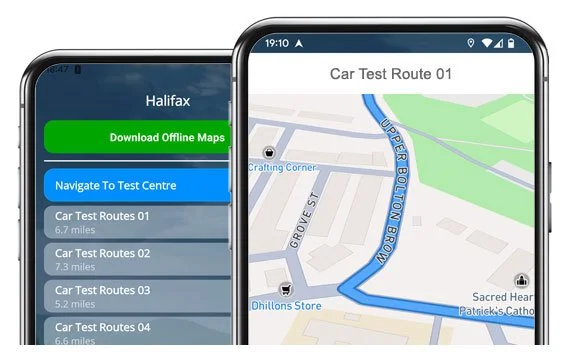
Download the app and drive 20 up-to-date Halifax test routes.
Learn the roads used in actual tests for a confident exam day!
Current Routes
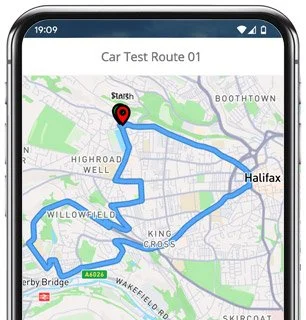
Route 1 Instructions:
- Turn left out of the Driving Test Centre, then at the end of the road turn right.
- On Cross Street West, turn right at the end.
- On Pellon New Road, turn left.
- On Spring Hall Lane, turn left at the end.
- Continue as Pellon Lane becomes Brackenbed Lane, then turn left at the end.
- On Long Lane, turn right.
- On Lane Ends, turn right.
- On Wheatley Road, turn left.
- Follow as it becomes Wheatley Lane, then turn right at the end.
- On Ovenden Way, turn right at the lights.
- At the Ovenden Road roundabout, go ahead on the second exit.
- Continue as Orange Street becomes Waterhouse Street, then turn right.
- Turn right onto Silver Street.
- Continue ahead on Central Street as it becomes Pellon Lane, then turn left at the lights.
- On Queens Road, turn right at the lights.
- On Gibbet Street, turn right.
- At the Court Lane roundabout, take the first exit left.
- On Highroad Well Lane, turn right.
- Turn right onto Gleanings Avenue.
- On Paddock Lane, take the first exit left at the roundabout.
- At the next Highroad Well Lane roundabout, go ahead on the second exit.
- At the following Highroad Well Lane roundabout, take the second exit right.
- Turn left onto Stretchgate Lane.
- Return along Cross Street West to the Driving Test Centre.
-
Turn left out of the Driving Test Centre, then turn left at the end of the road.
On Moorend Road, turn left.
On Sandbeds Road, take the third exit at the roundabout (right).
On Highroad Well Lane, go ahead on the second exit at the roundabout.
On Highroad Well Lane, turn left.
On Sandhall Lane, turn left at the end.
On Gibbet Street, turn right.
On Warley Road, turn left at the lights.
Turn left onto Burnley Road.
On Skircoat Moor Road, go ahead at the roundabout.
* Updated, complete route available on the app.
-
Turn left out of the Driving Test Centre, then turn right at the end.
On Pellon New Road, turn left.
On Spring Hall Lane, turn left.
Continue as Pellon Lane becomes Brackenbed Lane, then turn right at the end.
On Hebble Lane, turn left at the end.
On Wheatley Road, turn right.
On Ramsden Street, turn right at the end.
At the Denfield Lane roundabout, take the first exit left.
At the Ovenden Way roundabout, take the first exit left.
At the next two Cousin Lane roundabouts, go ahead on the first exit each time.
Continue on Cousin Lane, then turn left.
* Updated, complete route available on the app.
-
Turn left out of the Driving Test Centre, then turn left at the end.
On Moorend Road, turn left.
On Sandbeds Road, take the third exit right at the roundabout.
On Highroad Well Lane, go ahead on the second exit at the roundabout.
At the next Highroad Well Lane roundabout, take the first exit left.
On Court Lane, turn left at the end.
On Gibbet Street, turn right at the lights.
On Queens Road, turn left.
On King Cross Road, turn left at the end.
On Aachen Way, turn left.
At the King Cross Street roundabout, take the second exit right.
Continue as Fountain Street becomes Wards End, then Horton Street.
Turn left at the lights.
* Updated, complete route available on the app.


Average Length: 7 miles
Based on the 20 route variations offered in the app
Average Duration: 38 minutes
Key Focus Areas in Halifax
Throughout the 20+ possible test route variations from the Halifax Test Centre, there are a number of roads and roundabouts that occur more often than not. Take some additional time to practise the following:
Pellon Lane & Pellon New Road: These roads appear on almost every route variation and link the test centre with the north side of town. They include mixed gradients, parked cars, and meeting points, so early planning can really help.
Ovenden Road & Ovenden Way: Busy stretches with traffic lights, multiple roundabouts, and changing speed limits. They are good places to show-off your lane discipline and clear signalling.
Highroad Well Lane Area: This hilly, twisty section shows up in the majority of tests. Expect several roundabouts close together, requiring quick, confident decision-making.
Gibbet Street & Surrounding Residential Loops: A common area for performing manoeuvres. Visibility can be somewhat limited in places, so cautious progress and positioning will make a big difference.
Town Centre Loop (Orange Street, Waterhouse Street, Silver Street): This busy one-way system is ideal for demonstrating confident lane choice, responding early to traffic lights and showing awareness of pedestrians.

“Best driving test app out there! Helped me become more confident ready for my test.”

“Passed first time! Practicing the routes really helped!”
Route-Led provides Driving Test Routes for iPhone and Android devices. Download Halifax driving test routes straight to your device. Car, Motorcycle, ADI, and LGV routes are available.
Driving Test-Routes App


Compatible with Android, iPhone and SatNavs
Route-Led driving test routes work with a number of devices, and so ensuring that you do not really require a SatNav device for your driving practise lessons. Compared to the market, the rates we charge are extremely cheap meaning you don’t have to fork-out a lot of cash to practise the driving test-routes. Here at Route-Led, we plan on adding Satnav and Independent driving routes to our offering shortly. Download 2021 Halifax Driving Test-Routes now!
Up-to-date Routes
Every day Route-Led collaborates with instructors, experienced drivers and learners to improve our driving test-routes, meaning that you have the best information to excel in your driving test. Purchasing test-routes from Route-Led conserves your money and improves your ability. Route-Led is the premier supplier of Halifax test-routes in the United Kingdom. Download 2021 Halifax Driving Test-Routes now!
Routes for Experienced and Learner Drivers
If you are an experienced driver who needs to get acquainted with Halifax test routes for your motorbike or car or a learner driver who wants to pass their driving test, then Route-led has got you covered. The price of theory lessons, practical lessons and exorbitant insurance premiums, can be quite high! Why spend time and money when you can save both and increase your skills. Download 2021 Halifax Driving Test-Routes today!


Number one Provider of Driving Test Routes
Users are able to purchase Halifax test routes in Google Maps format. It doesn’t matter if you don’t have a dedicated Sat-nav as you can practise our test routes using either iPhone or Android. If you already own a Satnav (e.g. TomTom) you are able to purchase the routes for that device and start practising.
We work alongside Halifax driving instructors, to produce an updated test-route for the relevant place. Our test-routes are used by examiners everywhere in the United Kingdom for the purpose of driving tests, and as a result we highly encourage students and experienced drivers to get comfortable with the test-routes.
Halifax Driving Test-Route Formats Navigation


Android Satnav - Test Routes
TomTom Satnav Test Routes
iPhone Satnav - Test Routes
Accessing our Android driving test-routes is quite easy and is possible using a recommended third party Android software application or Route-led's dedicated Android app. As soon as you have installed your relevant software app on your device, you should then purchase the driving test-route from our official webpages. The pre-programmed driving test routes on your Android device will guide you through your practise session or test. Buy Halifax Driving Test Routes
Following 4th December, 2017, the United Kingdom driving test also requires following Sat nav instructions. Given Route-led is the top provider of SatNav test-routes in the United Kingdom, we provide a lot of routes for Garmin and Tomtom devices. For customers who want to buy Satnav devices, we definitely suggest the tomTom Start 52, pretty much because it is the number one pick for the Halifax driving test examiners.
Buy routes from our webpages into an iPhone or from Route-led's purpose built iPhone app. To use the test-route either use the dedicated Route-Led App or install a supported 3rd party iPhone software application. Supported third party software applications can be located in the iPhone app store.
Practise Halifax Test Routes


SatNav Driving Test
During your driving test, the examiner will select a preferred route on the Sat Nav. You will be requested to use the route chosen by the examiner in addition to the directions from the sat-nav. The make and model of the device will not matter, this is due to the fact that Route-led's test-routes are compatible with many different devices.You cannot utilise your personal Satnav device in the Halifax driving examination. For more information, you can find 2021 changes to the driving test here.
Practice
We aim to provide purchasers with a lot of support and help with our routes. You’ll quickly get good at the various routes provided. However, we definitely recommend using a person that is a professional teacher.
Independent Driving Test
In the course of the independent driving test, the examiner will provide the student all the relevant instructions. If the student becomes lost during the journey, they will be required to get confirmation on the instructions from the test examiner. Students can’t utilise personal Sat-Nav for independent driving as they give turn-by-turn prompts. Independent driving will test the skill of the examinee to undertake independent choices.
Halifax Test Centre Info
Halifax test centre can be found at 11 Cross Street West, Pellon, Halifax West Yorkshire HX2 0HA. There should be ramp access for disabled users but it would be best to call to make sure. There are also usually disabled, male and female facilities for use at the test centre but it's generally better to go before you head there! It is occasionally feasible to park at the test centre. If this is not possible, it ought to be easy to park nearby and walk. Be prepared for one-way streets, roundabouts, busy roads and difficult junctions. Navigating test routes whilst practising to drive is always very useful, allowing you to learn on roads that you will actually be driving during your test.
Address: 11 Cross Street West, Pellon, Halifax West Yorkshire HX2 0HA
Parking: Parking could be possible at the test centre. If it is not, park close by and walk there.
Toilets: There are usually male, female and disabled toilets at the test centre but better to use these at your house beforehand.
Test Centre Disabled access: You should be able to get into the test centre in a wheelchair but telephone ahead to make sure.
Find local test centre details: https://www.gov.uk/find-driving-test-centre