

Gloucester Driving Test Routes
The complete collection of current Gloucestershire test routes

PRACTISE NOW


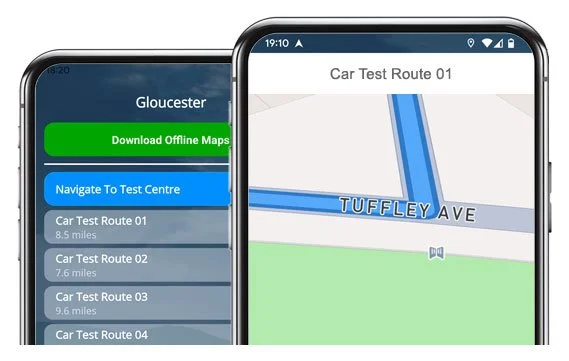
Drive the same 25 routes examiners use from Gloucester Test Centre.
Get the confidence to pass your test first time!
All Test Routes
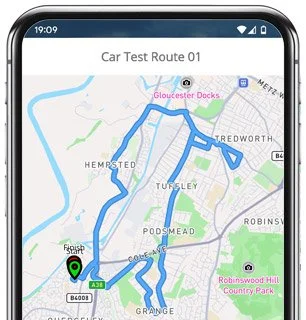
Route 1 Instructions:
- Leave the Driving Test Centre and continue ahead.
- At the Falcon Close roundabout, take the left exit.
- At the Merlin Drive mini roundabout, take the third exit to the right.
- At the end of Elmore Lane West, turn left.
- At the Haywicks Lane roundabout, take the third exit to the right.
- On Sellars Road, take the first left.
- At the end of Westland Road, turn right.
- At the Sellars Road roundabout, continue ahead (second exit).
- At the Arkendale Drive roundabout, take the second exit to the right.
- At the next Arkendale Drive roundabout, take the left exit.
- At the School Lane roundabout, take the third exit to the right.
- At the Fieldcourt Drive roundabout, take the third exit to the right.
- At the Bristol Road roundabout, take the third exit to the right.
- Continue as Bristol Road becomes Bath Road and take the fourth exit at the roundabout.
- At the A38 roundabout, continue ahead and then take the second right at the traffic lights.
- On Cole Avenue, turn right at the lights.
- At the Epney Road roundabout, take the third exit to the right.
- At the Tuffley Lane roundabout, take the third exit to the right.
- At the end of Greenhill Drive, turn left.
- Join the A38 and take the first left.
- On Bristol Road, turn right at the lights.
- At the Merlin Drive roundabout, take the left exit.
- Take the first left into Falcon Close and return to the Test Centre.
-
Leave the Driving Test Centre and turn right.
At the Falcon Close roundabout, take the right exit.
At the lights on Merlin Drive, turn right.
On Bristol Road, take the second roundabout left.
Turn right onto Naas Lane.
At the Telford Way roundabout, take the right exit.
At the Water Wells Drive roundabout, take the right exit.
On the A38, turn right at the traffic lights.
On Cole Avenue, turn left at the lights.
On Podsmead Road, take the third left.
* Updated, complete route available on the app.
-
Leave the Driving Test Centre and turn right.
At the Falcon Close roundabout, take the right exit.
At the lights on Merlin Drive, turn left.
At the Bristol Road / Cole Avenue roundabout, take the left exit.
At the Stroud Road roundabout, continue ahead then take the left exit.
On Linden Road, take the second left.
Turn right into Calton Road.
At the end of Tweenbrook Avenue, turn left.
On Stroud Road, turn right.
At the Tredworth Road roundabout, take the third exit to the right.
* Updated, complete route available on the app.
-
Leave the Driving Test Centre and turn right.
At the Falcon Close roundabout, take the right exit.
At the lights on Merlin Drive, turn right.
At the Bristol Road roundabout, continue ahead then take the next roundabout left.
Turn right onto Naas Lane.
At the Telford Way roundabout, take the right exit.
On the A38, go ahead at the lights, then turn right at the next set of lights.
At the Cole Avenue roundabout, take the right exit.
On Stroud Road, take the third right.
Turn right onto Grange Road.
At the end of Bybrook Road / Gurney Avenue, turn left.
* Updated, complete route available on the app.


Average Length: 9.1 miles
Based on 25 route variations offered in the app
Average Duration: 40 minutes
Key Focus Areas Around Gloucester
With 25 route variations starting at the Test Centre, there are inevitably some roads and roundabouts that appear across many. Try to learn these areas below, as there’s a good chance they will feature on your test:
Merlin Drive & Falcon Close Roundabouts: These appear at the start and end of every test route. They’re small but busy... good clutch control, careful observation and giving way correctly is essential for a positive start/end to your test.
Bristol Road / Bath Road Corridor: A long mixed-speed road with several roundabouts and commercial entrances. Examiners will assess your lane discipline, speed judgement, and awareness of vehicles emerging.
A38 & Cole Avenue Junctions: Several multi-lane traffic-light junctions and roundabouts appear across the routes, and are key areas for correct lane choice, signalling, and merging.
Tuffley Lane & Greenhill Drive Residential Areas: These quieter estates feature give-way signs, tighter bends and are likely locations for manoeuvres.
Waterwells / Naas Lane Business Park Loop: Wide roads and multiple roundabouts can feel fast and open. It's a great place to show-off your new confidence.

“Best driving test app out there! Helped me become more confident ready for my test.”

“Passed first time! Practicing the routes really helped!”
Route-Led provides Driving Test Routes for iPhone and Android devices. Download Gloucestershire driving test routes straight to your device. Car, Motorcycle, ADI, and LGV routes are available.
Gloucester Driving Test-Routes App


Compatible with Android, iPhone and SatNavs
Route-Led is a driving test route provider for a extensive range of devices such as Android, Garmin, Tomtom and iPhone for motorcycles, LGV, cars and taxis. Route-LED's rates are very affordable when compared to some of the test routes being sold in the market. Route-LED will shortly be adding independent driving routes to Route-led's offering. Get the latest Gloucester Driving Test-Routes today!
Up-to-date Routes
Each day Route-led collaborates with instructors, experienced drivers and learners to improve Route-LED's test-routes, ensuring that you have the latest information to excel in your test. Purchasing driving test-routes from Route-LED saves you cash and improves your driving ability. Route-led is the leading supplier of Gloucester test routes in the United Kingdom. Get the latest Gloucester Driving Test Routes today!
Routes for Experienced and Learner Drivers
Whether you are an experienced driver who wishes to get to know the Gloucester test routes for a car or motorbike or a learner driver who wishes to pass their driving test, then Route-Led has got you covered. The cost of theory lessons, exorbitant insurance premiums and practical lessons, can be a strain on your wallet! We understand that time and money are both at a premium. Route-LED helps you be efficient in both. Download 2021 Gloucester Test Routes today!


Premier Provider of Driving Test-Routes in the UK
Gloucester Driving Test-Routes are available on lots of devices including Google Maps. It does not matter if you don’t have a Sat-Nav because you can practise our test routes on either iPhone or Android. If you happen to have a Tom-tom device already, you are able to purchase our driving test routes for Tom Tom SatNav devices directly from our web page and then use it on your device for your practise sessions.
To ensure our test routes are fully updated, we work closely with Gloucester driving instructors and learner drivers. We are always open to feedback from our customers regarding any of our products.
Gloucester Test-Route Formats Navigation


Android SatNav Test Routes
Sat Nav Driving Test Routes
iPhone SatNav Test Routes
Utilising RL’s Android driving test routes is really simple provided you have RL’s app or a supported third party application installed on an Android device. Gloucester test routes for Android devices are available on our official webpages. After buying the driving test route, the customer can then either install a supported Android app or use RL’s dedicated app in order to use the relevant file.
Driving test-routes are available for purchase on our webpages. As soon as the driving test-routes have been bought from Route-led's website, the customer should install the driving test-route into their sat nav device and start their practise session. Gloucester test routes are voice-guided, thereby all the student needs to do is to receive instructions from the device.
Route-LED has made practicing test-routes much easier using an iPhone device by making driving test-routes specifically for iPhones. All you need to do is to either install RL’s purpose built iPhone app in the Apple app store or buy our iPhone format file, and then use a recommended 3rd party app to access the driving test routes following our step-by-step guide. The iPhone device will navigate you to the Gloucester test centre, completely around the test-route, and then returning to the test centre. Whilst learning with Route-Led's test routes, you will be led securely with the helpful voiced instructions to Gloucester test centre.
Learn Gloucester Test Routes
The test examiner will require the student to take directions from a setup Sat-nav on their own. The SatNav will include the route that the learner will be required to follow. The make or model of Satnav device used while the exam is in progress won’t matter as the test-route will be identical. In the situation where the student accidentally takes the wrong road, the examiner will advise accordingly. That said, we highly recommend the Tom Tom Start 52 mainly as it is what examiners use whilst examining driving tests.

Route-led provides customers with a high degree of help and support to use our test routes. You will get used to all the different sections of the routes to be navigated during the test. We would suggest using a knowledgeable driving instructor in addition. For more information on how you can practise for your driving test please go to Driving Test Practice

The Independent driving test does not test your ability to follow directions. Moreover, an independent driving test does not check your ability to remember instructions. If you query the examiner for updated instructions, they should confirm them for you. Veering off route won’t change your test results in any way. Don’t worry about unclear road signs as the examiner will help you should you require it. You should note that you cannot bring your own Sat-nav with you to take the test. This is due to the fact that your own Sat-nav will be setup to give step by step instructions.
Gloucester Test Centre Info
Gloucester test centre can be found at Falcon Close Green Farm Business Park, Falcon Close, Quedgeley, Gloucester Gloucestershire GL2 4LY. There should be ramp access for wheelchair users but we suggest calling to make sure. There are also quite often disabled, female and male facilities for use at the test centre but it's probably better to use these at home beforehand! It’s occasionally feasible to park at the test centre. If this is not possible, it should be easy to park nearby and get there by foot. Practise busy roads, difficult junctions, one-way streets and roundabouts. Navigating test routes while practising to drive is always very useful, allowing you to practice on routes that you will certainly be driving during your test.
Address: Falcon Close Green Farm Business Park, Falcon Close, Quedgeley, Gloucester Gloucestershire GL2 4LY
Parking: Parking could be available at the test centre. If not, park close by and head by foot.
Toilets: There are quite often disabled, female and male facilities at the test centre but better to go before you travel there.
Test Centre Disabled access: You should be able to get into the test centre in a wheelchair but call ahead to make sure.
Find local test centre details: https://www.gov.uk/find-driving-test-centre