

Gillingham Driving Test Routes
Know the roads, ace your test - real routes for real confidence

START PRACTISING


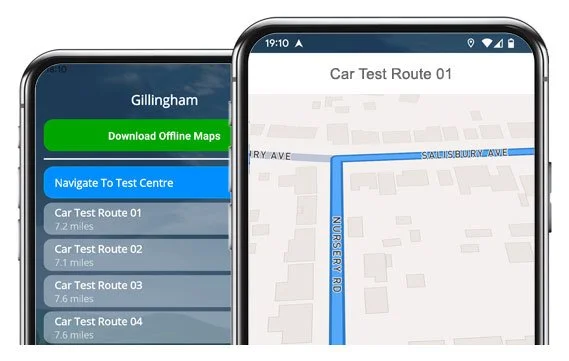
Build test-day confidence with 21 actual routes direct from Gillingham Test Centre.
Practise the smart way and give yourself an advantage.
The Routes
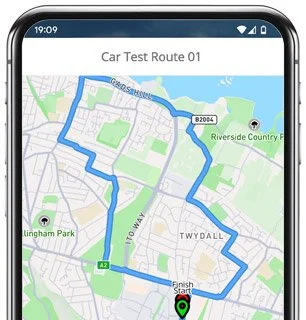
Route 1 Instructions:
- Leave the Driving Test Centre and turn left at the end of the road.
- On Bailey Drive, take the roundabout to the left.
- At Grosvenor Road, take the roundabout to the right.
- Continue along Will Adams Way, then take the next roundabout left and the following roundabout ahead.
- Follow Ito Way (A289) ahead at the roundabout.
- Continue on Yokosuka Way (A289) ahead at the roundabout.
- Turn fourth left onto Pier Road (A289).
- At the end of King Edward Road, turn right.
- At the end of Grange Road, turn right.
- Follow Ingram Road onto Church Street and take the second left.
- Continue on Forge Lane onto Parr Avenue and take the fifth right.
- On Corporation Road, take the first left.
- Continue ahead at the crossroads on Hamilton Road, then turn left at the end.
- At the end of Lincoln Road, turn right.
- Continue from Roseberry Road onto Medway Road.
- At the traffic lights, turn right, then take the left for the second exit into the Medway Tunnel.
- On Northern Link (A289), take the first exit left at the roundabout.
- Continue on Maritime Way ahead at the roundabout.
- At Dock Road, take the roundabout left.
- Continue on Wood Street onto Brompton Road, which becomes High Street, then Arden Street, then Jeffery Street.
- At the lights on Victoria Street, continue ahead.
- Turn right onto Balmoral Road.
- At the lights on Duncan Road, continue ahead.
- Follow Nelson Road onto Canterbury Street and turn left at the end.
- Continue along Watling Street (A2), which becomes Sovereign Boulevard, and take the roundabout to the right.
- On Will Adams Way, take the next roundabout right, then the following roundabout left.
- At Grosvenor Road, take the roundabout right.
- On Bailey Drive, take the fifth right.
- Turn into Campus Way and return to the Driving Test Centre.
-
Leave the Driving Test Centre and turn left at the end.
Follow Bailey Drive and take the roundabout left.
At Grosvenor Road, take the roundabout right.
Continue along Will Adams Way, taking two consecutive roundabouts left.
Join Watling Street (A2) and take the first right at the traffic lights.
Turn left onto Woodlands Road.
Take the first right into First Avenue.
Turn left at the end of Glebe Road.
At the end of Second Avenue, turn right.
Turn left onto Barnsole Road.
Continue ahead at the crossroads on Seaton Road and turn right at the end.
* Updated, complete route available on the app.
-
Leave the Driving Test Centre and turn right at the end.
On Bailey Drive, take the roundabout right.
Continue on Ambley Road ahead at the roundabout.
At Hempstead Road, take the roundabout right.
On Hempstead Valley Drive, take the roundabout left.
Return to Hempstead Road and take the roundabout right.
At Dukes Meadow Drive, turn left at the end.
At Pear Tree Lane, take the roundabout right.
On Capstone Road, take the roundabout right.
Turn left at the end of Ash Tree Lane.
On Rainham Road (A2), take the fourth right at the traffic lights.
* Updated, complete route available on the app.
-
Leave the Driving Test Centre and turn right at the end.
On Bailey Drive, take the roundabout right.
At Ambley Road, take the roundabout left.
At Hoath Way, take the roundabout left.
On Hoath Way (A278), continue ahead at the roundabout (second exit).
Turn left onto Twydall Lane.
At the end of Lewis Lane, turn right.
At Eastcourt Lane, take the roundabout left.
On Beechings Way, continue ahead at the roundabout.
Turn right at the traffic lights onto Cornwallis Avenue.
Turn left onto Woodlands Road.
Turn right onto Sunnymeade Avenue.
* Updated, complete route available on the app.


Average Length: 7.3 miles
Based on the 21+ route variations offered in the app
Average Duration: 38 minutes
Frequent Features
With over 20 route variations of the Gillingham practical test, there are of course a number of areas that feature regularly. Give the following roads and roundabouts a little extra practise as they might well show up.
Will Adams Way & Grosvenor Road Roundabouts: These sit at the heart of the Medway network and appear in almost every route, coming up quickly and often in sequence. They're a good test of lane choice, signalling and forward planning.
A289 Ito Way & Yokosuka Way: Fast-moving dual carriageway sections with several roundabouts to negotiate. You’ll need to demonstrate confident acceleration, good merging judgement and steady positioning.
Medway Tunnel (A289): A unique feature of this area (and of many test routes). Tunnel driving requires correct spacing, good speed control and awareness of changing light conditions.
Gillingham Road & Balmoral Road Corridor: A busy urban stretch where you'll encounter traffic lights, pedestrians and several quick turns.
High Street / Canterbury Street One-Way System: A tight sequence of mandatory turns, lane markings and traffic lights. Staying calm and reading the signs early is key to navigating these stretches.

“Best driving test app out there! Helped me become more confident ready for my test.”

“Passed first time! Practicing the routes really helped!”
Route-Led provides Driving Test Routes for iPhone and Android devices. Download Gillingham driving test routes straight to your device. Car, Motorcycle, ADI, and LGV routes are available.
Gillingham Test Routes App


Compatible with Android, iPhone and SatNavs
Up to date Routes
Routes for Experienced and Learner Drivers
As a leading test-route provider in the United Kingdom, Route-LED provides test-routes that work with very many devices including Tomtom, Garmin, Mac, iPhone and PC devices. Our rates are very affordable when compared to many of the test routes being sold in the marketplace. In an effort to expand Route-Led's offering, Route-Led will shortly be updating our products to add independent driving routes. Get the latest Gillingham Driving Test-Routes now!
To improve Route-led's product and make sure that our test routes are up to date, we collaborate closely with learner drivers and instructors operating in Kent. New drivers are able to save lots of money by buying driving test-routes from Route-LED, leaving you to improve your driving ability in the best way. Of all the providers of driving test routes, Route-led is the leading. Get the latest Gillingham Test-Routes today!
Whether you are a driver with experience that needs to get to know the Gillingham test-routes for your vehicle or motorbike or a new driver who wishes to pass their driving test, then Route-Led is the provider for you. Being taught how to drive and the related costs of insurance can often be a very costly process. Our driving test routes for your test will allow you to be time and money cost efficient. Get the latest Gillingham Driving Test Routes today!
Premier Supplier of Driving Test-Routes in the UK
Customers are able to buy Gillingham driving test-routes for use in Google Maps. iPhone and Android customers are able to load the test routes on those devices too. Tom Tom owners are also able to download driving test-routes to work on that device.
In order to make sure our driving test routes are up to date, Route-LED works closely with local Gillingham driving instructors and learner drivers. We are always open to information from our clients with respect to any of Route-LED's products.


Gillingham Test-Route Formats Navigation


Android Sat-nav Test Routes
By buying our dedicated Android application, you can effortlessly utilise our test routes. Download the recommended applications and immediately start testing your driving ability today. Route-led's detailed instructions will enable you to focus on increasing your driving ability whilst getting to experience the test-routes.
Satnav Test Routes
Before you take a driving test, it is really important to be familiar with every one of the potential test-routes. Being familiar with your driving test routes will not only increase your confidence but, in addition, ensure that you drive safely. Using our Satnav test routes is very easy, generally because you can just follow the turn by turn instructions on the device while driving.
iPhone Sat-nav Test Routes
Download routes from Route-Led's website directly into an iPhone or from our dedicated iPhone app. To use the test route either use the dedicated Route-LED App or install a recommended third party iPhone software application. Supported 3rd party software applications can be found in the iPhone app store.
Learn Gillingham Driving Test Routes
In your driving test, the examiner will choose a particular route on the Sat-nav device. You will be expected to follow the route chosen by the examiner in addition to the instructions from the sat-nav. The model and make of the device will not make a difference, this is because our test routes work with many different devices.You can’t use your own Sat-Nav in the driving examination. For more info, you can get 2021 changes to the driving test here.

We aim to supply customers with a lot of support and help with Route-Led's products. You will quickly get good at the different routes we provided. However, we definitely recommend having someone who is a professional teacher.

During the independent driving test, the examiner will give the learner all the relevant instructions. If the student gets lost along the way, they will need to confirm the instructions from the examiner. Learners cannot use personal SatNav for independent driving because they give detailed voice prompts. Independent driving will test the ability of the learner to undertake independent choices.
Gillingham Test Centre Details
Gillingham test centre is located at Unit 1, Astra Park, Courteney Road, Gillingham Kent ME8 0RZ. There should be ramp access for disabled users but we suggest calling to confirm. There are also quite often disabled, male and female facilities available at the test centre but it's generally better to use these at your house beforehand! It is occasionally possible to park at the test centre. If this is not possible, it ought to be fine to park nearby and walk. Practise one-way streets, busy roads, difficult junctions and roundabouts. Navigating test routes whilst learning to drive is always very useful, allowing you to learn on routes that you will certainly be going on during your examination.
Address: Unit 1, Astra Park, Courteney Road, Gillingham Kent ME8 0RZ
Test Centre Parking: Parking could be possible at the test centre. If not, park nearby and head by foot.
Toilets: There are usually female, male and disabled toilets at the test centre but better to go before you travel there.
Test Centre Disabled access: You ought to be able to get into the test centre in a wheelchair but telephone in advance to make sure.
Find local test centre details: https://www.gov.uk/find-driving-test-centre