

Gateshead Driving Test Routes
Train on actual examiner routes to eliminate test day surprises!

PRACTISE SMARTER


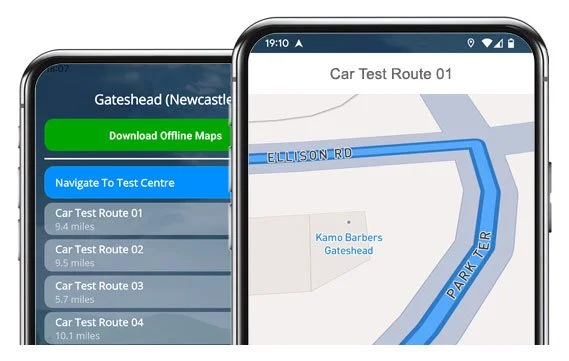
Get our learner driver app on iOS or Android and practise 20+ authentic test centre routes.
Practise the smart way and ace your test first time!
The Routes
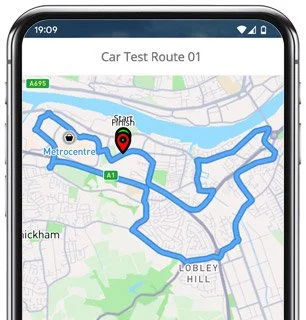
Route 1 Instructions:
- Leave the Driving Test Centre and turn right onto Palting Way.
- Continue on Waterside Drive and turn left at the end of the road.
- Follow Wellington Road / Dunston Road and take the fifth left.
- Join the A184 / A1 and follow the road left.
- At the A184 roundabout, take the third exit.
- Continue on Askew Road and take the third left at the traffic lights.
- Join the A167 using the left lane for the Swing Bridge.
- At the lights, turn left onto Bottle Bank.
- Follow Bridge Street to the left.
- Turn right at traffic lights onto Forth Banks.
- Turn left into Jury’s Inn Lane.
- Turn left again onto Scotswood Road.
- Use the left lane for Redheugh Bridge and take the third exit at the roundabout.
- Continue on Askew Road West and go ahead at the roundabout.
- At the lights, turn left onto Askew Road West.
- Turn left into Team Street.
- Follow Yetholme Road / Johnson Street to the end and turn right.
- At the mini roundabout on Derwentwater Road, turn left.
- Join the flyover and turn left.
- Follow Bolam Street / Angus Road to the end and turn right.
- At the lights on Victoria Road, turn right.
- Continue to Lobley Hill Road and take the third exit at the roundabout.
- At the next Lobley Hill Road roundabout, turn right.
- Join the A1 North via the slip road.
- Take the first exit from the A1.
- At the slip road, turn right at the traffic lights.
- On Dunston / Wellington Road, take the first right after the bridge.
- Follow Waterside Drive, turning left then right.
- Return to the Driving Test Centre.
-
Leave the MPTC and turn right, then right again.
Follow Waterside Drive and turn right at the end.
At the mini roundabout on Wellington Road, turn left.
At the lights on Cross Lane, turn right using the right-hand lane.
Continue along Scotswood View through the roundabout, straight ahead at the lights, and ahead again at the next roundabout.
On A1114 Riverside Way, go ahead at the roundabout.
At the next roundabout, turn right.
Join the A695 towards Scotswood Bridge using the left lane.
Continue on Scotswood Road, ahead at the second roundabout and take the first right.
On Tyne View, take the sixth right.
At the mini roundabout on Union Hall Road, turn right.
* Updated, complete route available on the app.
-
Leave the Test Centre and turn right onto Waterside Drive.
At the end, turn left.
On Wellington Road, take the sixth left.
Join the A184 left.
At the slip road, turn right at the end.
At the mini roundabout on Derwentwater Road, turn right.
Continue on Derwentwater Road and turn left.
Continue along Bolam Street / Angus Road and turn right at the end.
Turn right at lights onto Victoria Road.
On Lobley Hill Road, take the second left.
Turn right onto Queensway.
* Updated, complete route available on the app.
-
Leave the Test Centre and turn right onto Waterside Drive.
At the end, turn left.
On Wellington Road, take the sixth left slip road.
At the A184 roundabout, turn left.
At Askew Road West roundabout, turn left.
Turn left at lights onto Cuthbert Street.
Turn right at lights onto Bensham Bank.
At the mini roundabout on Coatsworth Road, turn left.
At the mini roundabout on Whitehall Road, turn right.
Turn left onto Alexandra Road.
At the end of Exeter Street, turn right.
Continue ahead on Prince Consort Road.
* Updated, complete route available on the app.


Average Length: 8.8 miles
Based on the 20+ route variations offered in the app
Average Duration: 39 minutes
Key Areas to Focus On
With more than 20 route variations there are always going to be roads and roundabouts that feature heavily. Spend some time practising the following 5 areas as they will likely show up during your Gateshead test.
Askew Road (& Askew Road West)
Linking busy multi-lane roundabouts and offering a good test of lane choice, timing and planning. Traffic can build up quickly here, so keep your spacing and check your mirrors regulalry.
Redheugh Bridge
Several routes cross or approach the Redheugh Bridge, where correct lane discipline is vital, especially when peeling off into the roundabout system immediately after the crossing.
A1 Junctions & Slip Roads
Northbound and southbound sections are common, depending on the route. You’ll need to demonstrate confident acceleration, safe merging and a clear checks over your shoulder.
Victoria Road to Lobley Hill Road Corridor
This stretch appears on several of the routes and includes traffic lights, a tight roundabout, and some lane changes.
Wellington Road & Waterside Drive
Most tests start and finish here, often using early mini-roundabouts and/or unexpected priority shifts. It’s a calm place to settle in but still requires good awareness.

“Best driving test app out there! Helped me become more confident ready for my test.”

“Passed first time! Practicing the routes really helped!”
Route-Led provides Driving Test Routes for iPhone and Android devices. Download Gateshead Driving Test Routes straight to your device. Car, Motorcycle, ADI, and LGV routes are available.
Test-Routes App - New Version


Compatible with Android, iPhone and SatNavs
Up to date Routes
Routes for Experienced and Learner Drivers
As the leading test-route provider in the UK, Route-Led creates driving test-routes that work with very many modern devices such as Mac, iPhone, PC, Garmin and Tomtom devices. Compared with the marketplace, the rates we charge are extremely low which means that you don’t need to spend a lot of cash to practise the driving test routes. We intend on adding Sat-nav and Independent driving routes to Route-Led's offering shortly. Download 2021 Gateshead Driving Test Routes now!
Instructors and Learner drivers are continually supplying Route-LED with improved test-route information, meaning that Route-LED is the top supplier of test routes. At good value prices we provide you driving test-routes that you are able to use to increase your ability whilst simultaneously lowering the expenditure on driving lessons. We pride ourselves on being the leading provider of test-routes. Download 2021 Gateshead Driving Test-Routes now!
It doesn't matter if you are an experienced driver looking at the advanced, taxi or new vehicle test, a new driver looking to excel in their driving test or an instructor wanting to understand the newest driving test routes. Route-led is the place for everything you need. People can end up spending a huge amount of money being taught how to drive. Who would waste money and time when you are able to conserve both and at the same time improve your skills. Download 2021 Gateshead Test-Routes now!
#1 Provider of Driving Test Routes in the UK
Route-Led's Gateshead driving test routes are able to be used on Google Maps. Those who have not bought a SatNav are able to use their Android or iPhone devices to load our driving test-routes. If you have a SatNav (e.g. TomTom) you are able to purchase the relevant driving test routes and get learning right away.
Due to the help of local learner drivers and Gateshead examiners who conduct tests each day on these routes, we are can develop a lot of top quality test routes for sat-nav, iPhone, Garmin and Android devices.


Gateshead Test-Route Formats Navigation
Accessing our Android test-routes is very simple and is possible using Route-Led's dedicated Android app or a recommended 3rd party Android software app. As soon as you have loaded your chosen application on your device, you can then purchase the driving test-route from our website. The pre-programmed driving test routes on your Android device will lead you through your test or practise session. Buy Gateshead Test Routes

From December 4 2017, the United Kingdom driving test includes being able to follow SatNav directions. As the leading provider of SatNav test routes in the UK, we supply a lot of routes for Garmin and Tom Tom devices. For those that want to purchase Satnav devices, we highly suggest the tomTom Start 52, mainly because it is the leading choice for the Gateshead driving test examiners.

Route-led has made practising test routes much simpler using an iPhone by creating driving test-routes just for iPhones. All you need to do is to either load RL’s purpose built iPhone app in the Apple app store or purchase our iPhone format file, and then install a supported third party application to use the test routes following our step-by-step guide. The iPhone can then navigate you to the Gateshead test centre, completely along the test-route, and then returning to the test centre. Whilst using Route-Led's test routes, you’ll be navigated securely with the helpful voice-guided instructions to Gateshead test centre.
Practice Gateshead Test Routes


SatNav Driving Test
The examiner will ask the student to follow instructions from a pre-configured Sat-nav on their own. The Satnav will show the route that the learner needs to track. The make or model of Sat nav device used while the examination is going on will not make a difference as the driving test-route will be the same. In case the student takes a different road, the examiner will let them know and give instructions. That said, we very much recommend the Tomtom Start 52 mainly because it is the device examiners utilise whilst examining driving tests.
Practice
Route-LED provides clients with a high degree of support and help to utilise our test-routes. You will get accustomed to all the different sections of the roads to be navigated during the examination. We would suggest using a knowledgeable driving instructor in addition. For more information on what you can do to pass your driving examination please visit Driving Test Practice
Independent Driving Test
If you go off the independent driving route, it won’t have any effect on your test results except if you do some other driving fault, make a traffic offence or break a traffic regulation. In the case where you make a wrong route choice, the examiner will help you get back to the correct route. In case of poor or obscure road signs, the examiner will direct the learner until they arrive at the following clear road sign. The examinee doesn’t need to have a good understanding of the area. You cannot use your personal Sat-nav for independent driving, as it gives the student very detailed instructions. The independent driving section will test if you are able to effect secure independent decisions.
Gateshead Test Centre Details
Gateshead test centre is located at Waterside Drive, Dunston, Gateshead Tyne and Wear NE11 9HU. There ought to be ramp access for wheelchair users but it would be best to call to confirm. There are also quite often female, disabled and male facilities available at the test centre but it's generally better to go before you travel there! It is sometimes feasible to park at the test centre. If this is not possible, it should be fine to park close by and walk. Practise busy roads, one-way streets, difficult junctions and roundabouts. Using test routes while learning to drive can be very helpful, allowing you to practise on routes that you will actually be going on during your test.
Address: Waterside Drive, Dunston, Gateshead Tyne and Wear NE11 9HU
Test Centre Parking: Parking may be available at the test centre. If it is not, park nearby and head by foot.
Test Centre Toilets: There are usually disabled, female and male toilets at the test centre but better to use these at home before.
Disabled access: You should be able to get into the test centre in a wheelchair but call in advance to confirm.
Find local test centre details: https://www.gov.uk/find-driving-test-centre