

Eastbourne Driving Test Routes
The only app offering real, current test routes for Cars, Motorcycles, ADIs & LGVs.

START PRACTISING


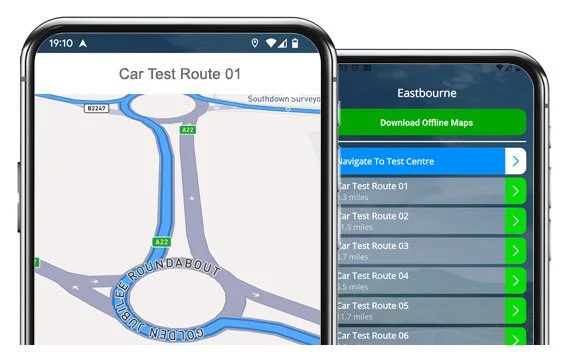
Practise genuine Eastbourne driving test routes from the comfort of your car.
Build test-day confidence with turn-by-turn satnav guidance.
Test Route Examples
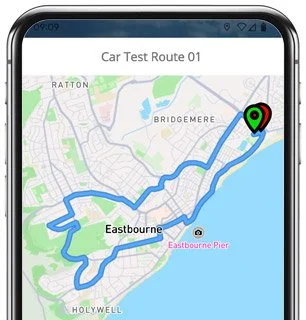
Route 1 Instructions:
- Depart from the Driving Test Centre and turn right
- At Wartling Road Roundabout, take the 5th exit (right)
- Turn right onto Royal Parade
- At the end of Addingham Road, turn left
- On Seaside, take the 5th right
- Turn right onto Langney Road, then the 3rd right onto Bourne Street
- At Cavendish Avenue / Firle Road lights, turn right
- On Whitley Road, take the 2nd left
- Take the 2nd right into St Philips Avenue
- Take the 2nd left into Woodgate Road
- At the end of Baillie Avenue, turn left
- At the end of Woodgate Road, turn left
- At Seaside Roundabout, take the 1st exit (left)
- At Lottbridge Drove Roundabout, go ahead, then take the next roundabout right
- At Highfield Link Roundabout, go ahead (2nd exit)
- At Golden Jubilee Roundabout, take the 3rd exit (right)
- On Dittons Road, take the 3rd right
- At Lion Hill / Friday Street Roundabout, take the 1st exit (left)
- At Willingdon Drove Roundabout, take the 2nd exit (right)
- At Langney Rise Roundabout, go ahead (2nd exit)
- Turn left onto Princes Road
- Turn right onto Ramsey Way
- At the end of Cunningham Drive, turn right
- Turn left onto Beatty Road
- At Princes Road Roundabout, take the 4th exit (right)
- Return along Wartling Road to the Driving Test Centre
-
Depart from the Driving Test Centre and turn right
At Wartling Road Roundabout, take the 2nd exit
Turn right onto Princes Road
On Beatty Road, take the 4th left
Turn left onto Mountbatten Drive
Take the 2nd left onto Fraser Avenue
At the end of Mountbatten Drive, turn right
At the end of Cunningham Drive, turn left
At the end of Ramsey Way, turn right
At Princes Road Roundabout, go ahead (2nd exit)
Turn right onto Langney Rise
* Updated, complete route available on the app.
-
Depart from the Driving Test Centre and turn right
At Wartling Road Roundabout, take the 5th exit (right)
Turn right onto Royal Parade
At the end of Addingham Road, turn left
At the lights on Seaside Road, turn right
Continue through Cavendish Place lights ahead, then turn right at the next lights
At the lights on Cavendish Avenue / Firle Road, turn right
On Whitley Road, take the 2nd left
On St Philips Avenue, take the 2nd right
Turn left onto Woodgate Road
Turn left onto Fitzmaurice Avenue
Turn left again onto Woodgate Road
Turn left onto Bailey Avenue
* Updated, complete route available on the app.
-
Depart from the Driving Test Centre and turn right
At Wartling Road Roundabout, take the 1st exit (left)
At Lottbridge Drove Roundabout, take the 1st exit (left)
On Seaside, take the 6th right
At Roselands Avenue Crossroads, continue ahead
At the end of Harding Avenue, turn left
Turn left onto Astaire Avenue
Turn left onto Hunloke Avenue
Turn left again onto Astaire Avenue
Exit Brookmead Close and turn left
At the end of Astaire Avenue, turn left
Turn immediately right into Ringwood Road
* Updated, complete route available on the app.


Average Length: 9.4 miles
Average Duration: 39 minutes
Based on the 15+ route variations offered in the app:
Route Focus Areas
With more than 15 route variations starting from Eastbourne Test Centre, we often find areas appearing more than others. The following 5 roads and roundabouts are worth a little extra practise:
Wartling Road Roundabout
Right outside the test centre, this large five-junction roundabout is often your first challenge. It’s great place to practice timing and positioning.Royal Parade & Seaside Road
These long, seaside stretches test your ability to maintain speed limits and spot hazards early. Expect frequent pedestrian crossings and parked vehicles pulling out unexpectedly.Langney Rise & Princes Road
A quieter area ideal for practising turns, mini-roundabouts, and manoeuvres. Observations matter here, as these quieter roads can feel deceptively simple.Friday Street Roundabout
A major junction connecting several local routes making for a perfect test of lane discipline and planning under pressure.Highfield Link & Lottbridge Drove
Fast-flowing dual-carriageway-style route sections where you’ll likely be tested on lane positioning, lane changing and joining safely from a roundabout.

Route Tips
If you’ve already given yourself the biggest advantage by downloading our app, you can increase your chances of passing even further by following these simple tips:
Practice Length
40-50 minute practice sessions are a good length as they mimic actual test durations. Try to drive as much as possible in advance.
Choice of Route
Choosing a simple route from the preview screen is a great way to start until you have built the confidence to try harder maps.
Time and Weather
It’s impossible to predict the traffic level and weather on test day, so try to drive in all weather conditions and even during rush hours.
“Best driving test app out there! Helped me become more confident ready for my test.”

“Passed first time! Practicing the routes really helped!”
Route-Led provides Driving Test Routes for iPhone and Android devices. Download driving test routes straight to your device. Car, Motorcycle, ADI, and LGV routes are available.
Eastbourne Test-Routes App - Latest Version


Compatible with Android, iPhone and SatNavs
Up to date Routes
Routes for Experienced and Learner Drivers
All our test routes are compatible with lots of devices, thus ensuring that you do not necessarily need a Sat nav device for your practice sessions. Route-led supplies one of the cheapest means to practise your test routes. Here at Route-Led, we intend to add Satnav and Independent driving routes to our products soon. Download 2021 Eastbourne Driving Test Routes now!
To improve our product delivery and ensure that our test routes are up to date, we work together with local learner drivers and instructors operating in Sussex. You can conserve your cash by purchasing driving test-routes from Route-Led, which means you can improve your driving ability in the best way. Route-LED is the premier provider of Eastbourne driving test-routes in the UK. Get the latest Eastbourne Driving Test-Routes now!
It's immaterial if you are a new driver seeking to pass their driving test, an experienced driver looking at the taxi, advanced or new vehicle test or an instructor looking to learn the latest driving test routes. Route-Led is the best place for all your driving test route needs. Being taught how to drive and the related price of vehicle insurance can often be a very costly procedure. Route-led's driving test routes for your test will let you to be money and time cost efficient. Get the latest Eastbourne Driving Test-Routes today!


Leading Supplier of Test-Routes in the UK
Route-LED's Eastbourne test-routes can be used with Google Maps. People that haven’t purchased a SatNav device can make use of iPhone or Android devices to access Route-Led's driving test-routes. tom-tom users are also able to buy test-routes to work on their device.
Route-Led works closely with local Eastbourne driving instructors, to produce an updated test-route for the relevant place. Route-LED's test-routes are also used by examiners everywhere in the UK for the purpose of driving tests, and thereby we encourage both students and experienced drivers to get comfortable with the driving test-routes.
Eastbourne Test-Routes Navigation


Android SatNav Driving Test Routes
Utilising our Android driving test-routes is very simple as long as you have RL’s app or a supported third party application loaded on your Android device. Eastbourne test-routes for Android devices are available on our webpages. Subsequent to purchasing a test route, the user will then either use RL’s dedicated app or install a supported Android software app in order to access a particular route.
Sat-Nav - Driving Test Routes
Driving test routes can be bought on Route-Led's webpages. Once the driving test-routes have been bought from Route-Led's webpages, the student should install the test route into their Sat-Nav device and start their driving session. Eastbourne test routes include voice guiding, as a result all the customer will be required to do then is to take instructions from the device.
iPhone SatNav Driving Test Routes
Route-Led has made practicing driving test-routes a lot simpler with an iPhone by making test routes just for iPhones. All you need to do is to either load RL’s dedicated iPhone app from the Apple app store or buy our iPhone file, and then install a supported third party application to use the driving test routes using our step-by-step instructions. Your iPhone will lead you to the Eastbourne test centre, completely along the driving test-route, and then back to the test centre. While learning with our driving test-routes, you’ll be navigated safely with the helpful voiced instructions to Eastbourne driving test centre.
Learn Eastbourne Driving Test Routes


Satnav Driving Test
Practise
Independent Driving Test
Whilst undertaking the independent driving test, the examiner will request the learner driver to take instructions from the SatNav device. The examiner will provide an already setup tom-tom Start 52 device. All you will have to do is to take instructions from the sat-Nav. The make or model of the Satnav that you will use during your learning sessions won’t matter at all. As a leading Sat-Nav company, we provide driving test routes for Garmin, iPhone, Tomtom and Android devices.You can’t use your own Sat-Nav device during the driving examination.
As a service-oriented company, we supply Route-LED's customers with extra support and help for our test routes. Learning with Route-LED's test routes allows the users to experience the roads, corners and junctions that they will be driving on during their driving tests.To assist the student in learning how to conduct a vehicle safely and in addition to pass the driving examination, we definitely suggest using a good driving teacher. How it works
When you veer off the independent driving route, it’s not going to have any effect on your test results unless you break a traffic regulation, do some other driving error or commit a traffic offence. If you make a wrong turn, the test examiner will assist you in getting back to the correct route. Where you have poor or obscure road signs, the examiner will direct the learner until they get to the next visible road sign. The learner does not need to have a detailed knowledge of the area. You can’t use your personal SatNav device for independent driving, mainly because it gives the student turn by turn prompts. The independent driving section is designed to test if you are able to make secure independent decisions.
Eastbourne Test Centre Info
Eastbourne test centre can be found at 1 Coastguard Cottages, 84 Wartling Road Sussex BN22 7PT. There should be ramp access for disabled users but we suggest calling to make sure. There are also quite often female, disabled and male facilities for use at the test centre but it's probably better to go before you head there! It’s occasionally possible to park at the test centre. If this is not possible, it ought to be easy to park nearby and walk. Practise difficult junctions, roundabouts, one-way streets and busy roads. Navigating test routes whilst learning to drive is always very helpful, as it allows you to learn on roads that you’ll certainly be driving during your examination.
Address: 1 Coastguard Cottages, 84 Wartling Road Sussex BN22 7PT
Parking: Parking could be possible at the test centre. If not, park close by and head by foot.
Test Centre Toilets: There are usually disabled, female and male facilities at the test centre but better to use these at your house beforehand.
Test Centre Disabled access: You ought to be able to get into the test centre in a wheelchair but telephone ahead to make sure.
Find local test centre details: https://www.gov.uk/find-driving-test-centre