

Dunfermline Driving Test Routes
The smart way to prepare for your Dunfermline driving test.
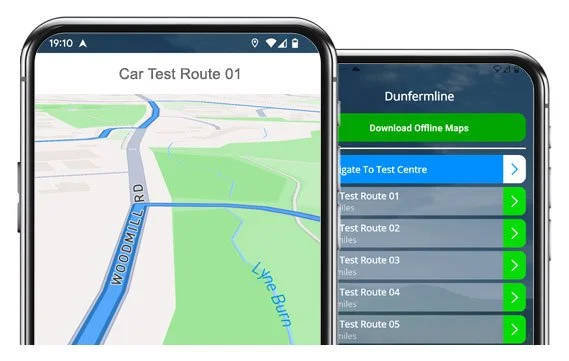

START PRACTISING


Drive the same Dumfermline test routes examiners use.
Download our app today and boost your confidence for test day.
Route Examples
Route 1 Instructions:
- Depart from the Driving Test Centre and at the end turn left
- At Pitreavie Way / Grange Drive Roundabout, take the 3rd exit (right)
- At Queensferry Road Roundabout, go ahead for the 2nd exit, continue through the next roundabout (3rd exit, Rosyth), then at the next one take the 3rd exit (right)
- Turn left onto Primrose Lane
- At the end of Anderson Lane, turn right
- On Primrose Avenue, take the 3rd right
- At the end of Forker Avenue, turn right
- On Camdean Crescent, take the 2nd left
- At the end of Camdean Lane, turn right
- At Park Road West Roundabout, take the 3rd exit (right)
- At Kings Road Roundabout, take the 1st exit (left)
- At Admiralty Road Roundabout, take the 4th exit (right) toward North Queensferry
- At Castlandhill Road Roundabout, go ahead (1st exit), then take the next roundabout left toward Inverkeithing
- At Ferrytoll Roundabout, take the 3rd exit (right) toward Inverkeithing
- Continue along Hope Street / High Street / Church Street through two mini roundabouts
- At Chapel Place Roundabout, take the 3rd exit (right), then at the next roundabout take the 1st exit (left)
- On North Road, take the 1st left
- At Masterton Road / Skylark Road Roundabout, take the 1st exit (left)
- At Carnegie Avenue Roundabout, go ahead (2nd exit)
- On Pitreavie Way / Pitreavie Drive, take the 2nd left
- Return to the Driving Test Centre
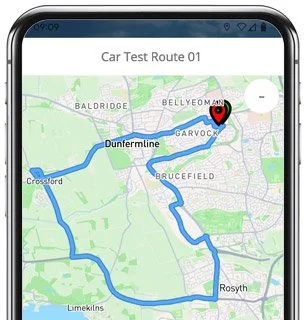
-
Depart from the Driving Test Centre and at the end turn right
At Pitreavie Way Roundabout, take the 3rd exit (right)
At Queensway Road Roundabout, go ahead (3rd exit), then continue through the double roundabout ahead
At Kings Road Roundabout, go ahead, then take the 3rd exit (right) at the next roundabout
On Kincardine Road (A985), go ahead at the roundabout, then take the 3rd right toward Crossford
At the lights on Waggon Road, go ahead
Continue along Knockhouse Road and follow the left bend
At the end of Kirkwood Crescent, turn left
On Lundin Road, take the 2nd right
At the end of Dean Drive, turn right
At the end of Lundin Road, turn left
* Updated, complete route available on the app.
-
Depart from the Driving Test Centre and at the end turn left
On Pitreavie Way, take the 2nd left
At the end of Pitreavie Crescent, turn left
At Pitreavie Way / Grange Drive Roundabout, take the 1st exit (left)
At Hospital Hill Roundabout, go ahead (2nd exit)
At St Leonards / Bothwell Street Roundabout, take the 1st exit (left)
At the lights on Nethertown Broad Street, turn right
Continue on Moodie Street / New Row / East Port and at the roundabout take the 3rd exit (right) onto A823 Edinburgh
At St Margarets Drive Roundabout, take the 1st exit (left)
On Woodmill Street, take the 3rd right
At the end of Charles Street / George Street / Millhill Street, turn left
* Updated, complete route available on the app.
-
Depart from the Driving Test Centre and at the end turn left
At Pitreavie Way / Grange Drive Roundabout, take the 3rd exit (right)
At Queensferry Road Roundabout, take the 1st exit (left)
On Carnegie Avenue, take the 3rd right
At the end of Castle Brae, turn right
At Carnegie Avenue Roundabout, take the 1st exit (left)
On Masterton Road, take the 2nd left
At the end of Morrison Drive, turn left
At Pitcorthie Drive Mini Roundabout, take the 1st exit (left)
At Laburnum Road Roundabout, take the 3rd exit (right)
At the lights on Hospital Hill, turn right
* Updated, complete route available on the app.


Based on 23+ route variations offered in the app:
Average Length: 8.1 miles
Average Duration: 41 minutes
Key Test Considerations
With over 20 Dunfermline route variations, there are a few key areas which repeatedly occur, and so it’s worth spending some additional time driving them before your test.
Ferrytoll Roundabout
One of the biggest and busiest roundabouts on the routes... it’s a real test of awareness and confidence, especially when joining from multiple lanes.
Pitreavie Way & Grange Drive
Right outside the test centre - smooth, well-marked roads where good observation and positioning will help make a strong first impression.
Carnegie Avenue & Masterton Road
These long, curving roads often include some tricky lane merges and changing speed limits. Keep scanning ahead, maintain a steady pace, and show good forward planning.
Rosyth & Inverkeithing Loops
A mix of mini roundabouts, uphill junctions, and bends. They're great for showing off your clutch control and hazard awareness, especially round the parked cars.
Hospital Hill & Queensferry Road
Two of the busier sections that frequently appear... with multiple traffic lights and junctions close together. The key here is staying patient and reading the flow of traffic.

Further Test Route Tips
Knowing the routes in advance is a huge advantage. Along with the following tips, you should be able to learn the routes, drive more confidently, and handle any situation that arises on test day confidently.
Choosing a Route
If you’re not too confident… choose a route preview that is simple to navigate, before working your way up to the more difficult variations.
Session Length
A good session length is around 40—50 minutes to reflect actual test conditions. Be sure to note down any mistakes to work on after.
Time / Weather
Try to drive in different weather conditions, and at different times of the day to cover any test-day scenarios you may face.
“Best driving test app out there! Helped me become more confident ready for my test.”

“Passed first time! Practicing the routes really helped!”
Route-Led provides Driving Test Routes for iPhone and Android devices. Download driving test routes straight to your device. Car, Motorcycle, ADI, and LGV routes are available.
Dunfermline Test-Routes App


Compatible with Android, iPhone and SatNavs
Up to date Routes
Routes for Experienced and Learner Drivers
All our test-routes are compatible with lots of devices, therefore meaning that you don’t necessarily need a Sat nav device for your driving practice lessons. Route-LED provides the cheapest ways to practise your driving test-routes. Route-led will soon add independent driving routes to our service. Download 2021 Dunfermline Test-Routes now!
Every day Route-LED works with learners, experienced drivers and instructors to improve our driving test routes, meaning that you have the best information to excel in your driving test. Buying driving test-routes from Route-Led conserves your cash and at the same time adds to your ability. Route-Led prides itself on being the top supplier of test routes. Get the latest Dunfermline Test-Routes now!
Whether you are a new driver who needs to pass his/her driving test or a driver with experience that needs to get to know the Dunfermline test routes for a vehicle or motorbike, then Route-Led is the provider for you. Learning to pass your driving test and the costs of vehicle insurance can often be an extremely exorbitant procedure. Route-led's test-routes for your test will allow you to be money and time cost efficient. Download 2021 Dunfermline Test Routes now!
#1 Provider of Test Routes
Dunfermline Test-Routes can be purchased for many devices including Google Maps. Android and iPhone customers can load the test routes on those devices too. Tomtom owners can also buy routes to work on that device.
With the help of Dunfermline examiners who test learner drivers each day on these routes and learner drivers, Route-Led is can produce a lot of high standard test-routes for Android, Sat nav, iPhone and Garmin devices.
Dunfermline Driving Test-Routes Navigation
By downloading Route-led's recommended Android application, you’ll be able to easily utilise Route-Led's test routes. Download the recommended applications and immediately start testing your driving ability right now. Route-LED's turn by turn directions enable you to focus on increasing your driving ability while getting to experience the driving test conditions.


Driving test-routes can be bought on Route-LED's official webpages. Once the test routes are purchased from Route-Led's webpages, the customer will be expected to install the test-route into their SatNav device and start their driving session. Dunfermline test-routes include voice guiding, as a result all the customer needs to do is to receive instructions from the device.

Purchase driving test-routes from Route-LED's dedicated iPhone app or from Route-LED's webpages directly into an iPhone. In order to use the test route either install a recommended 3rd party iPhone software app or use the dedicated Route-LED App. Supported 3rd party software apps are located in the iPhone app store.

Practice Dunfermline Test Routes


Sat nav Driving Test
Practice
Independent Driving Test
The examiner will ask the student to take directions from a pre-setup Satnav independently. The Satnav will show the route that the learner needs to track. The model or make of Satnav used during the examination won’t matter as the test-route will be the same. In the situation where the learner driver takes the wrong route, the examiner will let them know and give instructions. That said, we very much suggest the Tomtom Start 52 mainly as it is the device examiners tend to utilise whilst conducting driving tests.
Being a client-focused company, we provide Route-led's clients with additional support and help for Route-Led's test-routes. Using our test routes allows the customers to experience the roads, junctions and corners they will encounter during their driving tests.To help the student in learning how to conduct a vehicle safely and in addition to perform well during the driving test, we definitely suggest using an experienced driving teacher. How it works
When you veer off the independent driving route, it will not have any effect on your examination score except if you break a traffic regulation, make a traffic offence or do an additional driving mistake. If you do an incorrect route choice, the examiner will help you to return to the route. In case of poor or obscure traffic signs, the test examiner will instruct the learner until they get to the following clear road sign. The examinee doesn’t need to have a detailed knowledge of the town. You can’t use your own Sat-Nav for independent driving, mainly because it gives the learner very detailed prompts. The independent driving part is designed to test if you can effect safe independent choices.
Dunfermline Test Centre Details
Dunfermline test centre is located at Vine Conference Centre, 131 Garvock Hill, Dunfermline Fife KY11 4JU. There should be ramp access for wheelchair users but we suggest calling to confirm. There are also usually male, disabled and female toilets for use at the test centre but it's generally best to go before you head there! It is occasionally possible to park at the test centre. If this is not possible, it ought to be fine to park close by and get there by foot. Practise busy roads, roundabouts, difficult junctions and one-way streets. Using test-routes whilst learning to drive can be very useful, as it allows you to learn on roads that you’ll certainly be driving during your test.
Address: Vine Conference Centre, 131 Garvock Hill, Dunfermline Fife KY11 4JU
Test Centre Parking: Parking could be available at the test centre. If not, park nearby and walk there.
Test Centre Toilets: There are usually male, disabled and female toilets at the test centre but best to use these at your house before.
Test Centre Disabled access: You ought to be able to get into the test centre in a wheelchair but telephone in advance to confirm.
Find local test centre details: https://www.gov.uk/find-driving-test-centre