

Cheltenham Driving Test Routes
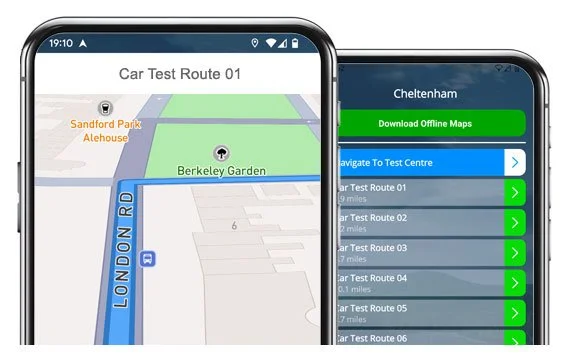
Real routes, interactive maps, and turn-by-turn guidance in one app.

START PRACTISING


The only place to find accurate, current Cheltenham test routes.
Prepare early and be 100% ready when test day arrives.
All Current Test Routes
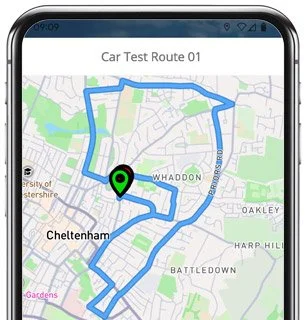
Route 1 Instructions:
- Depart from the Driving Test Centre
- On All Saints Road, turn left
- At Pittville Circus Roundabout, go straight ahead (2nd exit)
- On Wellington Road, at the traffic lights turn left
- On Evesham Road, at the lights turn right
- On Clarence Road, take the 2nd right
- On Clarence Square, turn left
- On Clarence Road, turn right
- On North Place, at the traffic lights turn right
- On St Margarets Road, take the 3rd left
- On Henrietta Street, at the end turn right
- On Lower High Street / Tewkesbury Road, at the roundabout take the 3rd exit (right)
- On Kingsditch Lane, at the mini roundabout go straight ahead
- On Wymans Lane, turn left
- On Church Road, turn right
- On Quat Goose Lane, take the 2nd left
- On Riveland, turn left
- On Quat Goose Lane, turn left
- On Dark Lane, follow the bend to the left
- On Church Road, at the end turn left
- On Hyde Lane, at the lights turn right
- On Evesham Road, at the roundabout take the 3rd exit (right), then the 3rd left
- On Central Cross Drive, take the 2nd right
- At the Albert Road Roundabout, go straight ahead (2nd exit)
- Follow Pittville Circus into All Saints Road
- Return to the Driving Test Centre
-
Depart from the Driving Test Centre
On All Saints Road, follow the bend left
At Pittville Circus Roundabout, go straight ahead
On Wellington Road, continue ahead at one set of lights, then turn left at the next
On Evesham Road, take the 4th left
On Cleveland’s Drive, take the 3rd left, then at the end turn right and left
On Evesham Road, go straight ahead at the roundabout, then turn left at the lights
Follow Hyde Lane left into Wymans Lane
Continue through two mini roundabouts ahead
At Kingsditch Lane Roundabout, take the 1st exit (left)
On Tewkesbury Road, take the 8th left
* Updated, complete route available on the app.
-
Depart from the Driving Test Centre
On All Saints Road, at the roundabout take the 3rd exit (right)
On Fairview Road, at the end turn right, continue ahead at two sets of lights, then right at the next
On Portland Street, continue ahead through two sets of lights
At Evesham Road Roundabout, take the 4th exit (right)
On New Barn Lane, take the 2nd right
On New Barn Avenue, follow the bend left
On New Barn Close, turn left, then at the end turn right
On New Barn Lane, turn left
At The Burgage, exit left
At Tatchley Lane Roundabout, take the 1st exit (left)
Follow Deep Street right, then High Street left
* Updated, complete route available on the app.
-
Depart from the Driving Test Centre
On All Saints Road, at the roundabout go straight ahead (2nd exit)
On Hewlett Road, take the 2nd left
Follow Carlton Street into Sydenham Road North
On Sydenham Road North, take the 2nd left
On Cranham Road, exit left
On Sydenham Road North, turn left
On Hales Road, take the 2nd left
On Eldon Road, take the 2nd left
On Beechurst Avenue, exit left
At the end of Eldon Road, turn right
On Hewlett Road, turn left
On Priors Road, turn right
* Updated, complete route available on the app.


Key Route Features
Across the 16+ test routes there are a number of roads that feature regularly. It’s worth spending some time practising these, as there is a good likelihood they will feature in your test:
Evesham Road (A435):
This is a major route through Cheltenham with several traffic light stops and roundabouts to negotiate. It's a good area to practise changing speed limits correct roundabout discipline.Pittville Circus and Albert Road:
Common early and late sections of several test routes, with mini roundabouts and average local traffic. Great practise for a wide range of basic driving techniques.Wymans Lane and Kingsditch Lane:
Busier suburban roads that are often used to assess roundabout awareness. Be aware of quickly changing priorities at mini roundabouts and ensure you signal clearly.Southam Lane and Kayte Lane:
Semi-rural stretches that will test your hazard perception and onward planning. Be on the ready for cyclists, bends, and hidden junctions.Town Centre (Clarence Rd, St Margarets Rd, Portland St):
These central sections can get a little tight (and busy). Patience and correct car positioning are key for a confident drive.

“Best driving test app out there! Helped me become more confident ready for my test.”

“Passed first time! Practicing the routes really helped!”
Route-Led provides Driving Test Routes for iPhone and Android devices. Download Cheltenham driving test routes straight to your device. Car, Motorcycle, ADI, and LGV routes are available.
Cheltenham Driving Test-Routes App - Latest Version
At Route-led, we provide Cheltenham driving test-routes for your Android, iPhone and SatNav devices. The test routes provided cover tests for motorbikes, cars, LGV and taxis. Our rates are very affordable when compared to lots of the test-routes currently being sold. We intend to add Sat-nav and Independent driving routes to Route-Led's service soon. Download 2021 Cheltenham Driving Test-Routes now!

Each day Route-LED co-operates with instructors, learners and experienced drivers to improve our driving test-routes, meaning that you have the best information to pass your driving test. At good value prices we offer you driving test routes that you can use to improve your ability whilst reducing the expenditure on driving lessons. Of all the providers of driving test-routes, Route-LED is the best. Get the latest Cheltenham Driving Test-Routes now!

It's immaterial if you are a learner driver looking to pass their driving test, an experienced driver taking the new vehicle, advanced or taxi test or an instructor seeking to understand the latest test-routes. Route-LED is the best place for everything you need. The cost of theory lessons, driving lessons and exorbitant insurance premiums, can be quite high! Who would spend time and money when you are able to conserve both and increase your ability. Download 2021 Cheltenham Test-Routes today!


Number one Provider of Driving Test Routes
Cheltenham Test-Routes are available on many devices including Google Maps. iPhone and Android customers are able to navigate Route-LED's routes on those devices too. If you have a Tomtom device, you are able to purchase our driving test routes for tomTom Sat nav devices directly from our web page and then use it on your device for your practice lessons.
In order to ensure our driving test-routes are fully updated, we work side by side with Cheltenham driving instructors and learner drivers. We are keen on feedback from our clients with respect to any of our products.
Cheltenham Driving Test-Route Formats Navigation


Android Satnav - Test Routes
By buying our recommended Android application, you’ll be able to easily utilise our test-routes. Download Route-LED's dedicated applications and immediately start improving your driving ability right now. Route-Led's turn by turn instructions will allow customers to concentrate on improving your driving ability whilst experiencing the test-routes.
Tom-tom Satnav Driving Test Routes
Following December 4 2017, the United Kingdom driving test includes following sat Nav directions. As the premier supplier of Satnav test routes in the United Kingdom, we supply numerous driving test-routes for Garmin and Tom Tom devices. For people that wish to purchase Sat nav devices, we definitely suggest the Tomtom Start 52, pretty much because it’s the leading pick for the Cheltenham driving test examiners.
iPhone Satnav - Test Routes
Route-LED has made practising test routes much easier using an iPhone by making driving test routes specifically for iPhones. All you have to do is to either load RL’s dedicated iPhone app in the Apple app store or download our iPhone format file, and then use a supported 3rd party application to use the driving test-routes using Route-led's detailed guide. Your iPhone can then lead you to the Cheltenham test centre, completely around the test route, and finally returning to the test centre. While learning with our test routes, you will be led safely with the voice-guided instructions to Cheltenham test centre.
Practise Cheltenham Test Routes


Sat nav Driving Test
Practise
Independent Driving Test
Whilst undertaking the independent driving test, the examiner will ask the learner driver to follow instructions from the satnav. The examiner will provide an already setup Tom-tom Start 52 device. All you’ll need to do is to take directions from the device. The make or model of the SatNav device that you’ll use in your practice sessions will not make a difference at all. As a premier Satnav company, we provide test-routes for iPhone, Garmin, Tomtom and Android devices.You can’t utilise your personal Sat nav device in the Cheltenham driving test.
We aim to supply purchasers with a great deal of help and support with our products. You will speedily get good at the different routes provided. However, we of course recommend using someone who is a skilled teacher.
The Independent driving test doesn’t check your ability to follow directions. In addition, an independent driving test doesn’t check your ability to remember instructions. If you need to ask the examiner for updated instructions, he/she should confirm them for you. Veering off route won’t change your examination score at all. Do not fret about obscured road signs as the examiner will assist you should you need it. Please note that you cannot bring your personal SatNav device with you for the examination. This is due to the fact that your own Sat nav will be setup to provide detailed directions.
Cheltenham Test Centre Details
The Cheltenham test centre is located at Bishopsgate House, 94 All Saints Road, Cheltenham Gloucestershire GL52 2HQ. There should be ramp access for wheelchair users but it would be best to call to make sure. There are also usually disabled, female and male facilities for use at the test centre but it's generally best to use these at home beforehand! It is sometimes possible to park at the test centre. If not, it should be easy to park close by and get there by foot. Practise roundabouts, busy roads, difficult junctions and one-way streets. Navigating test routes whilst practising to drive can be very helpful, allowing you to learn on routes that you’ll actually be driving during your examination.
Test Centre Address: Bishopsgate House, 94 All Saints Road, Cheltenham Gloucestershire GL52 2HQ
Test Centre Parking: Parking could be available at the test centre. If it’s not, park close by and walk there.
Toilets: There are quite often male, female and disabled toilets at the test centre but best to go before you travel there.
Disabled access: You ought to be able to access the test centre in a wheelchair but call ahead to confirm.
Find local test centre details: https://www.gov.uk/find-driving-test-centre