

Buxton Driving Test Routes
Take the stress out of test day - learn current local routes.

PRACTISE NOW


Know the roads before your test!
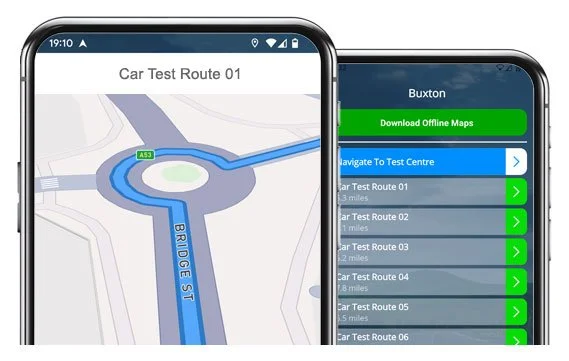
Our app helps you master real Buxton test routes and boost your chances of passing first time!
The Routes
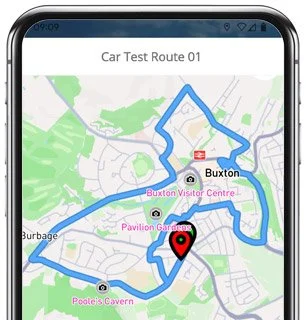
Route 1 Instructions:
- Depart from the Driving Test Centre
- On Green Lane, turn right
- On Cavendish Avenue, turn right
- On Milldale Avenue, turn right
- On Cavendish Avenue, turn right
- On Macclesfield Road, turn right
- On West Road, turn right
- On London Road, turn left
- On Heath Grove, turn right
- On Kents Bank Road, turn left
- On Heath Park Road, turn right
- On Dale Road, turn right
- On Grange Road, turn right
- On South Avenue, turn left
- On Hardwick Square South, turn left
- On Holker Road, turn right
- On Spring Gardens, turn left
- On Bridge Street, turn right
- On Charles Street, turn left
- On Lightwood Road, turn left
- On Lansdown Road / Lascelles Road, turn right
- On Palace Road, turn right
- On Station Road, turn left
- Continue through The Quadrant / Terrace Road / Market Place / High Street and turn right
- On West Road, turn left
- On College Road, turn right
- On Temple Road, turn right
- On Ecclesbourne Drive, turn left
- On Errwood Avenue, turn left
- On Milldale Avenue, turn right
- On Temple Road, turn left
- On Green Lane, turn left
- Return to the Driving Test Centre
-
Depart from the Driving Test Centre and turn right
On London Road, turn left
On Heath Grove, turn right
On Sherwood Road, turn right
On Kents Bank Road, continue ahead
On Heath Park Road, turn left
On Dale Road, turn right
On Grange Road, turn right
On South Avenue, turn left
On Hardwick Square South, turn right
On Market Street, turn left
On Market Place, continue ahead
* Updated, complete route available on the app.
-
Depart from the Driving Test Centre
On Green Lane, turn right
On College Road, turn left
On Temple Road, turn right
On Ecclesbourne Drive, turn right
On Dovedale Crescent, turn right
On Milldale Avenue, turn left
On Cavendish Avenue, turn left
On Green Lane, turn right
On Duke Street, turn left
On Macclesfield Road, turn left
On Leek Road, turn left
On Grinlow Road, turn right
* Updated, complete route available on the app.
-
On Green Lane, turn right
On Temple Road, at the end turn right, then right again
On College Road, turn left
On Spencer Road, turn right
On Green Lane, turn right
On Compton Road, turn left
On Mosley Road, turn right
On London Road / A515, turn right
On Harpur Hill Road, turn left
On Berwick Road, turn left
Continue along Harpur Hill Road / Burlow Road, then turn left onto the B5053
On the A515, turn right
* Updated, complete route available on the app.


5 Focus Areas
A number of the 24+ test routes documented share common roads, junctions and roundabouts. It makes sense to practise these a little more given the likelihood of them appearing during your practical exam:
London Road (A515):
A key route leaving and re-entering Buxton with changing speed limits. Build your speed smoothly and keep aware of any vehicles entering from the side roads.Spring Gardens and Market Place:
Typical town-centre driving with pedestrians, narrow roads, and parked cars. Try to keep your speed low and controlled - this section rewards calm, patient driving.Harpur Hill Road and Berwick Road:
Slightly rural, with hilly bends mixed with tighter junctions. Try to look ahead through curves and adjust your speed gently for better visibility.Dukes Drive and Ashwood Dale:
These winding, scenic roads are often used as a rural part of the test. Stay in control, position yourself well on approaching bends, and be ready for any oncoming traffic.Green Lane and Cavendish Avenue:
Residential areas near the test centre which are perfect for carrying out manoeuvres. It's worth familiarising yourself and practising a few here.

“Best driving test app out there! Helped me become more confident ready for my test.”

“Passed first time! Practicing the routes really helped!”
Route-Led provides Driving Test Routes for iPhone and Android devices. Download Derbyshire driving test routes straight to your device. Car, Motorcycle, ADI, and LGV routes are available.
Driving Test Routes App


Compatible with Android, iPhone and SatNavs
Up-to-date Routes
Routes for Experienced and Learner Drivers
As a leading test-route supplier in the UK, Route-led supplies driving test-routes that work with many modern devices including Garmin, iPhone, Mac, PC and Tomtom devices. Our prices are very affordable when compared with some of the driving test-routes currently being sold. Route-Led will soon add independent driving routes to our offering. Download 2021 Buxton Driving Test Routes now!
To continually upgrade Route-Led's service and make sure that our driving test routes are up-to-date, we collaborate closely with local learning drivers and instructors operating in Derbyshire. Buying driving test-routes from Route-LED conserves your money and adds to your driving ability. We pride ourselves on always being the best provider of driving test-routes. Get the latest Buxton Test-Routes now!
Route-LED provides routes for experienced and new drivers alike in order that they can all pass their driving test with confidence. Route-LED also supplies test routes to driving instructors looking to learn the latest driving test routes. The cost of practical lessons, insurance premiums and theory lessons, can be quite high! Who would waste time and money when you are able to save both and increase your ability. Get the latest Buxton Test-Routes today!
Number one Provider of Test Routes
Route-led's Buxton test-routes can be used on Google Maps. People who haven’t bought a SatNav device can make use of Android or iPhone devices to load Route-led's driving test-route files. Should you have a Tomtom device, you are able to download our driving test routes for Tom Tom Satnav devices from our web page and then use it on your device for your driving lessons.
Due to the help of Buxton examiners who conduct tests on a daily basis on these test routes and local learner drivers, we are able to produce many high standard test-routes for Garmin, Android, iPhone and SatNav devices.
Buxton Test Route Formats Navigation


Android Sat-Nav Test Routes
By downloading our recommended Android application, customers can easily use our test routes. Download Route-led's dedicated applications and instantly begin testing your driving ability today. Our turn by turn directions enable you to concentrate on improving your driving ability while experiencing the driving test conditions.

Sat-nav Test Routes
Driving test routes are available for purchase from our website. Once the routes have been downloaded from Route-Led's webpages, the customer will be expected to load the test-route into their SatNav device and begin their practise session. Buxton driving test routes are voice-guided, thereby all the customer will be required to do then is to follow instructions from the device.
iPhone Sat-Nav Test Routes
Download routes from our website directly into your iPhone or from Route-led's purpose built iPhone app. To use the test route either use the purpose built Route-Led App or install a supported third party iPhone software application. Supported 3rd party software applications can be located in the iPhone app store.

Learn Buxton Test Routes


Satnav Driving Test
In your driving test, the examiner will choose a preferred route on the Sat nav. You will be expected to follow the route chosen by the examiner as well as the directions from the SatNav. The model and make of the device won’t matter, this is because our test-routes are compatible with lots of devices.You can’t use your personal SatNav during the Buxton driving examination. For more information, you can get recent changes to the driving test here.
Practice
Route-led provides customers with a high degree of support and help to use Route-led's test routes. You’ll get used to all the different sections of the roads to be travelled during the examination. We suggest using a skilled driving teacher in addition. For extra free information on what you can do to pass your driving examination go to Driving Test Practice
Independent Driving Test
The Independent driving test doesn’t test your ability to follow directions. In addition, an independent driving test does not check your ability to remember directions. If you query the examiner for the directions, he/she should confirm them for you. Going off route will not change your test results at all. Don’t worry about unclear traffic signs as the examiner will assist you if you need it. Please note that you can’t bring your own Sat-Nav device with you to take the test. This is due to the fact that your own Sat-nav device will be setup to give step by step instructions.
Buxton Test Centre Details
Buxton test centre is located at The Dairy, 7 Green Lane, Buxton Derbyshire SK17 9DS. There should be ramp access for wheelchair users but it would be best to call to confirm. There are also quite often disabled, female and male toilets for use at the test centre but it's probably better to go before you travel there! It is sometimes possible to park at the test centre. If not, it ought to be fine to park close by and walk. Be prepared for one-way streets, difficult junctions, busy roads and roundabouts. Navigating test-routes while learning to drive can be very helpful, as it allows you to learn on roads that you will certainly be driving during your test.
Address: The Dairy, 7 Green Lane, Buxton Derbyshire SK17 9DS
Test Centre Parking: Parking could be available at the test centre. If it is not, park nearby and head by foot.
Toilets: There are quite often female, disabled and male facilities at the test centre but better to use these at home before.
Disabled access: You ought to be able to access the test centre in a wheelchair but telephone in advance to confirm.
Find local test centre details: https://www.gov.uk/find-driving-test-centre