

Bury (Manchester) Driving Test Routes
Learn every turn before test day with current car and motorcycle routes.
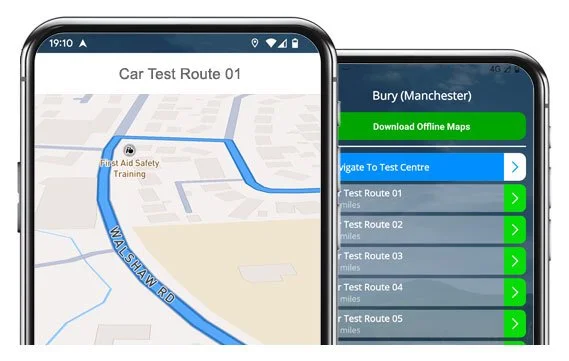

GET THE APP


Real Bury driving test routes - ready when you are.
Practise them all and feel full of confidence before your big day!
Real Test Routes
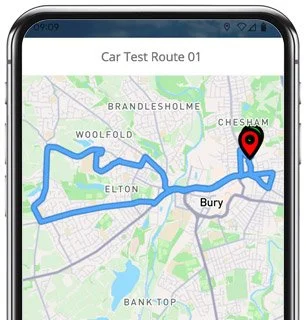
Route 1 Instructions:
- Depart from the Driving Test Centre and turn left
- On Smith Street, turn right
- On Brook Street, turn left
- On Geoffrey Street, turn right
- Continue as Taylor Street becomes St Mark’s Square
- On St Mark’s Square, turn left
- On Walmersley Road, turn right
- Continue as Peel Way becomes Bolton Street and then Crostons Road
- On Crostons Road, turn left
- Continue as Tottington Road becomes Bury Road and then Market Street
- On Market Street, turn right
- On Kirklees Street, turn left
- On Royds Street, turn right
- On Holcombe Road, turn right
- On Brandlesholme Road, turn left
- On Vernon Road, turn right
- Continue as Longsight Road becomes Brandlesholme Road
- On Brandlesholme Road, turn left
- On Springside View, continue as road becomes Rudgewick Drive
- On Rudgewick Drive, turn left onto Purbeck Drive
- On Purbeck Drive, turn left onto Brandlesholme Road
- Continue as Brandlesholme Road becomes Crostons Road and then Bolton Street
- On Bolton Street, turn left
- On Peel Way, turn left
- On Walmersley Road, turn right
- Continue as St Mark’s Square becomes Taylor Street
- On Taylor Street, turn left
- On Geoffrey Street, turn right
- On Brook Street, turn left
- On Smith Street, turn right
- Return to the Driving Test Centre
-
Depart from the Driving Test Centre and turn left
On Smith Street, turn left
Continue as Brook Street becomes Kenyon Street
On Kenyon Street, turn left
Continue as Taylor Street becomes Brook Street and continue straight ahead
On Wash Lane, turn right
On York Street, turn left
Continue on Rochdale Road straight ahead
On Bury New Road, turn right
Continue as Heap Brow becomes Moss Hall Road
On Moss Hall Road, turn right
Continue as Pilsworth Road becomes Croft Lane and then Hollins Brow
* Updated, complete route available on the app.
-
Depart from the Driving Test Centre and turn left
On Smith Street, turn left
Continue as Brook Street becomes Kenyon Street
On Kenyon Street, turn left
Continue as Taylor Street becomes Brook Street and continue straight ahead
On Wash Lane, turn right
On Bond Street, turn left
Continue on Rochdale Road straight ahead
On Bury New Road, turn right
On Heap Brow, turn left
On Bury Old Road, turn right
On Sutherland Road, turn right
* Updated, complete route available on the app.
-
Depart from the Driving Test Centre and at the end of the road turn left
On Wilton Avenue, at the end of the road turn left
On Church Green Road, at the end of the road turn left
On Buckingham Road, at the mini roundabout turn right
On Water Eaton Road, go straight ahead at the mini roundabout, then at the next roundabout take the 2nd exit (right)
On Manor Road, at the roundabout go straight ahead taking the 2nd exit
On Drayton Road, take the 6th left
On Lomond Drive, at the roundabout turn left
On Stoke Road, at the mini roundabout turn left
On Windermere Drive, at the mini roundabout turn right
On Stoke Road, at the roundabout go straight ahead, then at the next roundabout turn left
* Updated, complete route available on the app.


Key Focus Areas of the Routes
While practising the test routes you’ll soon notice a handful of roads that appear in the majority of tests. It’s worth giving a little extra practice-time to the following local landmarks:
Walmersley Road and Peel Way:
Busy main roads with traffic lights at regular intervals - keep calm, keep your distance, and keep steady around larger vehicles.Rochdale Road and Bury New Road:
You’ll have to negotiate varying speed limits and plenty of side junctions. Showcase your mirror checks and smooth braking on these roads that are commonly used for independent driving.Heap Brow and Bury Old Road:
These winding roads are a good test of your judgment and control, especially at bends and narrow points. Look well ahead and position yourself in the road carefully.Horninglow and Tottington Road:
Frequent parked cars lining the pavements and junctions make these suburban roads a good place to show-off your clutch control and hazard awareness.Town Centre Area (Bridge Street, Bolton Street):
Expect tight spaces, pedestrian crossings, and mini roundabouts will keep you on your toes! Keep your driving steady and don’t be afraid to wait.

“Best driving test app out there! Helped me become more confident ready for my test.”

“Passed first time! Practicing the routes really helped!”
Route-Led provides Driving Test Routes for iPhone and Android devices. Download Manchester driving test routes straight to your device. Car, Motorcycle, ADI, and LGV routes are available.
Bury (Manchester) Test-Routes App


Compatible with Android, iPhone and SatNavs
Route-led is a driving test-route supplier for a extensive group of devices such as Tom-Tom, Garmin, iPhone and Android for cars, motorcycles, LGV and taxis. Route-LED supplies one of the cheapest ways to practice your test routes. We intend on adding sat Nav and Independent driving routes to our products soon. Get the latest Bury (Manchester) Test-Routes now!
Up to date Routes
Instructors and Learner drivers are continually supplying Route-LED with updated driving test route information, meaning that Route-led is the best place for test routes. At good value rates we provide you driving test routes that you are able to practice to increase your driving ability while reducing your cost of driving sessions. We pride ourselves on always being the premier provider of test routes. Download 2021 Bury (Manchester) Driving Test Routes today!
Routes for Experienced and Learner Drivers
It doesn't matter if you are an instructor seeking to learn the latest driving test-routes, an existing driver taking the taxi, advanced or new vehicle test or a new driver looking to excel in their driving test. Route-Led is the best place for all your test-route needs. Learning to drive and the related costs of vehicle insurance is usually a very costly procedure. Route-Led understands that time and money are equally at a premium. Route-led helps you be efficient in both. Get the latest Bury (Manchester) Driving Test Routes today!


#1 Supplier of Test Routes
Bury (Manchester) Test Routes can be purchased for many devices including Google Maps. iPhone and Android users can load the routes on those devices too. If you happen to have a TomTom device already, you are able to download the driving test-routes for Tom Tom Sat-nav devices from our web page and then load it on your device for your driving lessons.
Due to the assistance of local learner drivers and Bury (Manchester) examiners who conduct tests each day on these routes, Route-LED is can develop numerous high standard test-routes for Garmin, iPhone, Android and Sat nav devices.
Bury (Manchester) Test-Routes Navigation


Android Sat nav Driving Test Routes
Satnav - Test Routes
iPhone Sat nav Driving Test Routes
By buying our recommended Android app, customers will be able to easily utilise Route-led's test-routes. Buy the dedicated applications and immediately begin testing your driving ability right now. Route-led's turn-by-turn directions allow you to focus on improving your driving ability whilst getting to experience the test-routes.
In preparation for taking the driving test, it is important to be familiar with all your potential test routes. Being familiar with the test-routes should not only increase your self-assurance but, in addition, enable you to drive well. Using Route-LED's Satnav test-routes is very easy, generally as a result that you can just track the pre-programmed routes on your device while driving.
Route-LED test-routes are available for very many devices including your iPhone. To access Route-LED's test-routes, start by installing a recommended 3rd party software application that you will use to access the route. As soon as the program has loaded properly, buy the Bury (Manchester) test-route and upload to your iPhone from Route-led's official webpages. You can then access the driving test-route downloaded using the recommended software app. Bury (Manchester) test centre.
Practise Bury (Manchester) Test Routes


SatNav Driving Test
Practice
Independent Driving Test
The examiner will ask the student to follow instructions from a setup SatNav independently. The SatNav will show the route that the student needs to follow. The make or model of Sat-Nav used while the examination is in progress won’t really make a difference mainly because the driving test route will be identical. In case the student takes the wrong route, the examiner will advise accordingly. That said, we highly recommend the Tom tom Start 52 mainly because it is the device examiners tend to use while conducting driving tests.
We like to provide customers with a great deal of support and help with our routes. You will speedily get good at the different routes provided. However, we definitely recommend using a person that is a professional teacher.
The Independent driving test doesn’t check your skill in following directions. Moreover, an independent driving test does not check your skill in remembering directions. If you need to query the examiner for updated instructions, he/she should confirm them for you. Veering off route won’t change your examination score at all. Do not worry about unclear road signs as the examiner will help you if you need it. Please understand that you can’t bring your personal Sat-Nav device with you to take the test. This is because your own Sat-Nav device will be configured to provide step by step instructions.
Bury (Manchester) Test Centre Info
Bury (Manchester) test centre can be found at Smith Street, Bury Lancashire BL9 6HH. There ought to be ramp access for disabled users but it would be best to call to confirm. There are also usually male, disabled and female facilities available at the test centre but it's generally best to go before you head there! It is sometimes possible to park at the test centre. If this is not possible, it ought to be fine to park nearby and get there by foot. Be prepared for busy roads, difficult junctions, roundabouts and one-way streets. Using test-routes whilst practising to drive is always very helpful, as it allows you to learn on roads that you’ll actually be driving during your test.
Address: Smith Street, Bury Lancashire BL9 6HH
Parking: Parking may be possible at the test centre. If it is not, park nearby and walk there.
Test Centre Toilets: There are usually female, male and disabled toilets at the test centre but best to use these at your house beforehand.
Disabled access: You ought to be able to get into the test centre in a wheelchair but telephone in advance to make sure.
Find local test centre details: https://www.gov.uk/find-driving-test-centre