

Burgess Hill Driving Test Routes
The most accurate and current driving test routes available online.

START PRACTISING


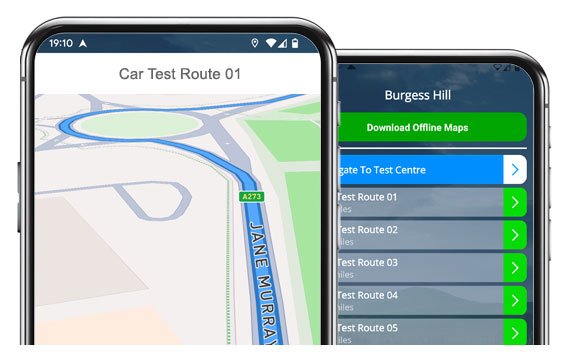
Download our app to explore every real Burgess Hill test route.
Learn the roads and increase your chances of passing first time!
Latest Test Routes
Route 1 Instructions:
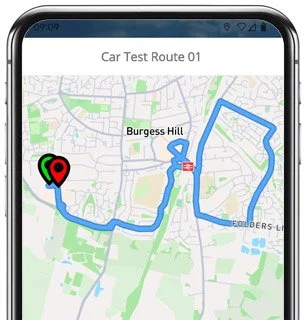
- Depart from the Driving Test Centre and at the end of the road turn left
- On Charles Avenue, take the 1st right
- On Albert Drive, continue as road becomes Victoria Way
- On Victoria Way, at the mini roundabout take the 2nd exit (right)
- On London Road, at the mini roundabout take the 2nd exit (right)
- On London Road, take the 2nd left
- On Chanctonbury Road, take the 5th left
- On Holmsdale Road, at the end of the road turn right
- On Potters Lane, at the end of the road turn right
- On Station Road, at the end of the road turn left
- On Queen Elizabeth Avenue, at the roundabout take the 3rd exit (right)
- On Civic Way, at the mini roundabout go straight ahead taking the 2nd exit
- On Crescent Road, at the end of the road turn left
- On Mill Road, take the 3rd left
- On Leyland Road, at the mini roundabout go straight ahead taking the 1st exit
- On Leyland Road, at the mini roundabout turn right taking the 2nd exit
- On London Road, at the roundabout go straight ahead taking the 2nd exit
- On London Road, at the next roundabout take the 1st exit (left)
- On Cuckfield Road, at the mini roundabout take the 1st exit (left)
- On Bolney Road, at the roundabout take the 1st exit (left)
- Join the A23 and take the 1st exit (left) toward Burgess Hill
- On the slip road, at the roundabout take the 2nd exit
- On the A2300, go straight ahead at the first roundabout taking the 2nd exit, then at the next roundabout take the 4th exit (right)
- On Jane Murray Way, at the roundabout go straight ahead taking the 2nd exit, then at the next roundabout take the 1st exit (left)
- On York Way, continue as road becomes Charles Avenue
- On Charles Avenue, turn left
- Return to the Driving Test Centre
-
Depart from the Driving Test Centre and at the end of the road turn right
On Charles Avenue, go straight ahead at the roundabout taking the 3rd exit
On Jane Murray Way, at the roundabout take the 3rd exit (right)
On London Road, at the traffic lights turn right
On Keymer Road, at the mini roundabout go straight ahead taking the 2nd exit
On Keymer Road, take the 2nd left
On Grand Avenue, take the 4th left
On Mackei Avenue, at the end of the road turn left
On Grand Avenue, at the end of the road turn left
On Ockley Lane, at the roundabout take the 2nd exit (right)
* Updated, complete route available on the app.
-
Depart from the Driving Test Centre and at the end of the road turn left
On Charles Avenue, take the 2nd right
On Jubilee Road, at the end of the road turn left
On Jubilee Road, continue as road becomes Consort Way
On Consort Way, at the end of the road turn left
On Victoria Way, at the mini roundabout take the 1st exit (left)
On London Road, at the traffic lights turn right
On Lower Church Road, take the 1st left
On St John Road, at the end of the road turn left
On Park Road, take the 2nd right
* Updated, complete route available on the app.
-
Depart from the Driving Test Centre and at the end of the road turn right
On Charles Avenue, go straight ahead at the roundabout taking the 3rd exit
On Jane Murray Way, at the roundabout take the 2nd exit
On London Road, take the 1st right
On Chanctonbury Road, continue as road becomes Queens Crescent
On Queens Crescent, continue as road becomes Wolstonbury Way
On Wolstonbury Way, at the end of the road turn right
On Station Road, go straight ahead at the mini roundabout
On Station Road, at the roundabout take the 3rd exit (right)#
On Keymer Road, take the 1st right
* Updated, complete route available on the app.


Key Test Moments
Some areas of Burgess Hill are repeated across a number of test routes, so it’s worth paying a little more attention to them as they’ll likely feature on test day. Be sure to practise:
London Road:
A main route through Burgess Hill that links several roundabouts and traffic lights. Keeping a steady pace, checking your mirrors often, and being ready for vehicles turning in and out of junctions is key.Jane Murray Way (A2300 link):
A faster road leading toward the A23 which is great for showing safe joining and lane discipline. Watch your speed as the limit changes when leaving or re-entering surrounding built-up areas.Chanctonbury Road and Queens Crescent:
Keep your speed low and be ready to give way on these residential areas with parked cars and narrow bends.Keymer Road and Ockley Lane:
Often used for the independent-driving part of the test, you can expect roundabouts, junctions, and changing sped limits. Keep calm, check all mirrors and time your turns with confidence.Victoria Way and Station Road:
You’ll face mini roundabouts and pedestrian crossings on these busy town routes. Smooth clutch control and steady progress are the key here.

“Best driving test app out there! Helped me become more confident ready for my test.”

“Passed first time! Practicing the routes really helped!”
Route-Led provides Driving Test Routes for iPhone and Android devices. Download Burgess Hill driving test routes straight to your device. Car, Motorcycle, ADI, and LGV routes are available.
Burgess Hill Test-Routes App
Route-led is a driving test-route supplier for a large group of devices including Garmin, tomTom, iPhone and Android for cars, motorcycles, taxis and LGV. Our prices are very good value when compared to some of the test routes currently being sold. Route-led will soon be adding independent driving routes to Route-led's service. Download 2021 Burgess Hill Test-Routes today!

Each day Route-Led works with instructors, experienced drivers and learners to update our driving test routes, ensuring that you have the best information to pass your test. Purchasing test routes from Route-Led saves you money and adds to your driving skills. Of all the providers of driving test-routes, Route-LED is the premier. Download 2021 Burgess Hill Test-Routes now!

It doesn't matter if you are an experienced driver looking at the taxi, new vehicle or advanced test, an instructor seeking to learn the newest test-routes or a new driver looking to pass their driving test. Route-LED is the one-stop shop for everything you need. People often spend a lot of money being taught how to pass their driving test. Route-Led understands that money and time are equally important. Route-led helps you be efficient in both. Download 2021 Burgess Hill Test-Routes now!


Number one Provider of Driving Test Routes
Customers can purchase Burgess Hill driving test routes for use in Google Maps. Don’t worry if you don’t have a SatNav as you are able to use Route-LED's driving test-routes using an iPhone or Android. If you already have a Satnav (e.g. TomTom) you can buy the relevant routes and start practising.
We work alongside Burgess Hill driving instructors, to come up with an updated test route for the relevant place. Route-Led's driving test routes are also used by examiners throughout the United Kingdom during driving tests, and as a result we highly encourage both students and experienced drivers to become acquainted with these driving test routes.
Burgess Hill Test-Route Formats Navigation


Android Satnav Test Routes
Utilising RL’s Android driving test routes is quite simple provided you have a supported 3rd party app or RL’s app installed on an Android device. Burgess Hill driving test-routes for Android devices can be purchased from our official webpages. After buying a driving test-route, the user can then either use RL’s dedicated app or install a supported Android app to use the particular file.
Satnav Driving Test Routes
Before you take the driving test, it’s important to be familiar with all the potential test-routes. Knowing the test routes won’t only boost your confidence but it will also ensure that you drive safely. Utilising our Sat nav driving test-routes is quite easy, generally because you can just follow the turn by turn instructions on your device whilst driving.
iPhone Satnav Test Routes
Download test-routes from Route-LED's webpages into an iPhone or from our dedicated iPhone app. In order to access the test-route either download a recommended third party iPhone software application or use the purpose built Route-Led App. Supported 3rd party software apps are found in the iPhone app store.
Learn Burgess Hill Test Routes


SatNav Driving Test
In your driving test, the examiner will choose a preferred route on the satNav. You’ll be requested to use the route chosen by the examiner as well as the directions from the sat Nav. The make and model of the device won’t matter, this is due to the fact that our test-routes work with a lot of devices.You can’t utilise your own Satnav in the Burgess Hill driving examination. For more information, you can find 2021 changes to the driving test here.
Practice
We like to provide customers with a lot of help and support with Route-Led's routes. You’ll quickly get good at the various routes provided. However, we definitely recommend having someone who is a professional instructor.
Independent Driving Test
The Independent driving test doesn’t test your ability to follow directions. In addition, an independent driving test does not test your ability to remember directions. If you ask the examiner for updated instructions, they will give them to you. Going off route will not affect your test results at all. Don’t fret about obscured traffic signs as the examiner will assist you should you need it. You should note that you cannot take your personal Satnav with you for the examination. This is because your own SatNav will be setup to provide step by step instructions.
Burgess Hill Test Centre Info
Burgess Hill test centre can be found at Off Charles Ave, Victoria Industrial Estate, Burgess Hill, />Burgess Hill West Sussex RH15 9AG. There ought to be ramp access for disabled users but we suggest calling to confirm. There are also quite often disabled, male and female toilets available at the test centre but it's probably better to go before you head there! It’s occasionally possible to park at the test centre. If this is not possible, it should be easy to park nearby and get there by foot. Be prepared for difficult junctions, roundabouts, busy roads and one-way streets. Using test routes whilst practising to drive can be very useful, allowing you to practice on roads that you will actually be going on during your test.
Address: Off Charles Ave, Victoria Industrial Estate, Burgess Hill, />Burgess Hill West Sussex RH15 9AG
Parking: Parking may be possible at the test centre. If not, park nearby and head by foot.
Toilets: There are usually disabled, male and female facilities at the test centre but better to use these at your house beforehand.
Test Centre Disabled access: You ought to be able to get into the test centre in a wheelchair but call ahead to make sure.
Find local test centre details: https://www.gov.uk/find-driving-test-centre