

Bradford (Heaton) Driving Test Routes
The most complete collection of up-to-date test routes available.

GET THE APP


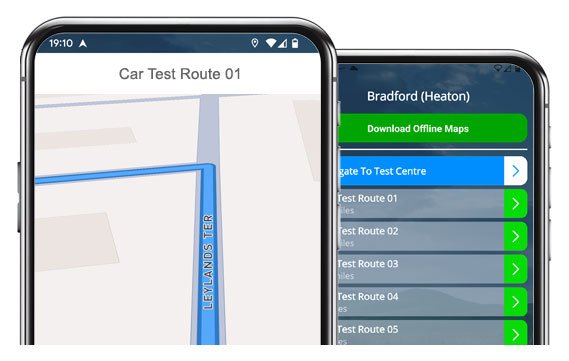
Practise real Bradford (Heaton) driving test routes using our #1 rated app.
Drive smarter, feel calmer, and pass first time!
Example Test Routes
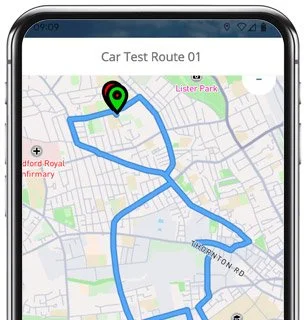
Route 1 Instructions:
- Depart from the Driving Test Centre and at the end of the road turn right
- On Scotchman Road, at the end of the road turn right
- On Heaton Road, continue as road becomes Church Street
- On Church Street, at the end of the road turn left
- On Toller Lane, at the traffic lights turn right
- On Whetley Lane, take the 3rd left
- On Aberford Road, at the end of the road turn left
- On Whetley Lane, take the 3rd left
- On Weetwood Road, take the 1st right
- On Walker Drive, at the end of the road turn right
- On Walker Drive, at the end of the road turn left
- On Thornton Road, at the end of the road turn right
- On Princess Way, at the roundabout go straight ahead
- On Manchester Road, take the 1st left
- On the A650, turn left
- On Canal Road, at the 2nd set of traffic lights turn right
- On Holdsworth Street, at the roundabout turn right
- On Valley Road, at the traffic lights turn left
- On Hamm Strasse, at the 2nd set of traffic lights turn right
- On Manningham Lane, at the 2nd set of traffic lights turn left
- On Oak Lane, take the 1st right
- On North Park Road, take the 4th left
- On Park View Road, take the 2nd right
- On Wilmer Road, take the 1st left
- On Milford Place, at the end of the road turn left
- On Heaton Road, take the 2nd right
- On Scotchman Road, take the 1st left
- Return to the Driving Test Centre
-
Depart from the Driving Test Centre and at the end of the road turn right
On Scotchman Road, at the end of the road turn left
On Heaton Road, at the end of the road turn right
On Emm Lane, take the 3rd left
On Carlton Drive, at the end of the road turn left
On Emm Lane, take the 1st left
On Park Drive, take the 1st left
On Parsons Road, take the 1st left
On Wilmer Drive, at the end of the road turn left
On Emm Lane, at the end of the road turn left
* Updated, complete route available on the app.
-
Depart from the Driving Test Centre and at the end of the road turn right
On Scotchman Road, at the end of the road turn left
On Heaton Road, take the 2nd left
On Heaton Park Drive, at the end of the road turn left
On Toller Lane, at the roundabout take the 3rd exit (right)
On Duckworth Lane, continue as road becomes Pearson Lane
On Pearson Lane, at the roundabout take the 3rd exit (right)
On Allerton Road, take the 1st left
On Rhodesway, take the 2nd left
On Sunningdale, at the end of the road turn right
On Rhodesway, at the end of the road turn left
* Updated, complete route available on the app.
-
Depart from the Driving Test Centre and at the end of the road turn right
On Scotchman Road, at the end of the road turn left
On Heaton Road, take the 2nd right
On Firth Road, at the end of the road turn right
On Wilmer Road, take the 1st left
On Park View Road, at the end of the road turn right
On North Park Road, take the 1st right
On Cleveland Road, at the end of the road turn right
On North Park Road, take the 2nd right
On St Marys Road, continue ahead at the traffic lights
On Church Street, at the traffic lights turn left
* Updated, complete route available on the app.


Key Heaton Route Features
You’ll encounter a number of roads, roundabouts and features that appear regularly in many of the Bletchley routes, so it’s worth keeping a look our for:
Toller Lane:
A key part featuring in most routes, with traffic lights, parked cars, and plenty of side roads. Keep your eyes moving and manage your speed carefully - examiners like smooth, steady progress here.Heaton Road and Church Street:
These link straight out from the test centre and can be busy with local traffic. Mirror checks and patience are key when turning in and out of any junctions onto these streets.Thornton Road and Princess Way:
Both can be fast-moving and feature roundabouts and lane changes. Keep confident, signal early, and commit once you’ve checked the route is clear.Manningham Lane and Hamm Strasse:
Larger urban roads where awareness of cyclists, buses, and pedestrians is key. Watch out for the necessary lane changes and filter lights.North Park Road and Wilmer Road Area:
These quieter residential areas are often used for manoeuvres. They are narrower, so keep calm, watch your spacing, and keep your steering tidy.

“Best driving test app out there! Helped me become more confident ready for my test.”

“Passed first time! Practicing the routes really helped!”
Route-Led provides Driving Test Routes for iPhone and Android devices. Download Heaton driving test routes straight to your device. Car, Motorcycle, ADI, and LGV routes are available.
Test-Routes App


Compatible with Android, iPhone and SatNavs
Route-led is a test-route supplier for a wide range of devices including TomTom, Garmin, Android and iPhone for taxis, cars, motorcycles and LGV. Route-LED supplies the most cost effective ways to practise your driving test routes. Route-LED will shortly be adding independent driving routes to Route-Led's offering. Download 2021 Bradford (Heaton) Test-Routes now!
Up to date Routes
Learner drivers and Instructors are continually supplying Route-Led with updated test route information, meaning that Route-LED is the best place for driving test-routes. You can conserve your cash by buying test-routes from Route-Led, which means you can improve your driving ability in the most efficient way. Route-led is the leading provider of Bradford (Heaton) driving test routes in the United Kingdom. Get the latest Bradford (Heaton) Test-Routes now!
Routes for Experienced and Learner Drivers
Route-Led provides test-routes for new and experienced drivers alike so that they can all pass their driving test with flying colours. Route-led also provides routes to instructors keen to understand the newest routes. The cost of insurance premiums, theory lessons and driving lessons, can be expensive! Why spend money and time when you are able to conserve both and at the same time improve your ability. Get the latest Bradford (Heaton) Test-Routes now!


Number one Provider of Driving Test-Routes in the UK
Customers are able to buy Bradford (Heaton) driving test-routes for use in Google Maps. iPhone and Android users are able to navigate the routes on those devices too. Tom Tom owners are also able to buy routes to load on their device.
To make sure Route-Led's test routes are up to date, we work side by side with local learner drivers and Bradford (Heaton) driving instructors. We are keen on feedback from Route-LED's customers regarding any of our products.
Bradford (Heaton) Test-Route Formats Navigation
Accessing Route-led's Android driving test-routes is very easy and is possible making use of our dedicated Android app or a recommended 3rd party Android app. As soon as you have loaded your chosen application on your device, you can then download the driving test route file from our official website. The turn-by-turn routes on your Android device will lead you through your test or practise session. Buy Bradford (Heaton) Test Routes

Driving test-routes are available for purchase on Route-Led's webpages. Once the driving test routes are bought from Route-led's website, the customer should install the test-route into their SatNav device and begin their driving session. Bradford (Heaton) test-routes include voice guiding, thus all the student will be required to do then is to take directions from the device.

Route-LED driving test-routes are available for several devices including your iPhone device. To access Route-led's driving test routes, begin by downloading a recommended 3rd party software application that you’ll utilise to use the route. Once the program has loaded correctly, buy the Bradford (Heaton) test-route and install on your iPhone device from our webpages. You can then access the driving test-route purchased using the recommended software app. Bradford (Heaton) test centre.
Practise Bradford (Heaton) Driving Test Routes


Sat-nav Driving Test
Practice
Independent Driving Test
In your driving test, the examiner will choose a preferred route on the Sat-nav device. You will be expected to follow the route chosen by the examiner as well as the directions from the Satnav device. The make and model of the device won’t matter, this is due to the fact that our test-routes work with very many devices.You cannot utilise your personal SatNav during the Bradford (Heaton) driving test. For more information, you can get 2021 changes to the driving test here.
Route-Led provides clients with a large amount of help and support to utilise our driving test routes. You’ll get accustomed to all the different sections of the roads to be travelled during the examination. We would recommend using a skilled driving instructor in addition. For more information on what you can do to practise for your driving test visit Driving Test Practice
In the course of the independent driving test, the examiner will provide the learner all the necessary directions. If the student gets lost during the journey, they will be required to get confirmation on the instructions from the examiner. Students cannot utilise personal Sat-nav for independent driving because they give detailed voice prompts. Independent driving will check the skill of the examinee to make independent decisions.
Bradford (Heaton) Test Centre Info
Bradford (Heaton) test centre can be found at 15 Farfield Street, Heaton, Bradford West Yorkshire BD9 5AS. There ought to be ramp access for disabled users but we suggest calling to confirm. There are also quite often disabled, female and male toilets available at the test centre but it's probably better to go before you travel there! It’s sometimes feasible to park at the test centre. If not, it ought to be fine to park close by and get there by foot. Be prepared for roundabouts, busy roads, one-way streets and difficult junctions. Navigating test routes whilst practising to drive can be very helpful, as it allows you to practice on routes that you’ll certainly be going on during your test.
Address: 15 Farfield Street, Heaton, Bradford West Yorkshire BD9 5AS
Parking: Parking may be possible at the test centre. If not, park nearby and head by foot.
Toilets: There are quite often disabled, male and female facilities at the test centre but better to use these at home before.
Disabled access: You should be able to access the test centre in a wheelchair but telephone in advance to confirm.
Find local test centre details: https://www.gov.uk/find-driving-test-centre